Multi-Factor Authentication: Why @login_required Is the Wrong Question Once You Have a Second Factor
Django Security Series — Post 15 | Series III: Authentication & Session
OWASP A07:2025 — Authentication Failures | Reading time: ~18 min
🧪 Run it yourself. This attack ships as a runnable lab in django-security-lab: a victim who did enrol in MFA, a confirmed TOTP device, and two dashboards whose code is identical below one decorator. Log in with her password alone and one of them hands you the flag. Then finish the second factor with a code you generate from four lines of standard library, and watch the other one open properly.
Petição Brasil has no MFA. I went looking before writing this, expecting to find something half-built, and found nothing at all — the only is_verified() in the codebase belongs to a signature, not a user.
What is there is everything else: a lockout counter on failed logins, per-view rate limiting, Turnstile in front of the forms, a custom authentication backend. Someone spent real time on that login. What it guards is narrower than it looks, though: a Petição Brasil password lets you create and publish a petition, not sign one — signatures go through gov.br's PKI, and it is the certificate that makes a signature binding. The account is a publishing identity, not a signing key, and I judged that impact low enough to live without a second factor.
So this post is not one I get to write from a position of having solved it. It is the one where I had to work out what "add MFA" actually means beyond installing a package — and the answer turned out to be almost entirely about a question I had never thought to ask.
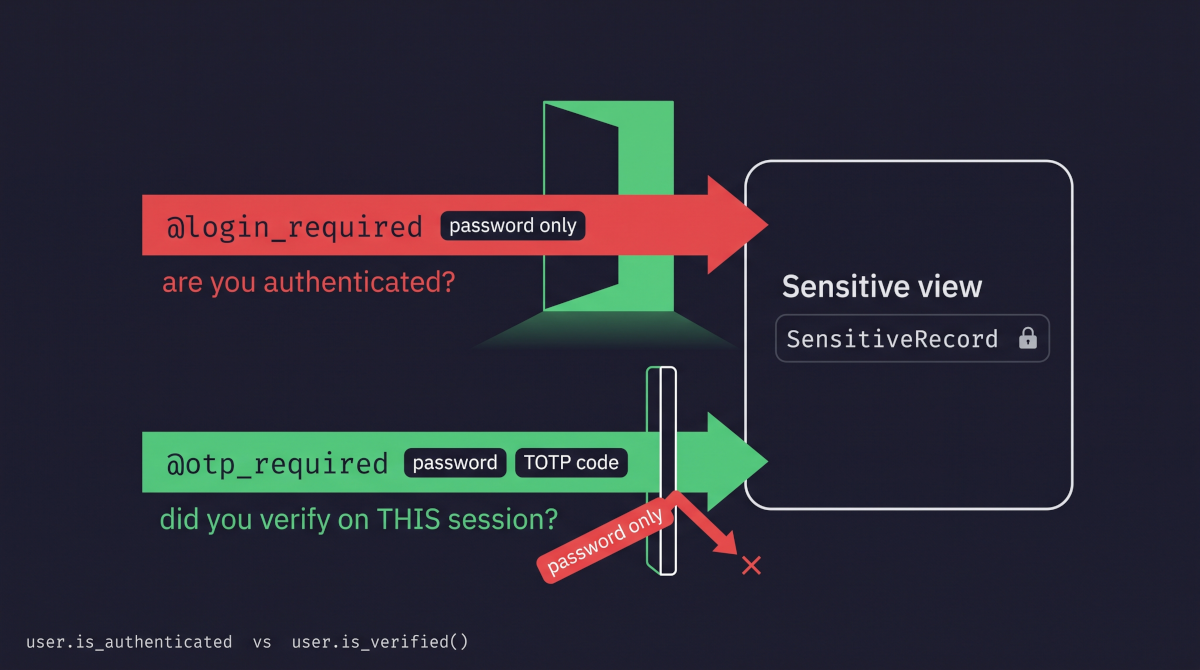
The question is: which thing are you checking? Every Django developer knows @login_required. It asks whether the request is authenticated. Once you add a second factor there is a second, different question — whether this session presented that factor — and the two are not the same question, do not have the same answer, and are not checked by the same decorator. The InvenTree bug later in this post comes down to that: a path in the application asking the first question when it needed to ask the second.
The Attack: What It Is and How It Works
The useful mental model is that MFA is not a property of an account. It is a property of a session, and every route that can mint a session is a place where that property can go missing.
Think about how a second factor is actually built into an existing application. You have a login view. You add a step: after the password checks out, ask for a code, verify it, and only then finish. That flow is usually correct, because it is the thing you were looking at while you were thinking about MFA. But in any application that has been around for a while, the login form is not the only place a session is born.
There is the mobile app's token exchange. The SSO callback. The "log in as this customer" button in the support tool. The legacy form that the old iOS build still posts to, which nobody can delete until the old iOS build is gone. A password reset that signs you in on completion, which is a nice touch and also a full authentication path (that is the territory of Post 14, Password Reset Flows, arriving here). Each of those ends in a call to login(), and each of them was written before MFA existed, by someone solving a different problem. None of them knows there is now a second question to ask.
That is the first half of the class. The second half is subtler and survives even a careful rollout: the check on the sensitive view itself is never changed. You added the second factor at the front door and left every interior door checking the thing it always checked. @login_required is on the sensitive view because @login_required has been on the sensitive view since 2019. It asks whether you are logged in. You are. In.
Both halves produce the same observable: a session that holds a password and nothing else, reaching something that was supposed to need two factors. The attacker's side of this is almost insultingly undramatic. They need the password — from a breach corpus, from a phish, from credential stuffing (Post 11), from a weak choice your validators allowed (Post 13) — and then they need to find the one route in your application that did not get the memo. There is no payload. There is no clever protocol trick. They log in.
I want to be careful about what this class is not, because the popular framing sends people at the wrong target. Most MFA content is about attacking the factor itself: SIM swapping to steal an SMS code, MFA fatigue where an attacker spams push notifications at 3am until someone taps approve, real-time phishing proxies like Evilginx that relay the code the instant the victim types it. Those are real and they are worth knowing. They are also mostly not your bug — they are attacks on the channel or on the human, and your application would have behaved correctly in every one of them. Brute-forcing the six-digit code does not even make that list in Django: django-otp's TOTPDevice.verify_token() imposes a growing lockout from the first wrong code (1, 2, 4, 8… seconds, stored on the device row) and, while it lasts, refuses even the correct code.
The enforcement gap is different, and it is worse in one specific way: it is the only failure in the list where the second factor the user enrolled in never gets a chance to matter. Nobody is defeated, tricked, or relayed. The code sitting on their phone, refreshing every thirty seconds, is simply never requested. From the user's side it is invisible — they enrolled, they see the prompt every morning on the web app, and they have every reason to believe they are protected. That gap between what the user was asked to do and what the application actually requires is the thing I find hardest to stomach about this class.
Real-World Incidents
InvenTree — "API bypasses MFA Requirements", GHSA-2crp-q9pc-457j, CVSS 7.4 (published May 24, 2024; fixed in 0.14.6, 0.15.2 and 0.16.0)
InvenTree is an open-source inventory management system, and it is a Django project, which makes this the closest thing to a mirror the series has run into. In 2024 it was building a new React front end, and that front end authenticated against /api/auth/login/. The advisory describes what that endpoint did in one sentence: it permitted login with a valid username and password "even if MFA is configured."
Read the scope carefully, because it is the part that generalises. The bypass applied to both user-level MFA settings and the globally-enforced policy — the setting an administrator turns on precisely so that individual users cannot opt out. An organisation that had mandated MFA across every account had, from the moment the new UI shipped, an endpoint that did not honour the mandate. The web login they had tested still asked for a code. The API did not.
CVSS:3.1/AV:N/AC:L/PR:L/UI:N/S:C/C:L/I:L/A:L — 7.4, High. PR:L — Privileges Required: Low, meaning the attacker must already hold an ordinary user's privileges before exploiting the flaw — is doing honest work there: you need the password. That is the whole point of the class, and it is why these advisories score lower than they feel. MFA is the layer behind the password; a bypass does not hand over the account, it removes the thing that was supposed to save you after the password was already gone.
The maintainers could not quickly make that endpoint enforce MFA, so the temporary remedy was to block MFA-configured users from the API endpoint entirely — which disabled the new React interface for exactly the users who had taken the security advice. The people who enrolled were the people who lost the feature. I do not say that as criticism; given the choice between "MFA users can be bypassed" and "MFA users cannot use the new UI for a while", they picked correctly. But it is a very concrete illustration of what the retrofit costs when authentication paths multiply faster than the enforcement around them.
MITRE ATT&CK maps this as T1078 — Valid Accounts: the adversary authenticates with legitimate credentials and, from the system's perspective, does nothing anomalous at all. Note what the mapping does not capture. T1078 is the identical technique whether the target has broken MFA or no MFA whatsoever, because the adversary's behaviour is the same in both cases — they log in with a password that works. The framework cannot tell those two applications apart from the outside, and neither can your logs. That is the shape of the problem, not a gap in ATT&CK.
The regulatory angle is less a new rule than a rising baseline. LGPD Art. 46 speaks in the language of measures "aptas a proteger os dados pessoais" — apt to protect personal data — and §1 measures that against "o estado atual da tecnologia", the current state of technology. That state has moved: for a system handling personal data, in a year when every major platform ships MFA for free, "we had passwords" is an increasingly hard sentence to say to a regulator. Worse, the failure mode here is not an absent control, it is a control the organisation believes it has. If your privacy documentation, your security page, or your enterprise customer's questionnaire says multi-factor authentication is enforced, and one endpoint does not enforce it, the exposure is not merely technical. The FTC read RockYou's own privacy policy back to it (Post 13, Weak Passwords and Validators); ANPD would be reading your DPIA.
Sources: InvenTree — GHSA-2crp-q9pc-457j: API bypasses MFA Requirements (May 24, 2024)
Django's Default Protections
Django ships no MFA. That is where this one starts, and unlike most posts in this series there is no framework default quietly saving you here — django.contrib.auth knows about passwords and sessions, and stops there.
What the ecosystem provides is django-otp, and it is worth understanding as three pieces rather than as a package, because the vulnerability lives in the seams between them.
The first piece is device models. A TOTPDevice row belongs to a user and holds what the code is computed from: the shared secret (a key generated at enrolment, copied into the user's authenticator app, usually by scanning a QR code, and kept on the server), the step (how many seconds each code is valid; 30 by default), the digit count (6 or 8; 6 by default) and the drift (how many steps the phone's clock is known to run ahead of or behind the server's; django-otp learns it whenever it accepts a code from a neighbouring step). Enrolment means creating one and confirming it. This is the part everyone gets right, because it is the part with a user interface.
The second is OTPMiddleware, which must be installed after AuthenticationMiddleware and which its own docstring describes as performing an analogous function:
Just as AuthenticationMiddleware populates
request.userbased on session data, OTPMiddleware populatesrequest.user.otp_deviceto the Device object that has verified the user, orNoneif the user has not been verified. As a convenience, this also installsuser.is_verified(), which returnsTrueifuser.otp_deviceis notNone.
That sentence is the whole post. There are two independent facts on the request — who you are, and what you proved — and the middleware's only job is to make the second one answerable.
The third is django_otp.login(request, device), which is what actually records a verified device on the session. Checking a code does not do this. Verifying a token and forgetting to call it produces an application that asks for a code, tells you it was correct, and then behaves as if you had never been asked.
Then the trap. is_authenticated and is_verified look like the same kind of thing, and they are not. is_authenticated is a property: you read it and get True or False. is_verified is a function the middleware attaches to the user: you have to call it, with parentheses, to get True or False. Leave the parentheses off and you are no longer asking the question at all. You are testing the function itself, and in Python a function, like almost any object, counts as true in an if:
if user.is_authenticated:      # correct — a property, already True or False
if user.is_verified:           # ALWAYS TRUE — tests the function, never calls it
if user.is_verified():         # correct — calls it and gets True or False
A missing pair of parentheses there produces an MFA check that passes for everyone, forever, silently. Django had the same trap with is_authenticated, which used to be a method too. Django 1.10 turned it into a property, and the release notes give the reason: it "avoids accidental information leakage if you forget to call the method". django-otp's is_verified never made that change. I did not know is_authenticated had changed from a method to a property until I went looking for why a Semgrep rule was firing on correct code, which is a slightly embarrassing route to the knowledge but an effective one.
Vulnerable Pattern: What NOT to Do
Strip the lab's vulnerable view down to the part that matters and it is four lines, one of which is the bug:
# INSECURE — do not use in production
@login_required
def dashboard(request):
    rows = SensitiveRecord.objects.filter(owner=request.user)
    return HttpResponse(render_rows(rows))
There is nothing else wrong with it. The queryset returns only the user's own rows (no IDOR — Post 6), the output is escaped (no XSS — Post 2), and the user is authenticated. A code review would ask the usual questions and get a good answer to every one. The one nobody asks is whether being authenticated is enough for this view.
What makes it exploitable is somewhere else entirely — a second path to a session:
# INSECURE in a project that has MFA — this endpoint has never heard of it
@require_POST
def login_view(request):
    user = authenticate(request, username=..., password=...)
    if user is None:
        return HttpResponse("invalid credentials", status=401)
    login(request, user)              # a full session, one factor
    return HttpResponse(f"logged in as {user.username}")
Nothing about that view is wrong as written. It was correct on the day it was merged. It became a vulnerability on the day someone added a second factor to a different file, and no compiler, linter or scanner will tell you that on its own.
The third shape is the one that scares me most, because it looks like diligence. Somebody asked for the code. Somebody checked the code. Somebody rejected the wrong ones. But the result of that check was never written to the session, and the redirect that follows is a brand-new request:
# INSECURE — the code is checked and then thrown away
if device.verify_token(request.POST["code"]):
    return redirect("dashboard")      # nothing recorded on the session
verify_token() only answers whether the code is right; it writes nothing to the session. What does is django_otp.login(request, device), which stores the device's id there. On the next request OTPMiddleware looks for that id, finds nothing, and is_verified() is False again. What happens then depends on the decorator guarding the dashboard. With @otp_required, the legitimate user types a correct code and is sent back to the login page, every time: nobody gets in. With @login_required, the dashboard never asks whether a code was verified, so the MFA step is decorative: anyone holding only the password walks straight in. Both outcomes are bad. Only the first generates a support ticket; the second fails in silence.
Secure Implementation: The Django Way
The corrected view is the same view:
# SECURE — recommended pattern
from django_otp.decorators import otp_required

@otp_required
def dashboard(request):
    rows = SensitiveRecord.objects.filter(owner=request.user)
    return HttpResponse(render_rows(rows))
In the lab the two files are identical below the decorator, apart from a # DANGER: comment on the vulnerable side marking where the bug is. Diff them. The entire vulnerability, and the entire fix, is which question the door asks.
The verify step has exactly one load-bearing line, and it is not the one that checks the code:
# SECURE
if not device.verify_token(request.POST.get("code", "")):
    return HttpResponse("bad code", status=401)

otp_login(request, device)     # <- this is what makes is_verified() true
Beyond those two changes, the work is inventory rather than code, and I would rather say that than pretend there is a clever fix. Find every path that reaches login() and decide, per path, whether it may mint a fully-verified session. Then find every view that serves something worth a second factor and move it off @login_required. If the sensitive area is a coherent section of the site, gate it once with middleware or a mixin on a base class rather than decorating views one at a time — a decorator you must remember to add is a decorator someone will forget. That is the same argument as scoping a queryset in a manager instead of in each view.
One judgement I have genuinely gone back and forth on: whether to enforce MFA on the session or re-prompt at the action. Session-level is what @otp_required gives you and what this post teaches, and it is the right default. But a session verified at 9am is still verified at 6pm on an unlocked laptop, and for a genuinely dangerous operation — changing payout details, exporting the customer table — the honest control is to ask again at that moment. Django has no built-in for this (django-otp does not ship a "recent verification" check), so it is code you write. NIST's AAL2 baseline is a useful floor — re-authenticate at least every 24 hours, and after an hour idle (SP 800-63B-4 §2.2.3) — but it does not tell you which actions deserve a fresh prompt. I have not settled on where the line sits, and I suspect anyone who tells you they have a clean rule for it has not run it past a support team.
The Analyst's View
MFA does nothing for you until the password is already gone. That is its job description, not a weakness in it: it is a preventive control placed behind another preventive control, so that one failure is not the whole defence. (CySA+ and NIST use "compensating control" for something else: a control put in place in lieu of one that cannot be implemented.) MFA's whole reason to exist is to be what is still standing once the password has already fallen: to brute force or credential stuffing (Post 11, Brute Force and Credential Stuffing), to a guess because it was weak (Post 13, Weak Passwords and Validators), or in a breach of another site where the user reused it.
Which leads to the operational point worth carrying: a second factor that is not enforced on every path is not a partially-effective control, it is an absent one. An attacker does not use the door you defended. There is no averaging here — coverage is a minimum, not a mean — and it is why "we have MFA" is not an answerable statement in a control review. The answerable version names the paths.
The detection problem is the same shape as Post 14's (Password Reset Flows), where taking over an account through the reset flow leaves the same trail in the logs as a legitimate user who forgot their password. Here it is worse: there is not even a reset in the logs, only a login. The attacker's session looks exactly like a legitimate one, because it is a legitimate one — correct password, normal user agent, plausible hour. Your logs record a successful login. The only telemetry that would distinguish the two is a record of which factors were presented, and most applications do not log that because most applications have never had a reason to. If you take one operational habit from this post, make it that one: log the verification state alongside the authentication event. It costs a field, and without it you cannot answer "was MFA actually used?" after an incident — which is the first question anyone will ask.
Catching It Automatically
Testing Your Defence
No off-the-shelf scanner finds this class (see below), so the first check is a test. The useful shape is a sweep rather than a per-view assertion:
def test_no_protected_url_is_reachable_with_a_password_only_session(self):
    protected = ["/billing/", "/exports/", "/admin-tools/"]      # your list
    login_paths = [                                               # every route that calls login()
        ("/accounts/login/", {"username": "erin", "password": PASSWORD}),
        ("/api/auth/login/", {"username": "erin", "password": PASSWORD}),
    ]
    for path, data in login_paths:
        with self.subTest(login_path=path):
            attacker = Client()
            attacker.post(path, data)
            reachable = [u for u in protected if attacker.get(u).status_code == 200]
            self.assertEqual(reachable, [])
Drive a session that only ever presented a password — through every route that can mint one — at every URL that is supposed to sit behind the second factor, and collect the ones that answer 200. It is a handful of lines, and it would have caught the InvenTree bug only with /api/auth/login/ on the list of login paths, which is the inventory again.
Two things worth saying plainly about it. Both lists are maintained by hand, so a view or a login route added next quarter is not covered until somebody adds it — that is a real weakness and I do not have a good answer to it beyond keeping the lists next to the URLconf where a reviewer will see them together. And each session has to come through its real route. For the doors, force_login() gives the same unverified session, but the paths are the half of the class where InvenTree failed, and only driving each one tells you what it actually mints.
Then the check nobody runs, which takes one command:
semgrep scan --config r/python.lang.maintainability.is-function-without-parentheses .
It flags every is_* attribute read without a call. On modern Django that includes is_authenticated, a property, so expect noise there; every is_verified hit is real. If your codebase has is_verified without parentheses anywhere, that is an MFA check which has never once returned False.
Scanning It
Bandit walks the Python AST looking for B-numbered risky constructs. Against this lab it produces exactly one:
bandit -r labs/post_15_mfa/
# >> Issue: [B105:hardcoded_password_string] Possible hardcoded password: 'copper meadow transit fifty'
#    Location: labs/post_15_mfa/seed.py:33:18
A fixture password, which a lab that has to hand the attacker a password cannot really avoid. Fine. Four lines further down the same file sits this, and nothing says a word about it:
TOTP_KEY = "3132333435363738393031323334353637383930"
That is the second factor. A shared secret which, if it leaks, generates valid codes forever, and which nobody rotates the way they rotate a password. B105 matches on the variable name, against a list of password-ish words. VICTIM_PASSWORD contains "password". TOTP_KEY does not, so it is just a string. A tool that finds credentials by asking what they are called misses every credential whose name is not on its list — "key" is not on B105's, "secret" is. Name the same constant TOTP_SECRET and Bandit reports it.
That is the most interesting thing any scanner did here, and notice that it has nothing to do with the vulnerability.
Semgrep's curated packs (p/...) have less than that to say:
semgrep scan --config p/django --config p/python --config p/owasp-top-ten labs/post_15_mfa/
# Ran 180 rules on 18 files: 0 findings.
Zero. Not a false positive to triage, not a near miss. A Django project with MFA wired into it, one dashboard correctly gated and one wide open, and 180 rules have nothing to say.
Every registry rule for Python and Django (r/...), audit rules included, which are noisier, returns nine findings:
semgrep scan --config r/python.django --config r/python labs/post_15_mfa/
# Ran 372 rules on 18 files: 9 findings.
None is about the decorator that guards the dashboard. The two dashboards draw the same two direct-use-of-httpresponse each, because both build their HTML directly with HttpResponse instead of a template — the scanner scores the vulnerable view and the secure one identically. Of the rest, three are lab conventions (unvalidated-password twice in the fixtures, no-csrf-exempt on the verify view) and two come from a rule worth a closer look. And in the rule definitions of all five packs, not one contains otp, is_verified or login_required: the tooling has no concept of a second factor to have an opinion about.
The rule worth a look is is-function-without-parentheses. It fires twice on is_authenticated read as an attribute — once in the verify view, once in a test:
if not request.user.is_authenticated:                       # views_verify.py:40
self.assertTrue(resp.wsgi_request.user.is_authenticated)    # tests.py:98
which is the correct modern spelling: it has been a property since Django 1.10. The rule is firing on the fix, because it flags any is_* attribute read without a call, and nothing in this lab reads one that needs calling. Point the same rule at if user.is_verified: and it fires, correctly: the registry already catches the live version of the trap, it just has nothing to catch here.
So this lab ships a custom rule of a different kind: one that has to be told the policy. The defect is @login_required on a view that should have carried @otp_required, and there is no syntactic difference between that and the thousands of @login_required views that are entirely correct. Which views sit behind a second factor is a policy decision about the data they serve, and Semgrep cannot guess it. It can enforce it once it is written down. The lab's rules/mfa.yaml names, in one regex, the models that need a second factor, and flags any function with @login_required and no @otp_required that reads one. A second rule, at INFO level, lists every login() call: the session-minting paths from the start of this post.
semgrep scan --config labs/post_15_mfa/rules/mfa.yaml \
    labs/post_15_mfa/views_vulnerable.py labs/post_15_mfa/views_secure.py labs/_common/views.py
# Ran 2 rules on 3 files: 2 findings.
One finding is the main rule, on views_vulnerable.py:36; the secure dashboard gets none. The other is the inventory, on labs/_common/views.py:28: the shared password-only login that is the lab's side door. The rule's test file records what it cannot see: a read inside a helper, a class-based view, a view wrapped in urls.py, a session written by hand. And the model list is kept by hand, the same weakness as the sweep's URL list. The two fail differently — the rule reads code, the sweep exercises behaviour — which is why the lab keeps both.
The habit worth carrying out of this one is a question to ask of any application that has MFA: how many ways are there to get a session here, and does every one of them require the second factor? The answer is an inventory, not an opinion, and in most codebases it takes an afternoon to produce and is uncomfortable reading. Next in the series is JWT, where the session stops being a row your server controls and becomes a signed string the client carries — which changes where that same question has to be asked.
Further Reading
- django-security-lab —
labs/post_15_mfa/— the runnable lab: a victim who enrolled, two dashboards identical below one decorator, the policy rule inrules/, and the captured scanner output inscans/ - django-otp — official documentation
- Django Docs — Limiting access to logged-in users
- OWASP A07:2025 — Authentication Failures
- OWASP — Multifactor Authentication Cheat Sheet
- NIST SP 800-63B-4 — Authentication Assurance Level 2 (§2.2)
- MITRE ATT&CK — T1078: Valid Accounts
- Web Security for Developers: Real Threats, Practical Defense (Malcolm McDonald) — Chapter 10: Authentication
- Secure Web Application Development: A Hands-On Guide with Python and Django (Matthew Baker, Apress) — Chapter 7: Authentication and Authorization