Path Traversal: How ../../settings.py Escapes Your Media Directory — and How Django's safe_join Stops It
Django Security Series — Post 9 | Series II: Broken Access Control
OWASP A01:2025 — Broken Access Control | Reading time: ~18 min
🧪 Run it yourself. This attack ships as a runnable lab in django-security-lab: a "download a document" endpoint that opens the file named in
?file=. Theos.path.joinview lets?file=../flag.txtclimb out of the document root and read a flag it should never reach; thesafe_joinview raisesSuspiciousFileOperationand returns 404. Reproduce both from the command line withcurl— and see the detection twist: the standard scanners give a false green here, so the lab ships the custom rule that actually catches realistic code.
Posts 6 through 8 dealt with access control failures over database objects. The attacker swapped an ID to read someone else's petition (Post 6), injected is_staff to promote themselves (Post 7), or tricked the victim's browser into submitting a forged request (Post 8). In each case the "resource" under attack was a model instance, a row in PostgreSQL. Post 9 moves the same failure to the filesystem.
While researching this post I ran os.path.join('/app/media', '/etc/passwd') in a Python shell and got back /etc/passwd. The base directory just disappeared. I had always assumed the first argument anchored the result. It does not — if any subsequent component is an absolute path, os.path.join silently discards everything before it. That one shell session changed how I think about every file-serving view I have ever written. It is the kind of latent bug that hides in ordinary production code — a hardcoded filename fed to os.path.join today, one refactor away from danger the moment that filename starts coming from a URL parameter. Running a real petition platform is what makes that failure mode feel concrete rather than academic.
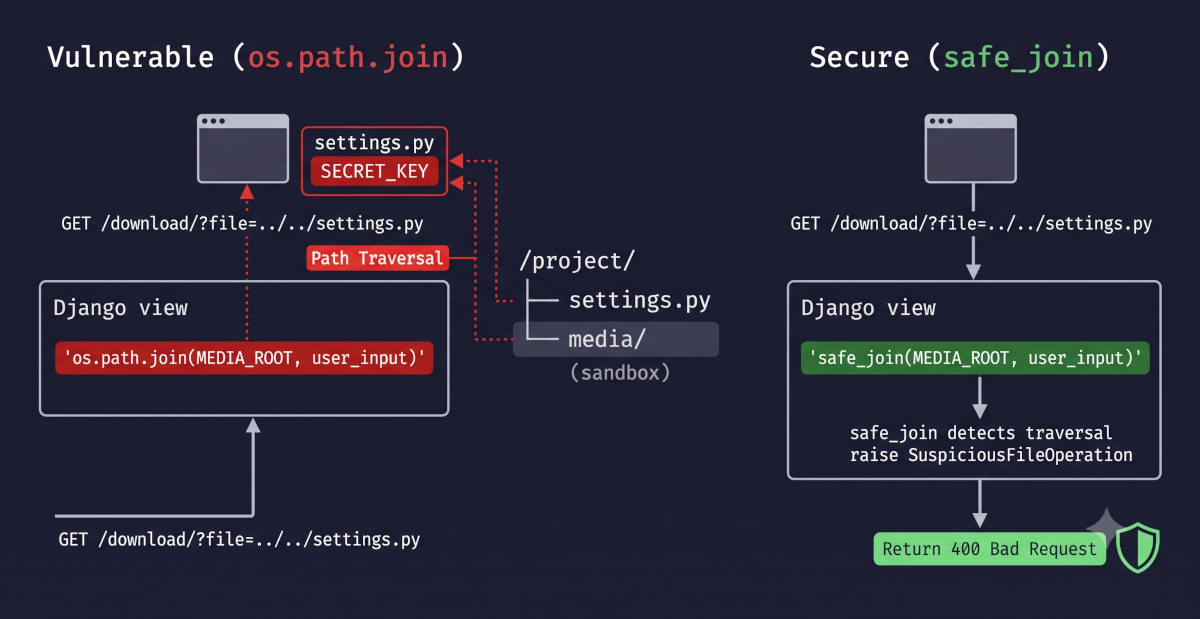
Path traversal is classified under A01 (Broken Access Control) in OWASP 2021 because the server hands out a file the user was never authorized to read. The "object" is a file on disk rather than a database row, but the failure is identical: the application accepts an identifier from the request and retrieves the resource without checking whether it falls inside the allowed boundary. Django ships a utility, safe_join, that raises SuspiciousFileOperation when the resolved path escapes the base directory. The vulnerability exists wherever a developer reaches for os.path.join instead.
The Attack: What It Is and How It Works
Path traversal exploits the way operating systems resolve relative path segments. When a path contains ../, the filesystem moves one directory upward. If a web application builds a file path by concatenating a base directory with a user-supplied filename, and the user supplies ../../../etc/passwd instead of report.pdf, the resulting path resolves outside the intended directory. The application opens a file it was never meant to serve.
The root cause is the same one that runs through every injection attack in this series: the application treats user input as trusted data when it should treat it as untrusted instructions. In SQL injection (Post 1), the input becomes SQL syntax. In command injection (Post 4), it becomes shell syntax. Here, it becomes filesystem navigation. The ../ sequence is not data content; it is a filesystem instruction that changes the directory context. And os.path.join does not care. It is a string concatenator: os.path.join('/app/media', '../../etc/passwd') returns '/app/media/../../etc/passwd' with the dot-dots still in the string. The function never normalizes, never resolves, never checks. The resolution happens later, in the kernel, when open() is called and the OS walks the path. That is what makes os.path.join dangerous: it does not even look at what you are joining.
The attack has two main variants. Relative traversal uses ../ sequences to climb out of the intended directory. os.path.join passes them through untouched, and open() resolves them at the OS level. Absolute path injection is worse: if any component starts with / or a drive letter (C:\), os.path.join silently discards all preceding components. os.path.join('/app/media', '/etc/passwd') returns '/etc/passwd', not '/app/media/etc/passwd'. Python's documentation says this explicitly, but it surprises developers who assumed the base directory would always be prepended.
From there, exploitation is a matter of aiming at the right file. The typical target is a download or file-serving endpoint that takes a filename from the URL or a query parameter: /download/?file=report.pdf or /media/serve/<filename>. The attacker replaces the filename with a traversal payload: ?file=../../../manage.py, ?file=../../../../etc/passwd, or ?file=../settings.py. If the application concatenates this into a path and opens the result without validation, the attacker reads whatever the web server process has permission to access.
The high-value targets on a Django server are predictable. settings.py contains SECRET_KEY, database credentials, AWS keys, and API tokens. Reading SECRET_KEY lets the attacker forge any artifact produced by django.core.signing (signed cookies, timestamped tokens, password-reset links if they also have the user's password hash), hijack sessions if the project uses the signed_cookies session backend, and tamper with the cookie-based messages framework. /etc/passwd confirms usernames. .env files hold credentials that python-decouple or django-environ read at startup. On Windows, the equivalent targets are web.config, registry exports, or any .env file in the project root.
On Linux servers, the attacker may also target /proc/self/environ (the process's environment variables, which often contain secrets passed via environment) and /proc/self/cmdline (the startup command). The filesystem becomes an information-gathering surface.
Real-World Incidents
Fortinet FortiOS SSL VPN — CVE-2018-13379 (2018–2020)
In May 2019, Fortinet published advisory FG-IR-18-384 for CVE-2018-13379, a path traversal vulnerability in the FortiOS SSL VPN web portal (affected versions: FortiOS 6.0.0–6.0.4, 5.6.3–5.6.7, 5.4.6–5.4.12; fixed in 6.0.5, 5.6.8, 5.4.13). Devcore researchers Meh Chang and Orange Tsai published technical details and presented the exploit at Black Hat USA 2019 in August. The flaw was in the SSL VPN portal's language-file handler (/remote/fgt_lang?lang=…): a specially crafted HTTP request allowed an unauthenticated attacker to read arbitrary files from the appliance, including sslvpn_websession, which contained plaintext usernames and passwords of active VPN users.
Despite Fortinet releasing patches, exploitation was widespread. In November 2020, two separate actors published exploitation data on hacking forums: one (“pumpedkicks”) posted 49,577 vulnerable FortiGate IP addresses with exploit one-liners on November 19, and another (“arendee2018”) posted extracted sslvpn_websession credential dumps around November 25. CISA added CVE-2018-13379 to its Known Exploited Vulnerabilities catalog. According to joint advisory AA21-321A (FBI, CISA, ACSC, NCSC, November 2021), Iranian state-sponsored actors scanned for and exploited the vulnerability directly to gain initial access to government and critical-infrastructure networks. The vulnerability scored 9.8 CRITICAL on CVSSv3 (NVD) — unauthenticated, network-exploitable, no user interaction required. A single ../ sequence in an HTTP request, unvalidated by the server, gave attackers the keys to tens of thousands of networks. In the UK, the NCSC told organizations running unpatched Fortinet VPN devices to assume compromise, remove the devices from service, and initiate incident response.
In ATT&CK terms the traversal itself is T1190 — Exploit Public-Facing Application; once the appliance was reading arbitrary files, the attack chained into T1083 — File and Directory Discovery (enumerating the filesystem), T1005 — Data from Local System (the read), and T1552.001 — Credentials In Files — which is exactly what sslvpn_websession was: a file full of plaintext credentials, the same class of harvest a Django traversal performs when it reads settings.py or a .env.
The regulatory weight lands on that credential file. sslvpn_websession held the usernames and passwords of active VPN users — personal data under both the EU GDPR and Brazil's LGPD (Lei Geral de Proteção de Dados, the country's general data-protection law). Under LGPD Article 48 the controller of a database that suffers a breach likely to create relevant risk must notify the national authority (ANPD) and the affected users; a disclosed dump of live credentials clears that bar comfortably. The path-traversal bug is one unvalidated ../, but the liability it triggers is a reportable breach of every user whose credentials sat in the file the server was tricked into serving — the technical defect and the legal exposure are the same event seen from two directions.
Source: NVD — CVE-2018-13379: Fortinet FortiOS Path Traversal (CVSS 9.8)
Django's Default Protections
Ask "does Django protect me from path traversal?" and the honest answer is: it depends on how you serve files.
If you use FileField, ImageField, and Django's Storage API (which you should), the filename is never a raw path from the user. FileField.upload_to controls the directory, the storage backend controls where the file lands, and retrieval goes through FieldFile.open() or default_storage.open(). The user never supplies a filesystem path. They interact with a model instance, and the model holds the storage key. This is the IDOR pattern from Post 6 applied to files: the "identifier" is a database primary key or UUID, not a filename, and the queryset is scoped to authorized objects. Path traversal on retrieval cannot happen because no user-supplied path reaches the filesystem. (Uploaded filenames are user-supplied and do reach storage — Django added validate_file_name and fixed CVE-2021-31542 precisely for that surface — but the retrieval path through FileField is safe.)
The danger surfaces when a developer steps outside the storage abstraction: a custom download endpoint that takes a filename from the URL, a view that builds a path with os.path.join(MEDIA_ROOT, request.GET['file']), or a file-serving view that opens a path the user controls. That is where Django's one dedicated utility matters.
django.utils._os.safe_join does what os.path.join does not: after joining the base and the user-supplied component, it resolves the result to an absolute path and checks that it still starts with the base. If it does not, if ../ sequences or an absolute path escaped the sandbox, it raises SuspiciousFileOperation. The check is simple and effective, but it has two caveats worth knowing.
First, safe_join lives in django.utils._os, a private module (leading underscore). There is no public API reference entry, no deprecation cycle, and no backwards-compatibility guarantee. Django's most useful path-safety primitive is one it will not promise to keep. The public-facing counterpart is django.core.files.utils.validate_file_name, which Storage.save() calls internally to reject .., absolute paths, and path-separator characters in uploaded filenames.
Second, safe_join uses abspath (lexical normalization), not realpath (symlink resolution). If a symlink inside MEDIA_ROOT points to a file outside it, safe_join sees a path that lexically starts with the base and raises nothing. The symlink-aware check is:
from pathlib import Path

base = Path(settings.MEDIA_ROOT).resolve()
candidate = (base / user_filename).resolve()
if not candidate.is_relative_to(base):
    raise Http404()
Path.resolve() follows symlinks and normalizes the path to its real location. is_relative_to() (Python 3.9+) then checks containment. Use this when MEDIA_ROOT could contain attacker-influenced content (uploaded files, user-created directories). For most Django projects where the media directory only contains files uploaded through FileField, safe_join is sufficient because the upload path itself does not create symlinks.
from django.utils._os import safe_join

# This works — the result is inside MEDIA_ROOT
path = safe_join(settings.MEDIA_ROOT, 'reports/q1.pdf')

# This raises SuspiciousFileOperation — the result escapes MEDIA_ROOT
path = safe_join(settings.MEDIA_ROOT, '../../settings.py')
Django's static file handling (collectstatic, StaticFilesStorage) and the development server's django.views.static.serve both use safe_join internally. The template loader also restricts template lookups to configured directories and raises TemplateDoesNotExist for paths that escape them. But if you write a custom view that opens files, none of this applies automatically. You are on your own.
What Django protects automatically:
FileField/ImageFieldresolve files through the storage backend, not raw paths.django.views.static.serve(the dev-only file-serving view) usessafe_join.- Template loaders restrict resolution to
DIRSand apptemplates/directories. SuspiciousFileOperationis a subclass ofSuspiciousOperation, which Django's default error handling catches and converts to a 400 response (preventing the exception from leaking path information).
What Django does NOT protect automatically:
- Any custom view that builds a file path from user input using
os.path.join,pathlib.Path, or string concatenation. - Any view that passes a user-supplied name to
open(),FileResponse(), orPath.read_bytes()without path validation. - Management commands or Celery tasks that process user-supplied filenames from the database.
Vulnerable Pattern: What NOT to Do
Pattern 1 — os.path.join with user input in a download view
# INSECURE — path traversal via os.path.join
import os
from django.conf import settings
from django.http import FileResponse, Http404
from django.contrib.auth.decorators import login_required

@login_required
def download_document(request):
    filename = request.GET.get('file', '')
    filepath = os.path.join(settings.MEDIA_ROOT, 'documents', filename)
    if os.path.exists(filepath):
        return FileResponse(open(filepath, 'rb'))
    raise Http404()
A request to ?file=../../projectname/settings.py produces the path MEDIA_ROOT/documents/../../projectname/settings.py. With a typical MEDIA_ROOT = BASE_DIR / 'media', the two ../ segments climb from documents/ to media/ to BASE_DIR/, then descend into the project package. The OS resolves this at open() time. The os.path.exists check passes because the file exists. The attacker reads SECRET_KEY, database credentials, and every secret in the settings module.
Pattern 2 — A URL parameter that replaces the base entirely
This one is the behaviour that caught me off guard:
# INSECURE — absolute path injection
import os
from django.conf import settings
from django.http import FileResponse

def serve_report(request, filename):
    # Developer assumes MEDIA_ROOT is always prepended
    path = os.path.join(settings.MEDIA_ROOT, filename)
    return FileResponse(open(path, 'rb'))
If filename is /etc/passwd, os.path.join('/app/media', '/etc/passwd') returns /etc/passwd. The base directory is discarded entirely. I tested this in a shell and the result genuinely surprised me:
>>> import os
>>> os.path.join('/app/media', '/etc/passwd')
'/etc/passwd'
The developer's mental model is "os.path.join always builds inside the first argument." Python's documentation says otherwise. The function discards all preceding components when it encounters an absolute path component.
Pattern 3 — Template loading from user input (Django hard-blocks this)
# LOOKS dangerous — but Django's template loaders block traversal
from django.template.loader import get_template
from django.http import HttpResponse

def render_email(request):
    template_name = request.GET.get('template', 'default.html')
    template = get_template(f'emails/{template_name}')
    return HttpResponse(template.render({'user': request.user}))
This looks exactly like Pattern 1: user input controls which file the application reads. But get_template with the stock filesystem and app-directories loaders does not resolve to arbitrary paths. Three frames down, get_template_sources calls safe_join against each configured DIRS entry and catches SuspiciousFileOperation. If the resolved path escapes the template directory, the loader skips it. Supplying template=../../settings.py raises TemplateDoesNotExist, not a file read.
I tested this against Django 5.2 to confirm: get_template('emails/../../../settings.py') raises TemplateDoesNotExist every time, regardless of how many ../ sequences you add. The guard is not a fragile check; it is safe_join, the same utility this post recommends for your own views.
The lesson is worth stating anyway: never accept template names from user input. The defence here is an implementation detail of Django's stock loaders, not a guarantee the framework makes to you. A custom template loader that skips safe_join, or a misconfigured DIRS that includes /, would reopen the surface. Use a mapping of allowed template keys instead of passing user input to get_template directly.
Secure Implementation: The Django Way
Rule 1 — Use safe_join for any path built from user input
Replace os.path.join with django.utils._os.safe_join everywhere user input touches a filesystem path:
# SECURE — safe_join raises SuspiciousFileOperation on traversal
import os
from django.conf import settings
from django.core.exceptions import SuspiciousFileOperation
from django.http import FileResponse, Http404
from django.utils._os import safe_join
from django.contrib.auth.decorators import login_required

@login_required
def download_document(request):
    filename = request.GET.get('file', '')
    try:
        filepath = safe_join(settings.MEDIA_ROOT, 'documents', filename)
    except SuspiciousFileOperation:
        raise Http404()

    if os.path.exists(filepath):
        return FileResponse(open(filepath, 'rb'))
    raise Http404()
safe_join resolves the full path and verifies it stays inside the base directory. If ../ sequences or an absolute path escape the sandbox, it raises SuspiciousFileOperation. Catch it and return 404 (not 400 with a message, which could confirm the traversal attempt to the attacker).
Rule 2 — Prefer database lookups over filesystem paths
The strongest defence is to remove the filename from the URL entirely. Instead of ?file=report.pdf, look up the file through a model instance:
# SECURE — the user supplies a PK or UUID, not a filename
import os
from django.shortcuts import get_object_or_404
from django.http import FileResponse
from django.contrib.auth.decorators import login_required

@login_required
def download_document(request, document_id):
    doc = get_object_or_404(
        Document, pk=document_id, owner=request.user  # ownership check from Post 6
    )
    return FileResponse(doc.file.open('rb'), as_attachment=True, filename=os.path.basename(doc.file.name))
The user never supplies a path. They supply an identifier that maps to a model instance, and the model's FileField resolves the storage path internally. This eliminates path traversal entirely because there is no path to traverse. It also inherits the IDOR protection from Post 6: the queryset is scoped to owner=request.user, so the authorization check and the path-safety guarantee come from the same line of code.
This is the pattern Petição Brasil uses for signature PDFs. The user provides a UUID, the view looks up the Signature model, checks authorization (petition creator, signer, or staff), and generates a signed S3 URL from signature.signed_pdf.name. No user-supplied string ever touches a filesystem path.
Rule 3 — Validate and constrain filenames when you must accept them
Sometimes the endpoint genuinely needs to accept a filename (downloading from a known set of static reports, for example). Constrain the input to a strict allowlist or pattern:
# SECURE — allowlist approach (strongest)
from django.conf import settings
from django.http import FileResponse, Http404
from django.utils._os import safe_join
from django.contrib.auth.decorators import login_required

ALLOWED_REPORTS = {
    'q1-2026': 'reports/q1_2026_summary.pdf',
    'q2-2026': 'reports/q2_2026_summary.pdf',
}

@login_required
def download_report(request, report_key):
    relative_path = ALLOWED_REPORTS.get(report_key)
    if relative_path is None:
        raise Http404()
    filepath = safe_join(settings.MEDIA_ROOT, relative_path)
    return FileResponse(open(filepath, 'rb'), as_attachment=True)
The user supplies a key (q1-2026), not a path. The mapping is server-defined. Even if the user sends ../../settings.py as the key, it simply does not match any entry and returns 404.
When an allowlist is impractical, validate the filename against a strict pattern and combine with safe_join:
import re
from django.conf import settings
from django.http import Http404
from django.utils._os import safe_join

def download_user_file(request, filename):
    # Only allow alphanumeric names with a single dot for the extension
    if not re.match(r'^[a-zA-Z0-9_-]+\.[a-zA-Z0-9]+\Z', filename):
        raise Http404()
    filepath = safe_join(settings.MEDIA_ROOT, 'uploads', filename)
    # ... serve the file
The regex rejects any input containing /, \, .., or null bytes. Combined with safe_join, this is a two-layer defence: the regex catches the obvious payloads, and safe_join catches anything the regex missed.
Rule 4 — Never log or return the resolved path on failure
When a traversal attempt is detected, return a generic 404. Do not include the resolved path in the response or in user-visible error messages:
# INSECURE — leaks path information
except SuspiciousFileOperation as e:
    return HttpResponseBadRequest(f"Invalid path: {e}")

# SECURE — generic 404, no path information
except SuspiciousFileOperation:
    raise Http404()
Log the attempt server-side for monitoring (a later post covers that in its own right), but the response to the attacker should be indistinguishable from "the file does not exist."
Path Traversal Prevention Checklist
| Control | What it covers |
|---|---|
FileField / Storage API |
Eliminates raw paths entirely; files are accessed through model instances |
safe_join instead of os.path.join |
Raises SuspiciousFileOperation when the resolved path escapes the base directory |
| Database lookup instead of filename | The user supplies a PK/UUID, not a path; authorization is enforced by the queryset |
| Filename allowlist or strict regex | Rejects traversal characters before they reach the filesystem |
| Generic 404 on failure | Prevents path-information leakage to the attacker |
| Ownership-scoped queryset (Post 6) | Ensures the user is authorized to access the specific file, not just any file in the directory |
The Analyst's View
For a CySA+ analyst, path traversal is a useful reminder that a clean scan is not the same as a safe application. CWE-22 is fundamentally a canonicalization failure — the server decides which file to serve before it resolves what the path actually points to — and canonicalization bugs are notoriously hard for pattern-based SAST to see, because the defect is the absence of a resolve-and-contain step rather than a dangerous call you can match. As the detection section below shows, the standard tools return nothing on the realistic form here, and one of them returns a false green that is worse than silence. An analyst who reads "0 findings" as "no path traversal" has misread the tool.
That shifts the weight of detection onto human judgement and dynamic testing: a targeted code review of every file-serving view (grep for os.path.join, open(), and FileResponse fed from the request), and a ../ probe against the running endpoint. This is the recurring lesson of the access-control series — authorization and containment are properties a scanner can rarely confirm, so they belong on the threat-model checklist, not only in the CI pipeline.
Catching It Automatically
Testing Your Defence
The control is small enough to test directly: safe_join must raise on a traversal and stay quiet on a legitimate path, and the view built on it must return 404 rather than file contents. Both halves matter — a test that only checks the happy path would pass against the vulnerable os.path.join view too.
# tests/test_path_traversal.py
from django.conf import settings
from django.core.exceptions import SuspiciousFileOperation
from django.test import TestCase, Client
from django.utils._os import safe_join
from django.contrib.auth.models import User


class SafeJoinTests(TestCase):
    """Direct unit tests for safe_join — no HTTP layer, no fixture dependency."""

    def test_relative_traversal_raises(self):
        with self.assertRaises(SuspiciousFileOperation):
            safe_join(settings.MEDIA_ROOT, '../../settings.py')

    def test_deep_traversal_raises(self):
        with self.assertRaises(SuspiciousFileOperation):
            safe_join(settings.MEDIA_ROOT, '../../../etc/passwd')

    def test_absolute_path_raises(self):
        with self.assertRaises(SuspiciousFileOperation):
            safe_join(settings.MEDIA_ROOT, '/etc/passwd')

    def test_legitimate_path_does_not_raise(self):
        """safe_join must allow a path that stays inside the base."""
        # No assertion needed beyond "does not raise" — that is the property.
        safe_join(settings.MEDIA_ROOT, 'documents', 'report.pdf')


class PathTraversalViewTests(TestCase):
    def setUp(self):
        self.user = User.objects.create_user(
            'alice', email='alice@example.com', password='testpass123'
        )
        self.client = Client()
        self.client.login(username='alice', password='testpass123')

    def _get_response_body(self, response):
        """Read the full body from either a regular or streaming response."""
        if response.streaming:
            return b''.join(response.streaming_content)
        return response.content

    def test_relative_traversal_returns_404(self):
        """A ../ payload must return 404, not file contents."""
        response = self.client.get(
            '/documents/download/', {'file': '../../projectname/settings.py'}
        )
        self.assertEqual(response.status_code, 404)

    def test_url_encoded_traversal_returns_404(self):
        """Percent-encoded ../ must not bypass the check.

        Note: use a RAW query string. Passing {'file': '..%2f..'} via the
        data dict re-encodes the '%' to '%25', so the view never sees a
        traversal. The raw string below arrives decoded as '../../'.
        """
        response = self.client.get(
            '/documents/download/?file=..%2f..%2fprojectname%2fsettings.py'
        )
        self.assertEqual(response.status_code, 404)

    def test_absolute_path_returns_404(self):
        """An absolute path must not bypass the base directory."""
        response = self.client.get(
            '/documents/download/', {'file': '/etc/passwd'}
        )
        self.assertEqual(response.status_code, 404)

    def test_backslash_traversal_returns_404(self):
        """Windows-style backslash traversal.

        Only meaningful on Windows CI: on POSIX, '\\' is a legal filename
        character, so this is a literal filename that 404s for a different
        reason. Kept to document the Windows attack surface.
        """
        response = self.client.get(
            '/documents/download/', {'file': '..\\..\\settings.py'}
        )
        self.assertIn(response.status_code, [400, 404])

    def test_response_never_leaks_secrets(self):
        """Even on a non-404 response, SECRET_KEY must never appear."""
        for payload in ['../../projectname/settings.py', '/etc/passwd', '../../.env']:
            response = self.client.get('/documents/download/', {'file': payload})
            if response.status_code != 404:
                body = self._get_response_body(response)
                self.assertNotIn(b'SECRET_KEY', body)
Scanning It
I expected this to be an easy scan. Path traversal via os.path.join is a textbook bug, so I pointed the usual tools at the lab's two views assuming both would light up the vulnerable one. Instead I got a clean bill of health on code I know leaks the flag — and chasing down why turned into the most useful thing in this post.
Bandit (a quick reminder: it walks the Python AST looking for B-numbered risky calls — shell=True, eval, yaml.load) reports zero findings on both views. That is not a tuning problem: Bandit ships no path-traversal plugin at all, and it does no dataflow, so it has no way to connect request.GET → os.path.join → open. The nearest thing it has, B108, only flags a hardcoded /tmp path. On this class Bandit is simply blind.
Semgrep community (structural pattern matching; its OSS engine follows taint only within a function) reports zero as well — from p/django, p/python, and p/owasp-top-ten together. That surprised me more, because Semgrep does ship a Django path-traversal rule: python.django.security.injection.path-traversal.path-traversal-join. Two things keep it from helping, and both are worth an analyst's attention:
- It is not in the curated packs. The rule lives in the registry's audit tier, which
p/pythonand friends exclude — the same reason the@csrf_exemptandmark_saferules earlier in this series don't fire from the default packs. You have to ask for it by name. - Even asked for by name, it misses realistic code. The rule is a syntactic pattern, and the community engine only follows one variable indirection. It fires on the fully-inlined one-liner
open(os.path.join(base, request.GET.get('file')))— but goes silent on the shape this post actually teaches:
name = request.GET.get('file', '')          # hop 1: request -> name
path = os.path.join(MEDIA_ROOT, name)        # hop 2: name -> path
open(path, 'rb')                             # the rule loses the trail here
Assigning the filename to a variable, building the path into another, then opening it — the normal way anyone writes a download view — is two hops, and two hops is one more than the OSS engine will follow. Bridging them needs the interprocedural taint analysis in Semgrep's Pro engine, which the community edition does not include. So the off-the-shelf rule gives a false green: it catches a form almost nobody writes and stays quiet on the form everybody does. (I reproduced the exact boundary — inlined fires, one hop fires, two hops miss — and captured the runs in the lab's scans/ directory.)
A false green is worse than no signal, because it invites you to trust it. So the lab ships a small custom Semgrep rule that catches the realistic form — it keys on the os.path.join → open hop the OSS engine does handle and stays silent on the safe_join fix:
# Fires on the vulnerable view, silent on the secure one — the assert the
# shipped rule can't give on realistic code.
semgrep scan --config rules/path_traversal.yaml labs/post_09_path_traversal/views_vulnerable.py   # 1 finding
semgrep scan --config rules/path_traversal.yaml labs/post_09_path_traversal/views_secure.py       # 0 findings
Its one honest limitation is the flip side of the OSS engine's: being syntactic and source-agnostic, it will also flag an os.path.join fed to open() when every component is a hardcoded literal (a safe read) — a false positive it documents rather than hides. Confirming the path is genuinely user-controlled is exactly the taint analysis the free tools can't do here.
The practical takeaways for a code review: grep is not beneath you. grep -rn "os.path.join" --include="*.py" across your file-serving views, and a look at every open() / FileResponse() that takes a name from the request, will find this class faster than a SAST run that reports nothing. And prove the fix dynamically — a ../ payload against a live endpoint is the other half:
# Dynamic check against a running endpoint — the DAST half.
curl -s -o /dev/null -w "%{http_code}\n" ".../download/?file=../../settings.py"   # 404, not 200
curl -s ".../download/?file=../../settings.py" | grep -i secret_key                # no output
Path traversal's lesson fits the pattern of this whole series: Django protects you when you use its abstractions (FileField, Storage, safe_join), and the vulnerability appears the moment you step outside them. Serve files through model instances, not filenames. If you must accept a filename, run it through safe_join and test with ../../settings.py the same way you test SQL injection with ' OR 1=1 --.
Post 10 closes Series II with Mass Assignment, where the attacker writes fields the developer never exposed, turning a profile-edit endpoint into a database-wide write surface.
Further Reading
- django-security-lab — Path Traversal lab (runnable vulnerable/secure views, captured scans, and the custom Semgrep rule)
- Django Docs — File Storage API
- Django Docs — FileField Reference
- Django Source (GitHub) — django.utils._os.safe_join
- OWASP A01:2025 — Broken Access Control
- OWASP Cheat Sheet — Input Validation
- PortSwigger Web Security Academy — Path Traversal
- MITRE ATT&CK — T1190: Exploit Public-Facing Application
- MITRE ATT&CK — T1083: File and Directory Discovery
- NVD — CVE-2018-13379: Fortinet FortiOS Path Traversal (CVSS 9.8)
- Web Security for Developers: Real Threats, Practical Defense (Malcolm McDonald) — Chapter 11: Access Control and Privilege Escalation