Multi-Factor Authentication: Why @login_required Is the Wrong Question Once You Have a Second Factor
Django Security Series — Post 15 | Series III: Authentication & Session
OWASP A07:2025 — Authentication Failures | Reading time: ~17 min
🧪 Run it yourself. This attack ships as a runnable lab in django-security-lab: a victim who did enrol in MFA, a confirmed TOTP device, and two dashboards whose code is identical below one decorator. Log in with her password alone and one of them hands you the flag. Then finish the second factor with a code you generate from four lines of standard library, and watch the other one open properly.
Petição Brasil has no MFA. I went looking before writing this, expecting to find something half-built, and found nothing at all — the only is_verified() in the codebase belongs to a signature, not a user.
What is there is everything else: a lockout counter on failed logins, per-view rate limiting, Turnstile in front of the forms, a custom authentication backend. Someone spent real time on that login. What it guards is narrower than it looks, though: a Petição Brasil password lets you create and publish a petition, not sign one — signatures go through gov.br's PKI, and it is the certificate that makes a signature binding. The account is a publishing identity, not a signing key, and I judged that impact low enough to live without a second factor.
So this post is not one I get to write from a position of having solved it. It is the one where I had to work out what "add MFA" actually means beyond installing a package — and the answer turned out to be almost entirely about a question I had never thought to ask.
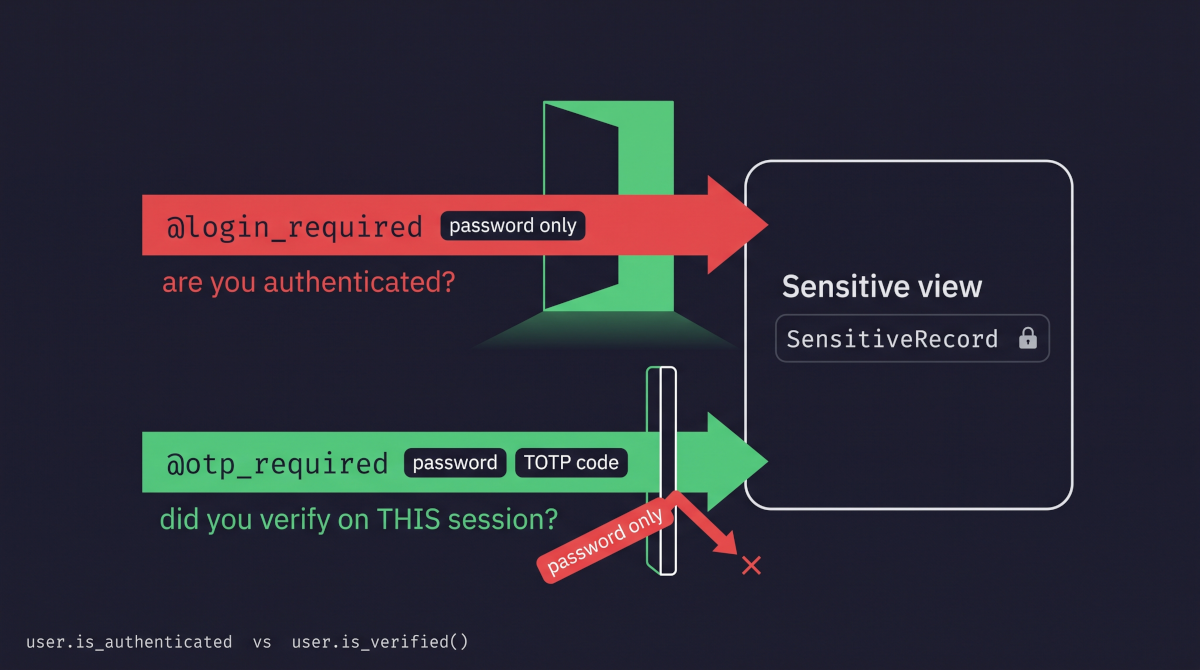
The question is: which thing are you checking? @login_required asks whether the request is authenticated. Once there is a second factor there is a second question, whether this session presented it, and the decorator you already have does not ask it.
The Attack: What It Is and How It Works
The useful mental model is that MFA is not a property of an account. It is a property of a session, and every route that can mint a session is a place where that property can go missing.
Think about how a second factor is actually built into an existing application. You have a login view. You add a step: after the password checks out, ask for a code, verify it, and only then finish. That flow is usually correct, because it is the thing you were looking at while you were thinking about MFA. But in any application that has been around for a while, the login form is not the only place a session is born.
There is the mobile app's token exchange. The SSO callback. The "log in as this customer" button in the support tool. The legacy form that the old iOS build still posts to, which nobody can delete until the old iOS build is gone. A password reset that signs you in on completion, which is a nice touch and also a full authentication path (that is the territory of Post 14, Password Reset Flows, arriving here). Each of those ends in a call to login(), and each of them was written before MFA existed, by someone solving a different problem. None of them knows there is now a second question to ask.
That is the first half of the class. The second half is subtler and survives even a careful rollout: the check on the sensitive view itself is never changed. You added the second factor at the front door and left every interior door checking the thing it always checked. @login_required is on the sensitive view because @login_required has been on the sensitive view since 2019. It asks whether you are logged in. You are. In.
Both halves produce the same observable: a session that holds a password and nothing else, reaching something that was supposed to need two factors. The attacker's side of this is almost insultingly undramatic. They need the password — from a breach corpus, from a phish, from credential stuffing (Post 11), from a weak choice your validators allowed (Post 13) — and then they need to find the one route in your application that did not get the memo. There is no payload. There is no clever protocol trick. They log in.
It is worse than it sounds in one specific way: it is the failure where the second factor the user enrolled in never gets a chance to matter. Nobody is defeated, tricked, or relayed. The code sitting on their phone, refreshing every thirty seconds, is simply never requested. From the user's side it is invisible — they enrolled, they see the prompt every morning on the web app, and they have every reason to believe they are protected. That gap between what the user was asked to do and what the application actually requires is the thing I find hardest to stomach about this class.
I want to be careful about what this class is not, because the popular framing sends people at the wrong target. Most MFA content is about attacking the factor itself: SIM swapping to steal an SMS code, MFA fatigue where an attacker spams push notifications at 3am until someone taps approve, real-time phishing proxies like Evilginx that relay the code the instant the victim types it. Those are attacks on the channel or on the human, answered by different controls (a cap on push prompts, a phishing-resistant factor), and in every one of them the application did ask for the second factor. Brute-forcing the six-digit code does not even make that list in Django: django-otp's TOTPDevice.verify_token() imposes a growing lockout from the first wrong code. Two slips in the code that asks reach the same place by another road: is_verified read without the parentheses that call it, which is true for everyone, and a code checked but never recorded on the session. And even a session that did verify ages: one verified at 9am is still verified at 6pm on an unlocked laptop.
Real-World Incidents
InvenTree — "API bypasses MFA Requirements", GHSA-2crp-q9pc-457j, CVSS 7.4 (published May 24, 2024; fixed in 0.14.6, 0.15.2 and 0.16.0)
InvenTree is an open-source inventory management system, and it is a Django project, which makes this the closest thing to a mirror the series has run into. In 2024 it was building a new React front end, and that front end authenticated against /api/auth/login/. The advisory describes what that endpoint did in one sentence: it permitted login with a valid username and password "even if MFA is configured."
Read the scope carefully, because it is the part that generalises. The bypass applied to both user-level MFA settings and the globally-enforced policy — the setting an administrator turns on precisely so that individual users cannot opt out. An organisation that had mandated MFA across every account had, from the moment the new UI shipped, an endpoint that did not honour the mandate. The web login they had tested still asked for a code. The API did not.
CVSS:3.1/AV:N/AC:L/PR:L/UI:N/S:C/C:L/I:L/A:L — 7.4, High. PR:L — Privileges Required: Low, meaning the attacker must already hold an ordinary user's privileges before exploiting the flaw — is doing honest work there: you need the password. That is the whole point of the class, and it is why these advisories score lower than they feel. MFA is the layer behind the password; a bypass does not hand over the account, it removes the thing that was supposed to save you after the password was already gone.
The maintainers could not quickly make that endpoint enforce MFA, so the temporary remedy was to block MFA-configured users from the API endpoint entirely — which disabled the new React interface for exactly the users who had taken the security advice. The people who enrolled were the people who lost the feature. I do not say that as criticism; given the choice between "MFA users can be bypassed" and "MFA users cannot use the new UI for a while", they picked correctly. But it is a very concrete illustration of what the retrofit costs when authentication paths multiply faster than the enforcement around them.
MITRE ATT&CK maps this as T1078 — Valid Accounts: the adversary authenticates with legitimate credentials and, from the system's perspective, does nothing anomalous at all. Note what the mapping does not capture. T1078 is the identical technique whether the target has broken MFA or no MFA whatsoever, because the adversary's behaviour is the same in both cases — they log in with a password that works. The framework cannot tell those two applications apart from the outside, and neither can your logs. That is the shape of the problem, not a gap in ATT&CK.
Sources: InvenTree — GHSA-2crp-q9pc-457j: API bypasses MFA Requirements (May 24, 2024)
Django's Default Protections
Django ships no MFA. That is where this one starts, and unlike most posts in this series there is no framework default quietly saving you here — django.contrib.auth knows about passwords and sessions, and stops there.
What the ecosystem provides is django-otp, and it is worth understanding as three pieces rather than as a package, because the vulnerability lives in the seams between them.
The first piece is device models. A TOTPDevice row belongs to a user and holds what the code is computed from: the shared secret (a key generated at enrolment, copied into the user's authenticator app, usually by scanning a QR code, and kept on the server), the step (how many seconds each code covers; 30 by default, and with the default tolerance of one step either side a code is also accepted a step early or late), the digit count (6 or 8; 6 by default) and the drift (how many steps the phone's clock is known to run ahead of or behind the server's; django-otp learns it whenever it accepts a code from a neighbouring step). Enrolment means creating one and confirming it. This is the part everyone gets right, because it is the part with a user interface.
The second is OTPMiddleware, which must be installed after AuthenticationMiddleware and which its own docstring describes as performing an analogous function:
Just as AuthenticationMiddleware populates
request.userbased on session data, OTPMiddleware populatesrequest.user.otp_deviceto the Device object that has verified the user, orNoneif the user has not been verified. As a convenience, this also installsuser.is_verified(), which returnsTrueifuser.otp_deviceis notNone.
That sentence is the whole post. There are two independent facts on the request — who you are, and what you proved — and the middleware's only job is to make the second one answerable.
The third is django_otp.login(request, device), which is what actually records a verified device on the session. Checking a code does not do this, unless you log in through django-otp's own OTP-aware authentication form, whose verified device a user_logged_in handler records for you.
The Vulnerable Pattern and the Fix
Pattern 1 — A sensitive view that asks the wrong question
The lab's two dashboards, views_vulnerable.py and views_secure.py, are identical below the decorator, apart from the # DANGER: comment on the vulnerable side. This is the whole diff:
-@login_required
+@otp_required
 def dashboard(request):
-    # DANGER: authentication, not verification. request.user.is_verified() is
-    # never consulted here, so a password-only session and a fully MFA'd session
-    # are indistinguishable to this view.
     rows = SensitiveRecord.objects.filter(owner=request.user)
     ...
There is nothing else wrong with the vulnerable view. The queryset returns only the user's own rows (no IDOR — Post 6), the output is escaped (no XSS — Post 2), and the user is authenticated. A code review would ask the usual questions and get a good answer to every one. The one nobody asks is whether being authenticated is enough for this view. The entire vulnerability, and the entire fix, is which question the door asks.
Pattern 2 — A second path to a session
What makes it exploitable is somewhere else entirely. The lab's shared login, labs/_common/views.py, is a plain password form:
@csrf_exempt
@require_POST
def login_view(request):
    username = request.POST.get("username", "")
    password = request.POST.get("password", "")
    user = authenticate(request, username=username, password=password)
    if user is None:
        return HttpResponse("invalid credentials\n", status=401)
    login(request, user)
    return HttpResponse(f"logged in as {user.username}\n")
As far as MFA goes, nothing about that view is wrong as written (its @csrf_exempt is a lab convenience so that one curl can log in; a browser login needs CSRF protection). It was correct on the day it was merged. It became a vulnerability on the day someone added a second factor to a different file, and no compiler, linter or scanner will tell you that on its own. There is no line to change in it either: the fix is Pattern 1's decorator on every door, plus an inventory, and I would rather say that than pretend there is a clever fix. Find every path that reaches login() and decide, per path, whether it may mint a fully-verified session. Then find every view that serves something worth a second factor and move it off @login_required. If the sensitive area is a coherent section of the site, gate it once with middleware or a mixin on a base class rather than decorating views one at a time — a decorator you must remember to add is a decorator someone will forget. That is the same argument as scoping a queryset in a manager instead of in each view.
The Analyst's View
MFA does nothing for you until the password is already gone. That is its job description, not a weakness in it: it is a preventive control placed behind another preventive control, so that one failure is not the whole defence. (CySA+ and NIST use "compensating control" for something else: a control put in place in lieu of one that cannot be implemented.) MFA's whole reason to exist is to be what is still standing once the password has already fallen: to brute force or credential stuffing (Post 11, Brute Force and Credential Stuffing), to a guess because it was weak (Post 13, Weak Passwords and Validators), or in a breach of another site where the user reused it.
Which leads to the operational point worth carrying: a second factor that is not enforced on every path is not a partially-effective control, it is an absent one. An attacker does not use the door you defended. There is no averaging here — coverage is a minimum, not a mean — and it is why "we have MFA" is not an answerable statement in a control review. The answerable version names the paths.
The detection problem is the same shape as Post 14's (Password Reset Flows), where taking over an account through the reset flow leaves the same trail in the logs as a legitimate user who forgot their password. Here it is worse: there is not even a reset in the logs, only a login. The attacker's session looks exactly like a legitimate one, because it is a legitimate one — correct password, normal user agent, plausible hour. Your logs record a successful login. The telemetry that would distinguish the two directly is a record of which factors were presented (an unfamiliar device or an impossible journey can raise a suspicion, not settle it), and most applications do not log that because most applications have never had a reason to. If you take one operational habit from this post, make it that one: log the verification state alongside the authentication event. It costs a field, and without it you cannot answer "was MFA actually used?" after an incident — which is the first question anyone will ask.
Catching It Automatically
Testing Your Defence
None of the scanners run against this lab finds this class (see below), so the check is a test, and the useful shape is a sweep rather than a per-view assertion: drive a session that only ever presented a password at every URL that is supposed to sit behind the second factor, and collect the ones that answer 200. The lab's version:
def test_sweep_reports_which_urls_a_password_only_session_can_reach(self):
    protected_area = [VULN, SECURE]
    attacker = self.password_only_session()

    reachable = [url for url in protected_area if attacker.get(url).status_code == 200]

    self.assertEqual(reachable, [VULN])
    self.assertNotIn(SECURE, reachable)
The assertion is deliberately non-empty, because the lab ships the bug. In your project it is assertEqual(reachable, []), and a dashboard that loses its @otp_required fails it. The lab's tests.py also covers the other side: a fully verified session still reaches the secure dashboard, so a door that refused everyone could not pass. A 200 is the right signal here because these dashboards disclose the flag on a GET; for a protected action, assert the refusal and that the side effect did not happen.
Two things worth saying plainly about the sweep. Both of its lists are maintained by hand: the protected URLs, and the routes that mint a session. In your project the session should come through every route that calls login(), not just the login form — the sweep would have caught the InvenTree bug only with /api/auth/login/ on that list, which is the inventory again — and a view or a login route added next quarter is not covered until somebody adds it. That is a real weakness and I do not have a good answer to it beyond keeping the lists next to the URLconf where a reviewer will see them together. And each session has to come through its real route. For the doors, force_login() gives the same unverified session, but the paths are the half of the class where InvenTree failed, and only driving each one tells you what it actually mints.
Scanning It
Bandit walks the Python AST looking for B-numbered risky constructs. Against this lab it produces exactly one:
bandit -r labs/post_15_mfa/
# >> Issue: [B105:hardcoded_password_string] Possible hardcoded password: 'copper meadow transit fifty'
#    Location: labs/post_15_mfa/seed.py:33:18
A fixture password, which a lab that has to hand the attacker a password cannot really avoid, and nothing to do with the vulnerability.
Semgrep's curated packs (p/...) have less than that to say:
semgrep scan --config p/django --config p/python --config p/owasp-top-ten labs/post_15_mfa/
# Ran 180 rules on 18 files: 0 findings.
Zero. Not a false positive to triage, not a near miss. A Django project with MFA wired into it, one dashboard correctly gated and one wide open, and 180 rules have nothing to say.
Every registry rule for Python and Django (r/...), audit rules included, which are noisier, returns nine findings:
semgrep scan --config r/python.django --config r/python labs/post_15_mfa/
# Ran 372 rules on 18 files: 9 findings.
None is about the decorator that guards the dashboard. The two dashboards draw the same two direct-use-of-httpresponse each, because both build their HTML directly with HttpResponse instead of a template — the scanner scores the vulnerable view and the secure one identically. Of the rest, three are lab conventions (unvalidated-password twice in the fixtures, no-csrf-exempt on the verify view) and two are is-function-without-parentheses firing on is_authenticated, which has been a property since Django 1.10 and is read correctly here. And in the rule definitions of all five packs, not one contains otp, is_verified or login_required: these rule sets have no concept of a second factor to have an opinion about.
So this lab ships a custom rule of a different kind: one that has to be told the policy. The defect is @login_required on a view that should have carried @otp_required, and there is no syntactic difference between that and the thousands of @login_required views that are entirely correct. Which views sit behind a second factor is a policy decision about the data they serve, and Semgrep cannot guess it. It can enforce it once it is written down. The lab's rules/mfa.yaml names, in one regex, the models that need a second factor, and flags any function that reads one behind @login_required without @otp_required, or behind @otp_required(if_configured=True), which admits any user who never enrolled a device. A second rule, at INFO level, lists every login() call: the session-minting paths from the start of this post.
semgrep scan --config labs/post_15_mfa/rules/mfa.yaml \
    labs/post_15_mfa/views_vulnerable.py labs/post_15_mfa/views_secure.py labs/_common/views.py
# Ran 2 rules on 3 files: 2 findings.
One finding is the main rule, on views_vulnerable.py:36; the secure dashboard gets none. The other is the inventory, on labs/_common/views.py:28: the shared password-only login that is the lab's side door. The rule's test file records what it cannot see: a read inside a helper, a class-based view, a view wrapped in urls.py, a model imported under an alias, a session written by hand. And the model list is kept by hand, the same weakness as the sweep's URL list. The two fail differently — the rule reads code, the sweep exercises behaviour — which is why the lab keeps both.
The habit this post left me with: every application with MFA gets one question — how many ways are there to get a session here, and does every one of them require the second factor? — and the answer is an inventory, not an opinion.
The next post is JWT, where the session stops being a row your server controls and becomes a signed string the client carries, which changes where that same question has to be asked.
Further Reading
- django-security-lab —
labs/post_15_mfa/— the runnable lab: a victim who enrolled, two dashboards identical below one decorator, the policy rule inrules/, and the captured scanner output inscans/ - django-otp — official documentation
- Django Docs — Limiting access to logged-in users
- OWASP A07:2025 — Authentication Failures
- OWASP — Multifactor Authentication Cheat Sheet
- NIST SP 800-63B-4 — Authentication Assurance Level 2 (§2.2)
- MITRE ATT&CK — T1078: Valid Accounts
- Web Security for Developers: Real Threats, Practical Defense (Malcolm McDonald) — Chapter 9: Compromising Authentication
- Secure Web Application Development: A Hands-On Guide with Python and Django (Matthew Baker, Apress) — Chapter 10: Authentication and Authorization