Weak Passwords and Validators: Why Django's Four Defaults Accept a Password Seen 295,389 Times in Breaches
Django Security Series — Post 13 | Series III: Authentication & Session
OWASP A07:2025 — Authentication Failures | Reading time: ~27 min
🧪 Run it yourself. This attack ships as a runnable lab in django-security-lab: three registration views and a victim whose password every default validator approved. One view hashes the password without ever validating it, so the account exists with
Password123!— and the attacker needs one guess, not a wordlist, to read a flag only she can see. The other two validate, one inline and one in aForm, and refuse that password outright. Reproduce all of it withcurl, then run Bandit and Semgrep over the same files and watch which one notices — and which one misfires.
I wrote seven custom password validators for Petição Brasil, stacked on top of Django's four built-in ones. Four of my seven are character-class rules: the password must contain an uppercase letter, a lowercase letter, a digit, and a special character. I was pleased with that stack. It felt like diligence — eleven validators standing between a user and a bad password, each one a small, testable class with its own error message in two languages.
Then I read the current version of the standard that everyone in this field cites and almost nobody reads to the end. NIST Special Publication 800-63B-4, published on July 31, 2025, says this, in the normative voice the document reserves for hard requirements:
Verifiers and CSPs SHALL NOT impose other composition rules (e.g., requiring mixtures of different character types) for passwords.
Not "should not." Shall not. Revision 3 had said "should not" since 2017; revision 4 promoted it to a prohibition. Four of my seven custom validators are the thing that sentence forbids. I did not write them because I had any evidence they worked. I wrote them because that is what a password policy looks like, and because watching a form reject a weak password felt like doing something.
Let me be precise about which half of that is actually the bug, though. Petição Brasil does call validate_password() before it saves a new password, in the reset form's clean_password1(), with the user object passed in — so the flow is wired correctly, and the failure mode this post spends most of its time on is one I avoided. The shape of the policy is the part I got wrong.
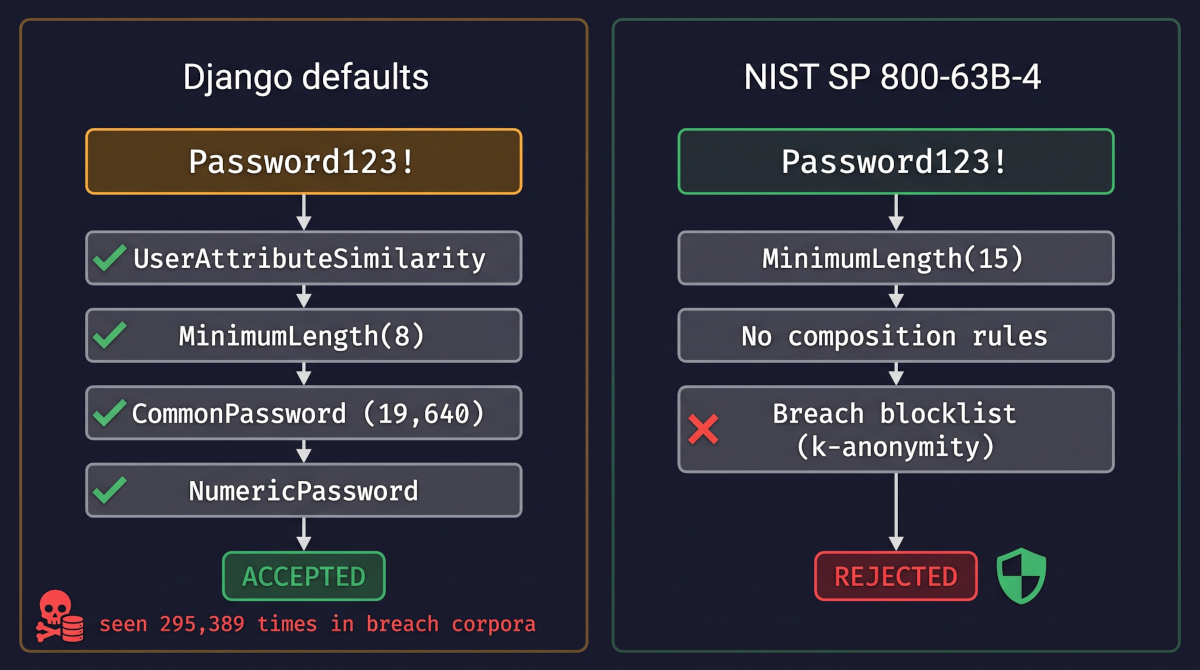
Then there is the part that actually changed my mind. Django's four default validators — the block startproject writes into your settings file, the block you have almost certainly never edited — accept the password Password123!. That string has been seen 295,389 times in the breach corpora behind Have I Been Pwned. I did not read that number in an article; I queried the API for it while writing this paragraph, and you can reproduce the query in four lines of Python before the end of this post.
The Attack: What It Is and How It Works
There is no payload here, which is why this post sits a little oddly beside the rest of the series. Every other one has had a string at the centre of it — an injected quote, a template expression, a traversal sequence, a fixed session id. Weak passwords have no such artifact. The attacker sends an ordinary login request carrying an ordinary password. The vulnerability is not in the request at all. It is that the password was guessable, and it was guessable because your application agreed to store it.
What makes a password guessable is not its length or its character set in the abstract. It is its position in a ranked list. Attackers do not enumerate keyspaces; they enumerate corpora, ordered by observed frequency, because human password choice is wildly concentrated. The canonical list is rockyou.txt: 14,344,392 unique passwords pulled out of a single 2009 breach. It still ships with Kali Linux by default, and sixteen years on it is still the first file most testers reach for. On top of the list sit mangling rules: mechanical transformations applied to every candidate — capitalise the first letter, append a digit, substitute a with @, append the current year. A cracking ruleset of a few dozen transforms multiplies a fourteen-million-entry wordlist into a candidate space in the hundreds of millions, and against a fast, unsalted hash modern hardware walks that in minutes.
Password123! shows how that works. It is not a random point in a 95-character alphabet raised to the twelfth power. It is password with three transformations applied — the capital on the first letter, the digits on the end, the symbol after the digits — all of which ship in every cracking ruleset by default, and the result has been seen 295,389 times in breaches. That puts it near the top of every real corpus, among the first candidates any attacker tries.
Against a sign-up path that never validates, the attack takes one request. The victim registered through it — an onboarding flow, an invite, an API sign-up that hashes the password with set_password() and never consults a policy — and chose Password123!, and nothing refused it. The attacker sends one login request with the victim's username and that password, and is in. There is no wordlist to walk and no throttle to defeat: the account falls because the password is cheap, not because the guessing is fast. Rate limiting and lockout (Post 11) slow down an attacker who needs thousands of attempts; they have nothing to say about the first one.
The password validator is the only control that operates upstream, at the moment of choice, on the supply side. It does not make a weak password harder to exploit; it prevents the weak password from existing in your database at all. Getting it wrong is also completely silent. Nothing fails, nothing is logged, no alert fires. A user picks Password123!, your validators wave it through, and the account sits in your admin looking exactly like every other account until the day somebody runs a list against it. The defect ships as data rather than as code. You are never going to find it by reading your views.
A weak password is spent in other ways too, and the policy fails in other places. Offline cracking runs against a stolen database's hashes, at whatever rate the hashing algorithm and the attacker's GPUs permit, where no login throttle reaches; password storage gets its own post later in the series. Credential stuffing skips guessing altogether and replays a pair harvested from someone else's breach, which is where reused passwords bite and multi-factor authentication becomes the answer. On the policy side, the validator block can be deleted or diluted in settings — validators dropped, the floor lowered, or an import path mistyped, which Django reports only when a password is first validated or a password form first renders, because it loads the validators lazily. validate_password() can be called without the user, which silently switches UserAttributeSimilarityValidator off (its validate() opens with if not user: return), or after the write, when the weak password is already stored. And composition rules — an uppercase letter, a digit, a symbol — push users into the predictable corner where Password123! lives, which is why NIST now forbids them.
Real-World Incidents
RockYou — 32.6 million plaintext email addresses and passwords (December 2009); FTC settlement announced March 27, 2012
RockYou built widgets and social games for Facebook and MySpace. In December 2009 an attacker using the handle "igigi" extracted its entire user table through an SQL injection flaw — Post 1's vulnerability — and found that all 32.6 million email addresses and passwords were stored in clear text. No hash, no salt, no encryption of any kind. The credentials were not merely exposed; they were exposed legibly, which is the difference between a breach that costs an attacker GPU-months and a breach that costs them a download.
I chose this incident over a bigger or more recent one because RockYou is the only breach in this series that did not just leak data — it built a weapon that is still in daily use. The dumped passwords, deduplicated, became rockyou.txt. Every password-guessing attack described in the previous section, here and in Post 11, is powered by a list of what 32 million real people actually chose in 2009, and it still works, because the distribution of human password choice has barely moved. 123456 was the single most common password in that dump. It is still line one of the 19,640-entry list that ships inside Django today, a list Django credits to Royce Williams's top-20,000 cut of Have I Been Pwned's corpus, compiled more than a decade after RockYou.
MITRE ATT&CK maps the follow-on activity as T1110 — Brute Force. Post 11 covered its stuffing and spraying sub-techniques; this post lives one level down in the same family, at T1110.001 — Password Guessing (candidates fired at a live authentication endpoint) and T1110.002 — Password Cracking, the offline variant. RockYou's own users needed no cracking — skipping hashing left nothing to crack — but the list their passwords became is the first candidate file cracking tools reach for against hashes stolen everywhere else. The distinction matters operationally: guessing is visible in your logs and answerable with throttling, cracking happens on the attacker's hardware after the fact and is answerable only by what you decided about hashing and password strength before the theft.
The FTC did not charge RockYou primarily over the 32 million adults. It charged the company under the Children's Online Privacy Protection Act, because, the complaint alleged, RockYou had knowingly accepted registrations from children under 13 — approximately 179,000 of them — collecting email addresses, passwords, birth year, sex, ZIP code and country without verifiable parental consent. The settlement announced on March 27, 2012 — a proposed consent decree, with no admission of liability — required a $250,000 civil penalty on the COPPA counts, a comprehensive data-security programme, and independent third-party security audits every other year for twenty years. On the security side the complaint alleged that RockYou had failed to maintain "reasonable procedures, such as encryption to protect the confidentiality, security, and integrity of personal information collected from children" — while, in the FTC's characterisation, touting its security features to users.
Sources: FTC — Charges That Security Flaws in RockYou Game Site Exposed 32 Million Email Addresses and Passwords (2012) · TechCrunch — RockYou Hack: From Bad To Worse (2009)
Django's Default Protections
This is one line of Django's own source, and it reframed the whole topic for me:
# django/conf/global_settings.py
AUTH_PASSWORD_VALIDATORS = []
Django's actual default is no password validation at all. The four validators you are thinking of do not live in the framework's defaults; they live in the startproject template, which writes them into your settings.py at the moment you scaffold the project. The distinction matters. Django is not maintaining that protection for you. It handed it over once, as text, in a file you own and edit. Delete the block, or start from a settings module that was not generated by startproject (a cookiecutter, a colleague's boilerplate, a hand-written twelve-factor config), and every password on your site is accepted. There is no warning. manage.py check --deploy does not mention it.
Assuming the block is there, here is what the four validators actually do — read from django/contrib/auth/password_validation.py in Django 5.2.17, not from the docs.
UserAttributeSimilarityValidator compares the lowercased password against the user's username, first_name, last_name and email, and against each \W+-delimited part of those values, using difflib.SequenceMatcher.quick_ratio() with a max_similarity threshold of 0.7. Splitting on non-word characters is why an email address protects both thiago and peticaobrasil independently, not just the whole address.
MinimumLengthValidator defaults to min_length=8. The startproject template does not override it. Against NIST SP 800-63B-4, which requires a minimum of 15 characters for a password used as a single factor (and permits 8 only when the password is one factor of a multi-factor scheme), Django's out-of-the-box floor is now roughly half of the current standard for the way most sites actually authenticate.
CommonPasswordValidator loads a gzipped list shipped inside the package and rejects the password if password.lower().strip() appears in it. The docstring says the list contains 20,000 entries. The file that ships with 5.2.17 counts 19,640, all unique, ordered by frequency with 123456 first. I counted it twice, assuming I had made an error the first time. Either number is simultaneously fine and far too small. It is a well-chosen list of the most common passwords ever recorded, and it is about 0.14 % the size of rockyou.txt on its own — before you count the fifteen years of breach corpora since.
NumericPasswordValidator is one line: if password.isdigit(). It exists because date-of-birth and phone-number passwords are common enough to deserve their own rule.
So what does that stack accept? I ran all four against a set of candidates, with a user object populated, on Django 5.2.17:
| Password | Result |
|---|---|
123456 |
rejected — too short, too common, entirely numeric |
password |
rejected — too common |
password123 |
rejected — too common |
abcdefgh |
rejected — too common |
qwerty123 |
rejected — too common |
P@ssw0rd |
rejected — too common |
thiago2026 |
rejected — too similar to the username |
peticaobrasil |
rejected — too similar to the email address |
Password123! |
accepted |
Summer2026! |
accepted |
Tr0ub4dor&3 |
accepted |
correct horse battery staple |
accepted |
The bottom four all pass. Now the same four against Have I Been Pwned's breach corpus, which counts how many times each password has appeared across the breaches HIBP has ingested:
| Password | Times seen in breaches |
|---|---|
Password123! |
295,389 |
Tr0ub4dor&3 |
3,196 |
correct horse battery staple |
391 |
Summer2026! |
45 |
That pair of tables is the whole argument of this post. Django's defaults reject P@ssw0rd and accept Password123!, and the second of those is two orders of magnitude more common in real breaches than Tr0ub4dor&3. That one comes from xkcd 936, "Password Strength" — the web comic that every argument about passwords eventually cites — where it is the bad example: exactly the shape a composition rule produces when it forces someone to add a capital, a digit and a symbol to a dictionary word. The correct horse battery staple row is the one I like best: the passphrase that a generation of engineers learned as the example of a good password has itself been breached 391 times, because it was published as an example and people used it as one. Every one of these numbers is reproducible. The breach counts come from four lines you can paste into a shell right now — no API key, no account, and the password never leaves the process:
import hashlib, urllib.request
h = hashlib.sha1(b"Password123!", usedforsecurity=False).hexdigest().upper()
body = urllib.request.urlopen("https://api.pwnedpasswords.com/range/" + h[:5]).read().decode()
print(next(int(l.split(":")[1]) for l in body.splitlines() if l.startswith(h[5:])))
# 295389
Run it against your own password before you close this tab.
One last piece of the default picture: where the validators run automatically, and where they do not. In Django 5.2 the validation call lives in SetPasswordMixin.validate_password_for_user(), which does exactly what you would write yourself —
# django/contrib/auth/forms.py
password = self.cleaned_data.get(password_field_name)
if password:
    try:
        password_validation.validate_password(password, user)
    except ValidationError as error:
        self.add_error(password_field_name, error)
— and that mixin is used by BaseUserCreationForm (via _post_clean), UserCreationForm, AdminUserCreationForm, SetPasswordForm, PasswordChangeForm and AdminPasswordChangeForm. If your registration, password-change and password-reset flows go through those forms, you are validated and you did not have to do anything.
Everything else is unvalidated:
user.set_password(pw)— the body isself.password = make_password(raw_password). No validation, by design.User.objects.create_user(...)— its_create_user_object()callsmake_password(password)directly. No validation.- Any DRF serializer, custom
Form, GraphQL mutation, management command or admin action that sets a password itself. createsuperuser --noinput. The command does callvalidate_password()— but only inside itsif options["interactive"]:branch. The non-interactive path readsDJANGO_SUPERUSER_PASSWORDfrom the environment and writes it straight through. And even interactively, a failed validation prints the errors and then asksBypass password validation and create user anyway? [y/N]:. The account with the most privilege in your system is the one Django is most willing to give a bad password to, because it assumes an operator is on the other end.
The Vulnerable Pattern and the Fix
Pattern 1 — A registration path that sets the password directly
This is the common case, and it almost never looks wrong, because the developer who wrote it was thinking about the user model, not the password. Every custom onboarding flow, invite acceptance, API sign-up and admin "create a user for this client" action ends up here. The lab's vulnerable view hashes the password and never validates it; the secure view adds one call, in the right place, with both arguments:
 def register(request):
     ...
     user = User(username=username, email=request.POST.get("email", ""))
-    # DANGER: hashes it, does not validate it. No consultation of
-    # AUTH_PASSWORD_VALIDATORS happens anywhere in this request.
+    try:
+        # Before the write, with the (still unsaved) user.
+        validate_password(password, user, password_validators=get_policy())
+    except ValidationError as exc:
+        return HttpResponse(
+            "password rejected:\n" + "".join(f"  - {m}\n" for m in exc.messages),
+            status=400,
+        )
     user.set_password(password)
     user.save()
set_password() hashes correctly. It uses the configured hasher, it salts, it does everything correct password storage asks of it — and that competence is exactly what makes the line look finished. Validation is a separate subsystem with a separate entry point, and nothing in the model layer reaches for it; User.objects.create_user(username=..., password=...) has the identical gap for the identical reason. Three details in the fix carry the weight. Validation happens before set_password(), so a rejected password never reaches the hasher or the database. The user object is passed, even though it has not been saved yet — the validator only reads attributes, so an unsaved instance works and is exactly what createsuperuser constructs for the same purpose. And the ValidationError is surfaced, with exc.messages giving you the same translated strings the built-in forms show. Both views are in the lab: views_vulnerable.py and views_secure.py.
The better answer, where it fits, is to not write this at all: subclass BaseUserCreationForm or SetPasswordForm and let the mixin do it (views_form.py is the same shape with a plain Form). Hand-rolling is for the paths a form does not cover — DRF serializers, invite flows, management commands — and the rule there is the same: one call, before the write, with the user. The third argument is the lab's own choice, and worth knowing: password_validators= takes an explicit list, built by get_password_validators() from the same {"NAME": ..., "OPTIONS": ...} dicts, and ignores the global AUTH_PASSWORD_VALIDATORS. Without it, the lab's 15-character floor would have reached every other lab in the repository, several of which deliberately use weak passwords. In a project, the setting is where the policy belongs.
Pattern 2 — The four defaults, which accept Password123!
Calling validate_password() is half of the fix. The other half is what it validates against, because the block startproject writes accepts the victim's password too — the table in Default Protections showed it passing all four. The lab's validating views use the policy in policy.py, and in a project it replaces that block in settings.py:
 AUTH_PASSWORD_VALIDATORS = [
     {"NAME": "django.contrib.auth.password_validation.UserAttributeSimilarityValidator"},
-    {"NAME": "django.contrib.auth.password_validation.MinimumLengthValidator"},
+    {
+        "NAME": "django.contrib.auth.password_validation.MinimumLengthValidator",
+        "OPTIONS": {"min_length": 15},
+    },
     {"NAME": "django.contrib.auth.password_validation.CommonPasswordValidator"},
-    {"NAME": "django.contrib.auth.password_validation.NumericPasswordValidator"},
+    {"NAME": "labs.post_13_weak_passwords.validators.BreachListValidator"},
 ]
Fifteen is NIST's single-factor floor, and it sounds hostile until you notice what it does to the shape of what users choose: at fifteen characters, mangled dictionary words stop being the path of least resistance and passphrases start being. That is the whole mechanism. You are not asking anyone to memorise more entropy per character; you are making the short, predictable shapes unavailable. NumericPasswordValidator is the one default the policy leaves out: at fifteen characters the dates and phone numbers it was written for are already too short, and what it still refuses — a long string of digits — it refuses for its character class alone, which is a composition rule by another name.
Which raises the practical question of where a user is supposed to get one. I wrote a passphrase generator for this site: it draws words uniformly at random from a published list — English, Portuguese, or both — and shows you the entropy it actually produced instead of a green bar. What matters for this post is where it runs. Every passphrase is generated in the browser by crypto.getRandomValues() and no request carries the result, because the alternative fails the standard this post spends its length applying to everybody else. A passphrase that reaches my server passes through code and infrastructure whose logging I would then have to vouch for, every layer of it, for as long as the tool exists — and put it in a URL and Heroku's router log, which records every path with its query string, keeps a copy. "Never saved" is not a promise anyone can make about a value that crossed the network; it is one you can make about a value that never left the tab. The difference is visible in your own network tab, which is the only good reason to believe me.
Do not put a low ceiling on it. NIST asks verifiers to permit at least 64 characters — it calls some limit reasonable, because a megabyte-long password costs real time to hash — and Django's storage costs you nothing to comply: set_password() hashes before storage, so the password column's max_length=128 holds a fixed-width hash regardless of input length. One caveat worth knowing before you go anywhere near hashers — BCryptPasswordHasher hands the raw password to bcrypt, which reads only 72 bytes: bcrypt releases before 5.0.0 (September 2025) silently truncate the rest, so a 100-character passphrase is only 72 bytes of secret, and 5.0.0 and later raise ValueError instead, which turns the long passphrase into a server error. Django ships BCryptSHA256PasswordHasher specifically to pre-hash around that, and it is the one you want. The default PBKDF2PasswordHasher has no such limit.
The breach list
The blocklist is the part NIST requires. Django's shipped list is 19,640 entries; the corpus behind Have I Been Pwned is a different universe of scale, and it is queryable for free, without an API key, without ever transmitting the password — via k-anonymity. You SHA-1 the password, send only the first five hex characters of the hash, and get back every suffix in that bucket with its breach count; the final comparison happens locally. The server learns which of roughly a million buckets your password fell into and nothing else. The four-line query in Default Protections is the whole mechanism; the lab's validators.py wraps it into PwnedPasswordValidator, standard library only, so it drops into any project. SHA-1 there is the API's wire format, a lookup key rather than a protection, and usedforsecurity=False says so. It sends Add-Padding: true, so the size of the response does not narrow down which bucket was asked for, and it fails open by default, so an HIBP outage does not block every registration and reset on your site — a choice to make deliberately, and the wrong one for a bank. Its threshold can let rare passwords through, and NIST leans that way, calling an excessively large blocklist of little benefit. And the whole security property is the five-character prefix: an implementation that sends the full hash is not a breach check but a password-disclosure endpoint with a friendly name.
The lab's active policy uses the offline half, BreachListValidator, a gzipped list it controls, so its tests never depend on a third party being reachable; Django's own CommonPasswordValidator does the same with a password_list_path option. Put your brand name, your product name, your domain, and the current and next year in that file. peticaobrasil2026 is a password somebody will choose, it is in nobody's wordlist, and it is trivially guessable by anyone who has looked at your homepage.
For Petição Brasil the conclusion is less tidy. Four of my seven custom validators are the thing the standard forbids, so those should go. The rest of this policy — 8 characters to 15, a real blocklist — I have not done, and the reason is blast radius rather than backlog: a Petição Brasil password lets you create a petition, not sign one. Signatures go through gov.br's PKI, and it is the certificate that makes a signature binding, not the session that reached the form. So I accepted the risk on impact — which is a defensible call, and still an uncomfortable sentence to write in a post arguing that this defect ships as data nobody ever looks at.
The Analyst's View
The CySA+ vocabulary matters here, because password policy usually gets filed under "compliance" and it does not belong there. A validator stack is a preventive control, and an unusual one: almost every preventive control in this series narrows what an attacker can do to your application, while this one narrows what your users can put into it. Everything else that defends against a guessed password — the rate limit in Post 11, the hashing underneath the row, the second factor on the account — is downstream of the account already existing with a bad secret, which makes them further layers behind a weak policy rather than substitutes for one. That ordering matters when you are asked to justify effort: throttling reduces the rate of guessing, MFA reduces the value of a correct guess, and only the validator reduces the number of accounts worth guessing at. Defence in depth means having all three, not picking whichever was easiest to ship.
The second half of the analyst's job here is measurement, and it is the part developers almost never do. You do not have to speculate about how many of your users chose something breached — you can find out. Because password hashes are one-way you cannot test your existing users' passwords against a list directly, but you have two honest options: check at the next successful login, where you hold the plaintext for exactly one request and can run it through the breach validator there and flag or force-rotate the account; or take your own hash dump into an isolated environment and crack it with the same tooling an attacker would, which gives you a percentage rather than an opinion. Either produces a number you can put in front of a decision-maker, and the number is usually much worse than anyone expects. That, rather than a policy document, is what gets a 15-character minimum approved.
Catching It Automatically
Testing Your Defence
The discriminating test is the lab's: send the victim's password to the secure registration view and assert it is refused and never stored.
def test_secure_register_rejects_the_same_password(self):
    resp = self.client.post(
        "/passwords/secure/register/",
        {"username": "mallory", "password": VICTIM_PASSWORD},
    )
    self.assertEqual(resp.status_code, 400)
    self.assertFalse(User.objects.filter(username="mallory").exists())
    body = resp.content.decode()
    # Rejected twice over: below the 15-character floor AND on the
    # breach blocklist. Neither reason is a composition rule.
    self.assertIn("at least 15 characters", body)
    self.assertIn("known data breach", body)
Point it at /passwords/vulnerable/register/ and it fails: the view answers 201 and mallory exists. The assertFalse(...exists()) line is the important one — a view can return 400 for a dozen reasons, and only that assertion proves the password never reached the database. The lab's tests.py also checks that a strong passphrase is accepted, so a view that refused everyone could not pass, and, separately, runs the one-guess login that captures the flag from a seeded victim — the impact, not the registration path.
The second check is of a different kind — it asserts on the configuration rather than on a view, and it keeps Pattern 2's policy from quietly going away:
from django.contrib.auth.password_validation import (
    CommonPasswordValidator, MinimumLengthValidator, get_default_password_validators,
)

def test_password_policy_is_configured(self):
    # Instantiating them is what Django does on the first validation.
    validators = get_default_password_validators()
    self.assertTrue(any(isinstance(v, CommonPasswordValidator) for v in validators))
    floors = [v.min_length for v in validators if isinstance(v, MinimumLengthValidator)]
    self.assertTrue(floors and min(floors) >= 15)
Delete the block or lower the floor, and this fails in CI instead of in production.
Scanning It
The lab ships three registration views — one that never validates, one that validates inline, one that validates in a Form — which turns "does the scanner catch it?" into the sharper question of whether it can tell them apart.
Bandit misses the class completely. Bandit walks the Python AST looking for B-numbered risky constructs, and there is no risky construct here: set_password() is the correct function, called correctly, on the right object. The defect is the absence of a call beside it, and absence has no AST node. Its four findings on the lab are three hardcoded-password hits on the fixtures and one B310 on the secure validator's urlopen. Its loudest finding was on the fix, not on the flaw.
Semgrep needs a word on how it is packaged, because this whole section turns on it. Its rules come from two places and you have to ask for each separately. --config p/<name> pulls a curated pack — a hand-picked set the Semgrep team stands behind, and what almost every CI pipeline and every tutorial runs. --config r/<name> pulls from the registry: every published rule for that language or framework, including the ones a given pack leaves out, many of them in a subcategory Semgrep labels audit. Same engine, same lab, different rule set. For this vulnerability that difference is the entire result.
Semgrep's curated packs miss it too:
semgrep scan --config p/django --config p/python --config p/owasp-top-ten labs/post_13_weak_passwords/
# Ran 156 rules on 18 files: 3 findings.
None of the three is about password validation, and here is the part that should bother you: two of them fire on the vulnerable and the secure view identically. A rule that cannot distinguish the bug from the fix carries no signal about this vulnerability at all, however serious its severity label looks in a report.
The audit tier catches it:
semgrep scan --config r/python.django --config r/python labs/post_13_weak_passwords/
# ❯❱ python.django.security.audit.unvalidated-password.unvalidated-password
#    labs/post_13_weak_passwords/views_vulnerable.py:37   user.set_password(password)
It fires on the vulnerable view and is silent on the inline secure one — so this post ships no custom rule. The finding is not "write a detection"; it is "the packs you are running do not carry this one, so run the audit tier as well."
Why is it missing? The packs do not say. The rule's own metadata — subcategory: [audit], confidence: LOW — marks it as a list of places to go and read, not a list of defects, and the three packs carry comparatively few such rules (2 of p/django's 28). The pack built for them is p/security-audit, and it does carry this one: run against the lab, it fires on the vulnerable view and stays silent on the inline secure one, exactly as the registry run did. Post 8's no-csrf-exempt and Post 2's avoid-mark-safe, both absent from p/django, are in it too. A rule can exist for years, be exactly right about your codebase, and never once run.
And the rule earns its low confidence twice over. It also flags the lab's Form-based view — the idiomatic Django shape, where a clean_password() method validates and the view writes afterwards — because its exclusion patterns only look for validate_password() in the same lexical scope as set_password(). Validation one function call away is invisible to it. So the more idiomatic your Django is, the more likely this rule is to be wrong about it.
Then there is the autofix, which is worse than useless. Semgrep offers:
if django.contrib.auth.password_validation.validate_password($X, user=$MODEL):
    $MODEL.set_password($X)
validate_password() returns None on success and raises on failure. It never returns a truthy value, so that branch is never taken and set_password() never runs. I read that three times convinced I had it backwards, then checked in the container:
validate_password returns: None
  -> branch taken?            False
  -> u.password after autofix: ''
  -> u.has_usable_password(): True
Apply that fix and you have not hardened registration — you have stopped setting passwords, and because has_usable_password() only looks for the ! prefix Django uses to mark a password unusable, the accounts are not even flagged as broken. They are simply accounts nobody can ever log into. An autofix is a suggestion from a pattern matcher that has never run your code.
One last absence worth naming. Django's own manage.py check --deploy warns about a long list of settings — a session cookie without Secure is security.W012 — but there is no equivalent for password policy: nothing in django.core.checks.security or django.contrib.auth.checks looks at AUTH_PASSWORD_VALIDATORS at all, so an empty list — Django's actual default — produces no warning from the framework's own deployment scanner. The settings test above is the check Django does not ship.
The full captured output, the mutation experiment that proves the rule keys on the validate_password() call rather than on anything incidental, and the reproduction of the broken autofix are all in the lab's scans/ directory.
The habit this post left me with: every code path that writes a password gets one question — where is validate_password(password, user), and does it run before the write — and the policy it runs measures where a password sits in an attacker's ranked list, not how much it annoyed the person choosing it.
The next post takes the other door into the same account. Password reset is a shadow authentication path — whoever completes it owns the account, no password required — and a hand-rolled reset flow reopens the holes Django's token generator was designed to close: tokens that never expire, and tokens that survive the password change they authorised.
Further Reading
- Django documentation — Password validation — the
AUTH_PASSWORD_VALIDATORSsetting, the four built-ins, and how to write your own. - NIST SP 800-63B-4 — Digital Identity Guidelines: Authentication and Authenticator Management (July 2025) — §3.1.1.2 is the password section: the 15-character minimum, the composition-rule prohibition, the blocklist requirement, and the end of forced rotation.
- Have I Been Pwned — Pwned Passwords API — the k-anonymity range endpoint and the
Add-Paddingheader. - FTC — Charges That Security Flaws in RockYou Game Site Exposed 32 Million Email Addresses and Passwords (2012) — the enforcement action behind the wordlist.
- CWE-521 — Weak Password Requirements and OWASP A07:2025 — Authentication Failures.
- django-security-lab — Lab 13: Weak Passwords & Validators — the runnable lab, its three registration views, the breach-list validators, and the captured Bandit/Semgrep output in
scans/.