Brute Force and Credential Stuffing: Why Django Never Says 'Too Many Attempts' — and How to Make It
Django Security Series — Post 11 | Series III: Authentication & Session
OWASP A07:2025 — Authentication Failures | Reading time: ~20 min
🧪 Run it yourself. This attack ships as a runnable lab in django-security-lab: two login endpoints and a victim whose deliberately weak password guards a flag. The vulnerable view rate-limits on the client-controlled
X-Forwarded-Forheader, so rotating one forged value from a single machine walks the whole wordlist unthrottled and the flag falls; the secure view counts failures per account and locks out regardless of source. Reproduce both from the command line withcurl.
Series II was about users who were already inside. IDOR read objects they didn't own, privilege escalation climbed to staff, CSRF borrowed a browser that was already logged in, and mass assignment wrote columns the form never rendered. Every one of those attacks assumed a valid session existed. Series III steps back to the moment before that: proving who you are at all.
And it opens with the least sophisticated attack in the entire series. There is no payload here. No injected syntax, no traversal sequence, no crafted JSON body. The attacker submits a username and a password, exactly the way the form intends, and then does it again. The only thing that makes it an attack is the number.
What I did not expect, when I started reading for this post, was how explicit Django is about not helping. I had assumed there was some modest built-in protection, a small delay, a soft counter, something. There isn't, and the docs do not hedge about it: "Django does not throttle requests to authenticate users. To protect against brute-force attacks against the authentication system, you may consider deploying a Django plugin or web server module to throttle these requests." That is the whole position. The framework that escapes your templates by default, parameterises your queries by default, and rotates your session key on login will answer an unlimited number of password guesses without complaint.
Worse than a missing control is one that looks like protection. A rate limiter keyed on a value the client controls will pass a naive test — five tries from one address, the sixth blocked — and still be switched off from a single laptop by adding one HTTP header to each request. That is the shape of bug that survives review, because a reviewer looking for a flaw finds a limiter and moves on. Running a real petition site taught me to distrust exactly this kind of "protection"; the companion lab reproduces it end to end, and most of this post is about why the key it chose is the wrong one.
The Attack: What It Is and How It Works
Brute force is guessing. Against a login endpoint it means trying passwords against an account until one works, and its economics are set entirely by two numbers: how many guesses per second you can make, and how large the space of plausible passwords is. That second number is far smaller than people think, which is why the attack survives at all. Nobody enumerates all 96^12 possible passwords. They try 123456, then senha123, then the company name with a 1! on the end, and against a large enough user base one of them lands.
Credential stuffing is the modern, far more dangerous mutation, and it inverts the arithmetic. Instead of many passwords against one account, the attacker takes username/password pairs that leaked from someone else's breach and replays them against your login. They are not guessing. They are testing a hypothesis, and the hypothesis is password reuse. Public breach corpora run into the billions of credential pairs, so the attacker's job is reduced to a lookup and a loop. Success rates are low per attempt, often quoted somewhere around a fraction of a percent, but a fraction of a percent of ten million attempts is still tens of thousands of accounts, and each one is a real login with a real password. Nothing was cracked. Your site simply confirmed that a password already public elsewhere also works here.
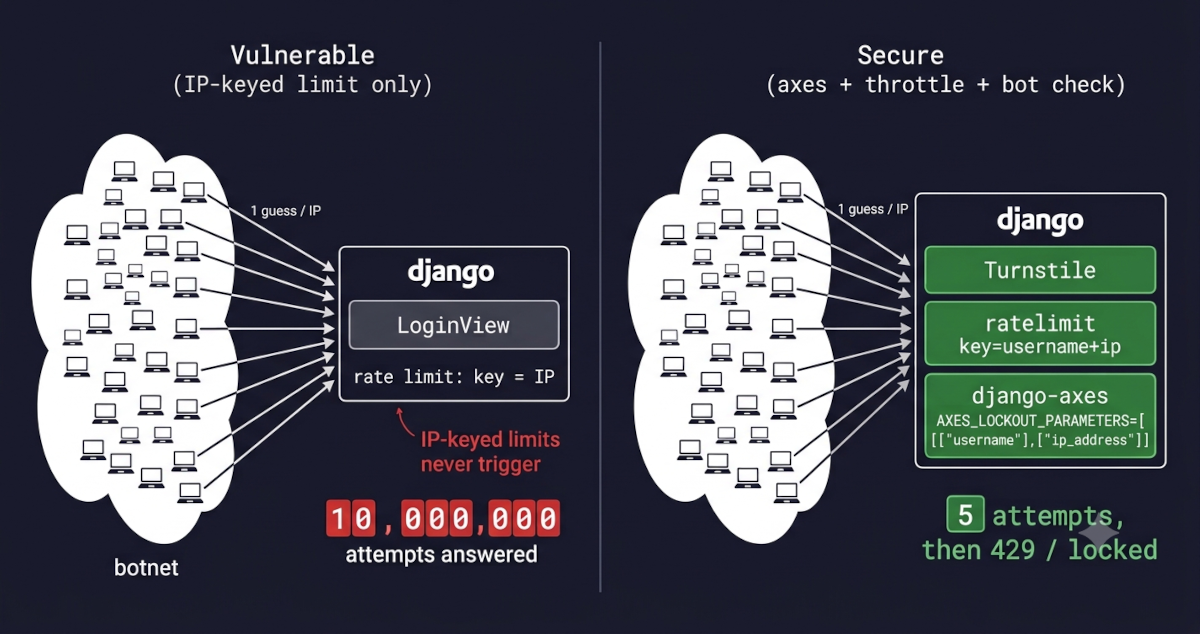
The consequence for the defender is the part that took me a while to internalise. A brute-force attack is loud on one account from one place. Credential stuffing is quiet on ten million accounts from ten million places, one attempt each. Those two shapes need genuinely different controls, and a control tuned for the first is often completely blind to the second. That asymmetry is the thesis of this post, and it is where my own project failed.
The reason the login endpoint is such a good target is that it is designed to accept anonymous input and answer honestly. Every other attack in this series had to smuggle something past a check. This one uses the front door exactly as built.
The tooling is unglamorous and widely available. Hydra, Patator, Burp Intruder, or forty lines of Python and requests will all do it, and the modern credential-stuffing kits (Sentry MBA and its descendants) are built around config files that describe a target's login form, its success and failure signatures, and its proxy rotation. That last item is the important one, and it is what defeats most naive defences: the attacker distributes their traffic across a residential proxy pool or botnet so that no single IP address is ever interesting.
Before the guessing starts there is usually a reconnaissance step that costs the attacker nothing: figuring out which usernames exist. If your login says "no such user" for one input and "wrong password" for another, you have handed over an oracle, and the attacker can enumerate valid accounts before spending a single guess on a password. The same leak shows up in registration ("that email is taken"), in password reset ("we couldn't find that address"), and, more subtly, in response timing, which I'll come back to because Django has a specific and slightly odd defence for it.
Real-World Incidents
Dunkin' Brands — New York Attorney General consent order (attacks from 2015; settled September 15, 2020)
I picked this one over the flashier breaches because it is the rare case where a regulator wrote down, in an enforceable document, what a company was supposed to have done about credential stuffing. Beginning in early 2015, attackers ran credential-stuffing attacks against DD Perks, Dunkin's rewards programme, whose accounts held stored value that can be spent or transferred. This is worth pausing on: the attackers were not after Dunkin's systems. They were after money that customers had already loaded onto cards, which made every compromised account directly monetisable, and which is why a doughnut loyalty scheme was worth industrialising an attack against at all.
MITRE ATT&CK maps this family as T1110 — Brute Force, and the Dunkin' case is squarely its T1110.004 — Credential Stuffing sub-technique: the attackers were not guessing passwords but replaying pairs leaked from other breaches. The inverse trick, T1110.003 — Password Spraying, tries one very common password against every account precisely to stay under per-account limits. Whichever variant lands, the follow-on is T1078 — Valid Accounts — from the first success the attacker is no longer attacking anything; they are simply logged in, and every control in Series II is what stands between them and the data.
Dunkin's third-party app developer repeatedly alerted the company to the ongoing attempts and handed over a list of nearly 20,000 accounts compromised in a single five-day sample period. According to the Attorney General, Dunkin' then failed to investigate, failed to notify the affected customers, failed to reset their passwords, and failed to implement safeguards against further attacks; the AG's own investigation later identified thousands of additional accounts compromised between 2015 and 2018. The resulting consent order, announced September 15, 2020, required $650,000 in penalties and costs, plus customer notification, password resets, refunds for fraudulent card use, and a commitment to maintain safeguards against credential stuffing and to follow incident-response procedures going forward. The claims were brought under New York's data-breach notification statute (GBL § 899-aa) and its consumer-protection provisions (Executive Law § 63(12), GBL §§ 349–350), the latter because Dunkin' had told customers it took reasonable measures to protect their information while, the AG alleged, it was doing none of these things.
The legal lesson is the one I keep coming back to as someone who trained in law before writing Django: notice is what converts a technical problem into liability. Dunkin' was not penalised for being attacked, and credential stuffing is not a vulnerability in any code Dunkin' wrote. It was penalised for knowing and not acting. Under LGPD the analogous exposure is Art. 48's incident-notification duty read together with Art. 44's standard that processing is irregular when it fails to provide the security a data subject can expect, and the ANPD's own resolution sets out the reporting timeline. So when your logs record user_login_failed ten thousand times against one account overnight and nobody looks, you have not merely missed an attack. You have created a documented, dated record that you knew. That record is discoverable.
Django's Default Protections
There is no throttle. There is no lockout. There is no counter. LoginView will process your ten millionth failed POST with the same equanimity as your first, and authenticate() has no memory of the previous attempt. For a framework whose entire security posture is "safe defaults, and here are the escape hatches," this is the one place where the default is simply absent, and the docs say so in the plainest language they use anywhere.
What Django does give you is a password storage layer that makes each guess expensive to verify and a set of primitives that make the missing controls easy to bolt on. The default hasher is PBKDF2 with a deliberately high iteration count, which is a real if indirect brute-force defence: it sets a floor on how fast your server can check a candidate password, which caps the attacker's online guess rate as a side effect of CPU cost, and it is what makes an offline attack against a stolen hash dump expensive rather than trivial. (Hashing gets its own treatment later in the series; here it matters only as the thing that makes each guess cost something.)
There is one genuine, deliberate default worth knowing, and it is in ModelBackend.authenticate:
try:
    user = UserModel._default_manager.get_by_natural_key(username)
except UserModel.DoesNotExist:
    # Run the default password hasher once to reduce the timing
    # difference between an existing and a nonexistent user (#20760).
    UserModel().set_password(password)
else:
    if user.check_password(password) and self.user_can_authenticate(user):
        return user
Read what that except branch does. When the username does not exist, Django hashes the submitted password anyway and throws the result away. It is deliberately wasting CPU, for no functional reason, so that a nonexistent user takes roughly as long to reject as a real user with a wrong password. Without it, "no such user" would return in microseconds while a real account burned through PBKDF2 iterations, and the response time alone would enumerate your entire user table.
I want to flag this as the thing that genuinely surprised me while writing this post, because it cuts against my mental model of the framework. Django will not throttle a single login attempt for you, but it will burn a full PBKDF2 hash cycle to hide a timing signal you would probably never have noticed. That is a strange pair of priorities until you see the logic: the timing oracle is invisible and unfixable from application code, so the framework closes it; the throttle is visible, and it is policy, so the framework refuses to choose your policy for you. I still think a default AXES-style counter would have prevented more real-world compromise than the timing fix ever has. But I understand the reasoning now, and I didn't before.
What Django protects automatically:
- Expensive password verification (PBKDF2 by default), which caps online guess rate and makes stolen hashes costly to crack.
- A constant-ish-time response for nonexistent usernames, via the deliberate hash-and-discard above.
- Session key rotation on
login(), which belongs to session fixation rather than this post.
What Django does NOT protect automatically:
- Any limit whatsoever on the number of authentication attempts, per IP, per account, or globally.
- Account lockout after repeated failures.
- Bot or automation detection on the login form.
- DRF token and JWT obtain endpoints, which are login endpoints wearing different clothes and ship with no throttle.
- Enumeration through your messages: your custom registration and reset views can undo the timing defence in one helpful error string.
Vulnerable Pattern: What NOT to Do
Pattern 1 — The bare login view
This is not a mistake so much as an omission, and it is what you get by following the tutorial and stopping:
# INSECURE — correct, idiomatic, and completely unthrottled
from django.contrib.auth.views import LoginView
from django.urls import path

urlpatterns = [
    path('login/', LoginView.as_view(), name='login'),
]
Nothing here is wrong. There is no bad code to point at, which is precisely why it survives review: a reviewer looks for a flaw and finds none, because the flaw is a control that was never written. The same shape applies to DRF, where obtain_auth_token and simplejwt's TokenObtainPairView are login endpoints that happen to return a token instead of a cookie, and they are just as open. A DRF project that carefully sets DEFAULT_THROTTLE_CLASSES for its data endpoints and leaves the token endpoint unthrottled has rate-limited everything except the door.
Pattern 2 — A rate limiter keyed on a header the client controls
This one is worse than Pattern 1, because it produces the feeling of protection. It is also, almost verbatim, what I found in my own project:
# INSECURE — the "client IP" is whatever the client says it is
def get_client_ip(request):
    x_forwarded_for = request.META.get('HTTP_X_FORWARDED_FOR')
    if x_forwarded_for:
        return x_forwarded_for.split(',')[0].strip()   # ← attacker-controlled
    return request.META.get('REMOTE_ADDR', '')

@rate_limit(max_requests=5, window=300)   # 5 attempts per 5 min "per IP"
def login_view(request):
    ...
X-Forwarded-For is a hop-by-hop breadcrumb trail, and each proxy appends to it. When a request arrives at a Heroku dyno, the router has appended the real client address to whatever the client already sent, so the header reads <whatever the attacker typed>, <real client IP>. Taking split(',')[0] reads the attacker's entry. Rotating that header per request hands the attacker a brand-new rate-limit bucket every time, from one machine, with no proxy pool at all. The correct entry to trust is the one your proxy appended, which on a single-proxy deployment is the last, not the first, and the number of hops you can trust is deployment knowledge that has to be configured rather than guessed.
Pattern 3 — IP-keyed limits as the only control
# INSECURE — irrelevant against distributed credential stuffing
@ratelimit(key='ip', rate='5/m', block=True)
def login_view(request):
    ...
What goes wrong: nothing, on the axis it measures. This correctly stops one IP from making six attempts a minute. It has no opinion whatsoever about one hundred thousand IPs making one attempt each against one hundred thousand different accounts, which is exactly the shape of the attack that took Dunkin's customers' money. An IP-keyed limit answers "is this source noisy?" The question you also need answered is "is this account under attack?", and no amount of tuning the first question will ever produce the second.
Secure Implementation: The Django Way
Rule 1 — Lock the account, not just the address (django-axes)
django-axes is the canonical answer, and the reason it is the first rule is that it is the only control here that tracks failures per account. Install it, add the middleware, and put its backend first:
# settings.py
INSTALLED_APPS = [..., 'axes']

MIDDLEWARE = [..., 'axes.middleware.AxesMiddleware']   # last

AUTHENTICATION_BACKENDS = [
    'axes.backends.AxesStandaloneBackend',             # must be first
    'django.contrib.auth.backends.ModelBackend',
]

AXES_FAILURE_LIMIT = 5
AXES_COOLOFF_TIME = 1                    # hours; None means lockout until reset
AXES_RESET_ON_SUCCESS = True
AXES_LOCKOUT_PARAMETERS = [["username"], ["ip_address"]]
That last setting is the one I got wrong, and I got it wrong in the project you are reading this on. AXES_LOCKOUT_PARAMETERS defaults to ["ip_address"]. I had installed axes on this blog, set a failure limit and a cool-off, seen the lockout template render during testing, and concluded I had account lockout. I did not. I had an IP lockout with a nicer template than my other project's, and it was blind to distributed stuffing in exactly the same way. The nesting is meaningful and easy to misread: the outer list is OR, the inner lists are AND. [["username"], ["ip_address"]] locks when either the username OR the IP crosses the limit. [["username", "ip_address"]] (one inner list) only locks a specific username-from-a-specific-IP pair, which sounds tighter and is in fact the weakest of the three, because rotating either half resets the counter.
Here is the part I am genuinely not settled on. Locking by username means anyone who knows your email can lock you out of your own account by failing five logins, which converts an authentication control into a denial-of-service tool aimed at your users. Axes offers AXES_LOCK_OUT_BY_USER_OR_IP and cool-off tuning to soften this, and the common advice is that a short cool-off (minutes, not hours) plus alerting is the right trade. I've gone with the OR configuration and a one-hour cool-off on this blog because it is a personal site where locking me out is a nuisance rather than a business event. I would not be as confident on a public civic platform, where locking a citizen out of signing during a petition deadline has consequences I would rather not have to explain to a regulator. This is a real trade-off with no clean answer, and anyone who tells you otherwise is selling something.
Rule 2 — Rate limit on the right key, from a trusted source
Rate limiting and lockout are different controls, and the difference is worth being precise about: the limiter blunts volume from a source, the lockout protects an account from accumulated failures. Use both, and key the limiter on the username as well as the address:
from django_ratelimit.decorators import ratelimit
from django.utils.decorators import method_decorator

@method_decorator(ratelimit(key='ip', rate='10/m', method='POST', block=True), name='post')
@method_decorator(ratelimit(key='post:username', rate='5/5m', method='POST', block=True), name='post')
class ThrottledLoginView(LoginView):
    pass
Two details carry most of the value. method='POST' means page views don't consume the budget, which sounds like a footnote and isn't; decorate dispatch instead of post and a user who reloads the login page six times gets a 429 while an attacker who POSTs directly is unaffected. And key='post:username' gives you the per-account view that key='ip' structurally cannot.
For this to mean anything, Django has to know which address is really yours. Behind exactly one trusted proxy, take the last entry rather than the first, and only trust the header at all when you know a proxy is in front of you:
# settings.py — only if you are behind a proxy you control
SECURE_PROXY_SSL_HEADER = ('HTTP_X_FORWARDED_PROTO', 'https')

def get_client_ip(request):
    """Trust only the hop our own proxy appended."""
    xff = request.META.get('HTTP_X_FORWARDED_FOR')
    if xff and settings.TRUST_PROXY_HEADERS:
        return xff.split(',')[-1].strip()      # ← the proxy's entry, not the client's
    return request.META.get('REMOTE_ADDR', '')
If you are not behind a proxy, ignore X-Forwarded-For entirely and use REMOTE_ADDR, which the client cannot forge.
Rule 3 — Make automation expensive
Lockouts and limits count attempts. A bot check attacks the attacker's cost model instead, which is the only control on this list that scales against a botnet. Cloudflare Turnstile is what both of my projects use, and validating the token server-side in the form's clean() is the whole integration: if the token is missing or invalid, authentication never runs. Two properties matter more than the widget. Tokens are single-use, so Cloudflare returns timeout-or-duplicate on replay and a captured token can't be fanned out across a credential list. And the validator must fail closed: a network error talking to Cloudflare, or a missing secret key, has to raise, not return True. A bot check that fails open under load is a bot check that disappears exactly when it is being attacked.
Rule 4 — Don't hand over the user list
Django's timing defence only helps if your own code doesn't undo it. Registration that says "that email is already registered", a reset flow that says "no account with that address", or a login that distinguishes "unknown user" from "wrong password" all rebuild the oracle Django spent a PBKDF2 cycle hiding. Say the same thing every time ("If the email is registered, you'll receive instructions"), and accept that the marginally worse UX is the price. Rate limit the reset endpoint per email address too, since it is a login-adjacent path that reveals account existence and sends mail on demand.
Brute Force Prevention Checklist
| Control | What it covers |
|---|---|
| PBKDF2 password hashing (Django default) | Caps online guess rate via CPU cost; makes a stolen hash dump expensive to crack offline |
ModelBackend's hash-and-discard on unknown users (Django default) |
Removes the timing oracle that would enumerate valid usernames |
django-axes with AXES_LOCKOUT_PARAMETERS = [["username"], ["ip_address"]] |
Per-account failure counting — the only control here that sees distributed stuffing |
django-ratelimit keyed on post:username and ip, method='POST' |
Blunts volume per source and per account without penalising page loads |
Trusted-proxy-aware client IP (last XFF hop, or REMOTE_ADDR) |
Stops a forged X-Forwarded-For from minting a fresh limit bucket per request |
| Cloudflare Turnstile (or equivalent) validated server-side, failing closed | Raises per-attempt cost against botnets, where per-IP counting is blind |
DRF ScopedRateThrottle on token/JWT obtain endpoints |
Closes the login endpoint that isn't called LoginView |
| Uniform responses on login, registration and reset | Denies the enumeration step that precedes the guessing |
Alerting on user_login_failed volume, with a usable identifier |
Converts logs into response; a hashed IP you can't block is a record, not a control |
| Multi-factor authentication | The layer that survives a correct password |
The Analyst's View
Brute force is where a CySA+ analyst's control vocabulary earns its keep, because no single control on that checklist covers the whole attack — the layering is the defence. The expensive PBKDF2 hash is a preventive control that caps the online guess rate; per-account lockout (django-axes) is a preventive control against sustained guessing at one account; rate limiting is a detective-and-responsive throttle on volume from a source; and Turnstile and MFA are compensating controls that stay standing when the password itself is weak or already known. Read that list against the two shapes of the attack and the blind spots line up on purpose: an IP-keyed limit sees a noisy source but is blind to distributed stuffing, while a per-account lockout sees the targeted account but can be turned into a denial-of-service against your own users. Defence in depth here is not a slogan — it is the specific admission that each control has a gap another one is there to cover.
The habit the attack rewards is a single question asked of every counter you deploy: what is this keyed on, and who controls that value? A limit keyed on X-Forwarded-For[0] lets the attacker write the answer; a limit keyed on the source IP answers a question distributed stuffing stopped asking years ago; only a per-account key answers "is this account under attack?" The same discipline runs past prevention into detection and response: a spike of user_login_failed events is only a control if the identifier you record is one you can act on — a hashed address you cannot drop into a firewall rule is a record of the attack, not a response to it.
Catching It Automatically
Testing Your Defence
The awkward thing about testing this control is that the assertion is about the sixth request, so the test has to make five real ones first, and it has to be honest about which key it is exercising.
# tests/test_brute_force.py
from django.contrib.auth.models import User
from django.core.cache import cache
from django.test import TestCase, override_settings
from django.urls import reverse


@override_settings(AXES_FAILURE_LIMIT=5, AXES_COOLOFF_TIME=1,
                   AXES_LOCKOUT_PARAMETERS=[["username"], ["ip_address"]])
class BruteForceTests(TestCase):
    def setUp(self):
        cache.clear()
        self.url = reverse('login')
        self.user = User.objects.create_user('vitima', password='corr3ct-h0rse!')

    def tearDown(self):
        cache.clear()

    def test_account_locks_after_five_failures(self):
        """The 6th wrong password must be refused, not evaluated."""
        for _ in range(5):
            self.client.post(self.url, {'username': 'vitima', 'password': 'wrong'})
        response = self.client.post(self.url, {'username': 'vitima', 'password': 'wrong'})
        self.assertEqual(response.status_code, 403)   # axes lockout

    def test_lockout_survives_ip_rotation(self):
        """The regression that matters: one account, many source addresses."""
        for i in range(5):
            self.client.post(self.url, {'username': 'vitima', 'password': 'wrong'},
                             REMOTE_ADDR=f'203.0.113.{i}')
        response = self.client.post(self.url, {'username': 'vitima', 'password': 'wrong'},
                                    REMOTE_ADDR='203.0.113.99')
        self.assertEqual(response.status_code, 403)   # fails if keyed on IP alone

    def test_correct_password_is_refused_while_locked(self):
        """A lockout that lets the right password through is not a lockout."""
        for _ in range(5):
            self.client.post(self.url, {'username': 'vitima', 'password': 'wrong'})
        response = self.client.post(self.url, {'username': 'vitima',
                                               'password': 'corr3ct-h0rse!'})
        self.assertNotIn('_auth_user_id', self.client.session)

    def test_page_views_do_not_consume_the_budget(self):
        """GET must not be throttled; only POST is an authentication attempt."""
        codes = [self.client.get(self.url).status_code for _ in range(10)]
        self.assertEqual(set(codes), {200})
test_lockout_survives_ip_rotation is the one to write first. It is the only test in that file that fails on an IP-keyed configuration — the misconfiguration this whole post is about.
A unit test proves the account lockout; the bypass itself is easier to feel from the command line. Rotate a forged X-Forwarded-For from one machine and watch whether the limit ever trips:
# Does a forged header mint a fresh bucket? Rotate XFF from one machine.
for i in $(seq 1 20); do
  curl -s -o /dev/null -w "%{http_code} " \
    -X POST https://staging.example.com/login/ \
    -H "X-Forwarded-For: 10.0.0.$i" \
    -d "username=vitima&password=wrong$i"
done; echo
# Want: 200 200 200 200 200 429 429 ...   Bad: twenty 200s.

# Control: same loop, no forged header. If this blocks and the above doesn't,
# your limiter is keyed on client-controlled input.
Scanning It
This is the post in the series where the scanners come up empty — and that result is worth as much as any finding. Bandit walks the Python AST for risky constructs; run against the lab it reports only a B105 on the seed's deliberately weak password, nothing on either login view. Semgrep's community packs (p/django, p/python, p/owasp-top-ten) — the rulesets an analyst runs by default — report zero. And because the CSRF post (Post 8) taught us a rule can hide in Semgrep's audit tier, the detection pass checked that too (r/python.django, r/python); it surfaces only unrelated nits, nothing about the throttle.
bandit -r labs/post_11_brute_force/                 # only B105 on the seed password
semgrep scan --config p/django --config p/python --config p/owasp-top-ten labs/post_11_brute_force/   # 0 findings
semgrep scan --config r/python.django --config r/python labs/post_11_brute_force/                     # audit tier: unrelated nits only
No tier finds it — and, unlike the other "miss" cases in this series, no custom rule could either. The two flaws defeat static analysis for different reasons. The vulnerable view trusts the wrong key: whether X-Forwarded-For[0] is safe to rely on is a judgement about who controls that value, not a dangerous call a rule can match. And the deeper gap — no per-account counter at all — is the absence of code, which no pattern can point at. A static rule can flag a dangerous call; it cannot flag a missing one. That is the line between this lab and IDOR or mass assignment (Post 6, Post 7): the standard tools missed those too, but a syntactic shape survived — an owner-unscoped lookup, a fields='__all__' — so a custom rule could still fire on it. Here nothing survives to write a rule against, so a rule would be theatre.
The signal here is dynamic — but deliberately not a DAST scanner, and it is worth being precise about why, because the reflex of a CySA+ analyst is to reach for one. DAST tools like sqlmap (Post 1) work by firing a crafted payload and reading a signature in the response; brute force leaves no signature to read. Its only symptom is volume across many requests, so "detecting" it is really a load test — and the sole way a scanner could be sure a limit is missing is to hammer the endpoint until it either blocks or falls over, which is a denial-of-service, not a scan. That is why OWASP ZAP ships no active rule for "missing rate limit," and why there is no push-button equivalent of sqlmap here.
Worse, a generic tool would get this lab backwards. Point Hydra or a ZAP fuzzer at the vulnerable login without rotating the header and it is blocked after five tries — so it reports the endpoint as protected and moves on, a clean false negative. The bypass only appears to a probe that already knows to forge and rotate X-Forwarded-For, and that knowledge comes from reading the threat model, not from any scanner's rule set. So the probe we keep is exactly that, made deterministic: point curl (or the Django test client in tests.py) at the booted lab, rotate the forged header, and watch the limit fail to trigger — the same manual check as above, promoted to the thing that proves the bug. A scripted credential-stuffing run (Hydra, Patator, a ZAP fuzzing loop) would show the same effect, but it measures timing and would only ever commit as a non-deterministic transcript, so there is no captured DAST artifact. The honest CySA+ lesson of the whole post is right here: some findings come from reading the threat model and running a probe, never from a scanner. The captured runs and the full write-up are under scans/.
Brute force is the attack with nothing clever in it, which is why the defence has to be deliberate: Django has decided, explicitly and in writing, that throttling your login is your job. Count failures per account, not just per address; trust only the hop your own proxy actually wrote; make automation expensive; and make sure the identifier you log at 3am is one you could act on. The counter you can point to in a review is not always the counter that stops the attack — and telling the two apart is the whole job.
Post 12 continues Series III with Session Hijacking and Fixation, where the attacker skips all of this. Instead of guessing the password, they take the proof of login after the fact, and we look at why Django already rotates your session key on login() and how easily a hand-rolled auth flow undoes it.
Further Reading
- django-security-lab — this post's runnable lab (
labs/post_11_brute_force/), the forgeable-XFF bypass vs. per-account lockout - Django Docs — Security in Django (on throttling authentication requests)
- Django Docs — Customizing Authentication: Authentication Backends
- django-axes — Configuration Reference (AXES_LOCKOUT_PARAMETERS)
- django-ratelimit — Rate Limit Keys
- DRF Docs — Throttling
- OWASP A07:2025 — Authentication Failures
- OWASP Cheat Sheet — Credential Stuffing Prevention
- MITRE ATT&CK — T1110.004: Credential Stuffing
- NIST SP 800-63B — Digital Identity Guidelines: Authentication
- NY Attorney General — Dunkin' Credential Stuffing Consent Order (2020)
- Web Security for Developers: Real Threats, Practical Defense (Malcolm McDonald) — Chapter 9: Authentication