Cross-Site Request Forgery (CSRF): How Your Browser Betrays You — and How Django's Token Stops It
Django Security Series — Post 8 | Series II: Broken Access Control
OWASP A01:2025 — Broken Access Control | Reading time: ~21 min
🧪 Run it yourself. This attack ships as a runnable lab in django-security-lab: a money-transfer endpoint where the "money" is a flag. The
@csrf_exemptview accepts a tokenless (forged) POST and the flag moves from the victim to the attacker; the@csrf_protectview returns403. Reproduce the server side from the command line withcurl, and the cross-site mechanic in a browser with the includedevil.html.
The first two posts of Series II dealt with an attacker who already had their own account and was poking at the boundaries — reading another user's objects (Post 6) or writing their own role (Post 7). In both cases the attacker made the request themselves, from their own browser, with their own session. Post 8 flips that completely. The attacker never touches your application directly. They don't need a session, a password, or an account. Instead, they trick the victim's browser into making the request for them — and the browser, dutifully obeying its programming, attaches the victim's session cookie to a request the victim never intended to make.
CSRF is the attack that made me rethink what "authenticated" actually means. My first real encounter with it was years ago, the first time I built anything with Django. I had wired up a form, the POST was submitting, and Django kept returning 403. I spent twenty minutes checking view logic before realising the template was missing {% csrf_token %}. That was the moment the middleware became visible to me — an invisible wall I had not known was there. The token became muscle memory soon enough, but it was only while researching this post that I understood the full mechanics of why Django forces you to trip over it. The 403 is annoying; the alternative (silently accepting every cross-origin POST) is worse in ways that are not obvious until you see the attack.
Cross-Site Request Forgery is not about stealing credentials. The attacker never learns the victim's password or session ID. Instead, they exploit a fundamental browser behaviour to make the victim's own browser submit a request the victim never intended. The mechanics are in the next section; the short version is that the server cannot tell the difference between a request the user meant to send and one their browser was tricked into sending.
CSRF is classified under A01 (Broken Access Control) in OWASP 2021 because the server accepts a state-changing request it should have rejected. Django's answer is CsrfViewMiddleware, which ships enabled by default. The protection is on from the start, so the entire CSRF surface in a Django application is the set of places where a developer turned it off.
The Attack: What It Is and How It Works
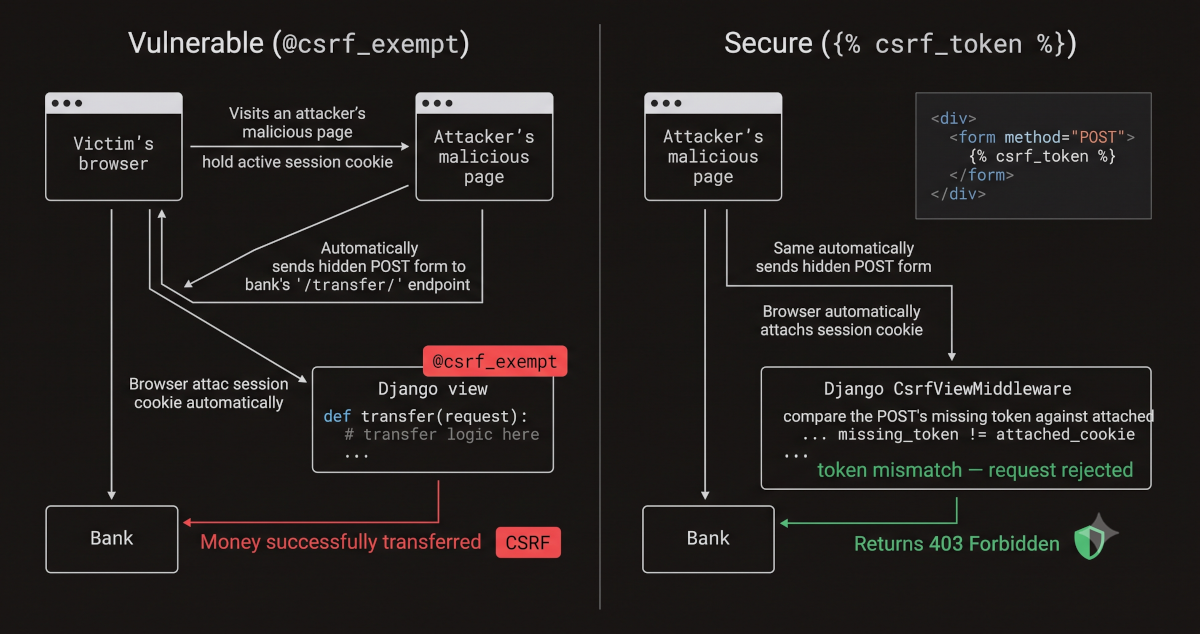
CSRF exploits the trust a web application places in the user's browser. The mechanics rest on a single browser behaviour: when the browser sends a request to a domain, it automatically attaches all cookies for that domain — including session cookies — regardless of which site initiated the request. This is by design; cookies are domain-scoped, not origin-scoped. The browser cannot distinguish "the user clicked a button on bank.com" from "a script on evil.com generated a form submission to bank.com."
Here is what happens. The victim logs into bank.com and gets a session cookie. Later (maybe minutes later, maybe hours) they visit a page the attacker controls, a forum post, a link in an email, a compromised ad network. That page contains a hidden form targeting POST bank.com/transfer/. The moment the page loads, JavaScript submits the form. The browser, doing exactly what browsers do, attaches the bank.com session cookie to the request. The server receives a POST with a valid session and a valid request body. It has no mechanism to distinguish this from a request the user submitted intentionally. The transfer executes.
The attacker never sees the session cookie, never reads the response, and never needs an account on the target application. They only need the victim to visit a page they control while logged into the target. Most users stay logged into their web applications for hours or days, so this condition is almost always met.
The most dangerous delivery mechanism is a hidden HTML form that auto-submits on page load. It sends a POST (which is what state-changing endpoints should require), the browser submits it as application/x-www-form-urlencoded (a "simple" content type that does not trigger a CORS preflight), and the victim never sees it happen. Image tags (<img src="https://bank.com/transfer?to=attacker">) also work, but only against endpoints that perform state changes on GET, which should not exist. JavaScript can also send cross-origin POSTs via fetch, though non-simple content types trigger a preflight that blocks the request. The attacker crafts the form with the exact field names the target endpoint expects:
<body onload="document.getElementById('csrf-form').submit();">
  <form id="csrf-form" action="https://bank.com/transfer/" method="POST">
    <input type="hidden" name="to_account" value="attacker-iban" />
    <input type="hidden" name="amount" value="10000" />
  </form>
</body>
When the victim visits this page, the form submits instantly. The browser attaches the bank.com session cookie. The server sees a POST to /transfer/ with a valid session and processes it. The transfer completes before the victim realises anything happened.
The practical exploitation of CSRF requires knowing the target endpoint's URL and expected parameters — which is often trivial. The attacker inspects the application's forms (which are visible to anyone with an account), reads the API documentation (if public), or simply reads the open-source code, then constructs the hidden form and hosts it on any domain they control. The victim does not even need to click a link — embedding the payload in an <iframe> on a page they are likely to visit (a forum, a social platform, a compromised blog) is enough, and the attack has no visible indicator: the submission happens in the background, the page may redirect immediately to something innocuous, and the browser shows no warning.
One caveat that matters in 2026: the specific attack above — a cross-site POST from a hidden form — is often stopped at the browser before it reaches the server. Browsers have defaulted cookies to SameSite=Lax since ~2020, and Django's session cookie defaults to Lax too; a Lax cookie is simply not sent on a cross-site POST. So against a default modern Django app the hidden-form POST above is blocked by the browser, not the server. CSRF is not dead, though — the mechanism is exactly what the token and SameSite exist to break, and it reopens the moment the cookie is SameSite=None, the state change rides a cross-site GET (which Lax still allows — Pattern 2 below), or a non-browser client is in play. The full SameSite picture is in Django's Default Protections.
Real-World Incidents
Netflix CSRF Account Takeover (2006)
In October 2006, security researcher Dave Ferguson published a Full Disclosure advisory demonstrating CSRF vulnerabilities across multiple Netflix account-management endpoints. A malicious page could host hidden forms that POSTed to Netflix's settings endpoints, changing the victim's login credentials, shipping address, DVD queue, and account name. The browser attached the session cookie automatically, no anti-CSRF token was required, and the requests succeeded. The attacker never needed the victim's password — only that the victim visit the attacker's page while logged into Netflix.
Given Netflix's long-lived sessions and the prevalence of tabbed browsing, that condition was almost guaranteed. Jeremiah Grossman subsequently popularized the disclosure, calling CSRF "the sleeping giant" of web vulnerabilities — a characterization that stuck because the attack class had been known for years but largely ignored by the industry. The Netflix advisory became one of the first high-profile demonstrations that CSRF was not theoretical but a practical, exploitable attack class against major web applications.
The lesson: CSRF turns every state-changing endpoint into a remote-control surface. The attacker does not break authentication; they borrow it. The application's own session management, designed to keep the user logged in for convenience, becomes the attack vector. In MITRE ATT&CK terms the result maps to T1565.001 — Data Manipulation: Stored Data Manipulation (the forged request alters stored data), or, when the target is account settings, T1098 — Account Manipulation (credentials or account config changed via the victim's session); the delivery side maps to nothing in ATT&CK's initial-access tactics, which assume endpoint compromise — CSRF abuses an authenticated session, not the user's machine.
The regulatory weight is easy to miss because no data is "stolen." But a forged request that changes a victim's email or shipping address, or moves their money, is unauthorised processing of personal data: under Brazil's LGPD (Art. 48, notify the ANPD and the affected subjects) or the EU's GDPR (Art. 33) an account-takeover-by-CSRF that touches personal data is a reportable security incident. The @csrf_exempt that made it possible is, in compliance terms, the removal of a required control.
Source: Dave Ferguson — Netflix CSRF Advisory (Full Disclosure, October 2006)
Django's Default Protections
Django is one of the few web frameworks that ships CSRF protection enabled by default. The protection is the CsrfViewMiddleware — added to the MIDDLEWARE list in every new project generated by django-admin startproject — and the {% csrf_token %} template tag. Together, they implement a masked Double Submit Cookie pattern (the secret lives in a cookie, and the form submits a masked copy of it; Django only uses true server-side/session storage when CSRF_USE_SESSIONS = True):
- When a page renders
{% csrf_token %}(or any code callsget_token()), the middleware sets a CSRF cookie (csrftoken) containing a random secret. This cookie isHttpOnly=Falseby default (JavaScript needs to read it for AJAX requests) and carriesSameSite=Lax, which means the browser will not send it on cross-site POST requests — so even if the token comparison somehow failed, the cookie itself would be absent from the attacker's forged request. - On every unsafe request (POST, PUT, PATCH, DELETE), the middleware demands a matching token — either as a form field named
csrfmiddlewaretoken(rendered by{% csrf_token %}) or as an HTTP headerX-CSRFToken. The middleware unmasks the submitted token and compares the underlying secret against the cookie's secret (the masking is a BREACH mitigation — the two values are not byte-identical). - If the token is missing or the secrets do not match, the middleware returns
403 Forbidden— the request never reaches the view.
This means that an attacker's hidden form on evil.com cannot produce a valid CSRF token for bank.com. The attacker can make the browser send the cookie (browsers do that automatically), but cannot read the cookie's value from a different origin (the same-origin policy prevents it), and therefore cannot include the matching form field. The token proves the request came from a page on the same origin.
One thing that surprised me: Django's session cookie has HttpOnly=True by default, which blocks JavaScript from reading it. The CSRF cookie does not. CSRF_COOKIE_HTTPONLY defaults to False.
Why? Because of how AJAX requests work. When JavaScript sends a POST via fetch, it cannot submit a form field, so it needs another way to prove the request is legitimate. The solution: JavaScript reads the CSRF cookie's value from document.cookie, then includes that value as an X-CSRFToken HTTP header. The middleware accepts either the form field or this header. But if the cookie were HttpOnly, JavaScript could not read it, and this whole AJAX workflow would break.
The alternative is to read the token from the hidden <input> that {% csrf_token %} renders in the page HTML, instead of reading it from the cookie. If your project does that (mine does), then CSRF_COOKIE_HTTPONLY = True is safe to enable and strictly better: it means that if an attacker finds an XSS vulnerability, they cannot use it to steal the CSRF token from the cookie. I only noticed the default was False when I checked my production settings while writing this post.
What Django protects automatically:
- Every
POST,PUT,PATCH, andDELETErequest processed by a view behindCsrfViewMiddlewarerequires a valid token. - Django's own
LoginView,LogoutView,PasswordResetView, and the admin interface all include{% csrf_token %}in their forms. - The session key is rotated on login (
login()callscycle_key()for session-fixation prevention) and the CSRF token is also rotated (rotate_token()), so a pre-authentication CSRF attack cannot reuse a token captured before login.
What Django does NOT protect automatically:
- Views decorated with
@csrf_exempt— the middleware is explicitly skipped. This is the single largest CSRF surface in Django applications. - State-changing GET requests —
CsrfViewMiddlewareonly checks "unsafe" methods (POST, PUT, PATCH, DELETE). A view that transfers money onGET /transfer/?to=attacker&amount=1000is completely unprotected, and a simple<img>tag is enough to trigger it. - Plain Django views that handle dual authentication manually — if you write a function view that checks both session cookies and
Authorizationheaders without DRF, and apply@csrf_exemptto avoid 403s for token-authenticated clients, you have genuinely removed CSRF protection from the session path. DRF handles this correctly (itsSessionAuthenticationenforces CSRF internally regardless of the middleware decorator), but plain views do not have that safety net. - AJAX requests without the token header — JavaScript making a
fetchPOST to a Django endpoint must include theX-CSRFTokenheader (read from thecsrftokencookie viadocument.cookieor Django's{% csrf_token %}tag). If the developer forgets this — or disables the CSRF cookie to "fix" the CORS error they are seeing — the protection is gone.
Vulnerable Pattern: What NOT to Do
Pattern 1 — @csrf_exempt on a state-changing view
# INSECURE — CSRF protection disabled entirely
from django.views.decorators.csrf import csrf_exempt
from django.contrib.auth.decorators import login_required
from django.shortcuts import redirect
from django.contrib import messages

@csrf_exempt      # ← the entire vulnerability
@login_required
def transfer_funds(request):
    if request.method == 'POST':
        to_account = request.POST.get('to_account')
        amount = request.POST.get('amount')
        # ... process transfer ...
        messages.success(request, f'Transferred ${amount} to {to_account}.')
        return redirect('dashboard')
    return render(request, 'banking/transfer.html')
The @csrf_exempt decorator is the entire vulnerability. It tells CsrfViewMiddleware to skip the token check. An attacker hosts a hidden form that POSTs to /transfer/ with the right field names; the victim's browser sends their session cookie; the middleware, told to stand down, lets it through. Notice that @login_required is still there. It confirms the session is valid. It just has no way to ask "did you mean to send this?"
Pattern 2 — A state-changing GET endpoint
# INSECURE — state change on GET; CSRF middleware does not check GET requests
from django.contrib.auth.decorators import login_required
from django.shortcuts import redirect

@login_required
def delete_account(request):
    request.user.delete()
    return redirect('home')
# urls.py
urlpatterns = [
    path('delete-account/', views.delete_account, name='delete_account'),
]
This is the one that does not need a form, does not need JavaScript, does not need anything except a single HTML tag. An attacker puts <img src="https://target.com/delete-account/"> on a forum post. The victim's browser tries to load the "image," which means it sends a GET to that URL with the session cookie attached. The account is deleted. The CSRF middleware never even looked at the request because GET is supposed to be safe and idempotent per HTTP semantics. The entire vulnerability is performing a destructive action on a method the middleware deliberately ignores.
Pattern 3 — Missing {% csrf_token %} in a form template
<form method="post" action="/settings/update/">
    <input type="text" name="email" value="{{ user.email }}">
    <button type="submit">Update Email</button>
</form>
What goes wrong: This is not a vulnerability that an attacker can exploit — it is a broken form that will always return 403 Forbidden because the middleware expects a token and the form does not include one. The developer's fix, unfortunately, is often @csrf_exempt on the view rather than adding the token to the template — which converts a broken form into a CSRF vulnerability.
Pattern 4 — @csrf_exempt on a plain view that handles dual authentication
# INSECURE — csrf_exempt removes all CSRF protection from a view that accepts session auth
from django.views.decorators.csrf import csrf_exempt
from django.contrib.auth.decorators import login_required
from django.http import JsonResponse
import json

@csrf_exempt  # ← added "because token-auth clients don't have a CSRF cookie"
def transfer_funds(request):
    """Accepts both session auth (browser) and token auth (mobile app)."""
    # Manual token check for mobile clients
    auth_header = request.headers.get('Authorization', '')
    if auth_header.startswith('Token '):
        # ... validate token, set request.user ...
        pass
    elif not request.user.is_authenticated:
        return JsonResponse({'error': 'Not authenticated'}, status=401)

    if request.method == 'POST':
        data = json.loads(request.body)
        # ... process transfer ...
        return JsonResponse({'status': 'ok'})
The developer needed this endpoint to work for both browser users (session cookies) and mobile clients (token in the Authorization header). Token-auth clients don't carry a CSRF cookie, so their requests would fail the middleware check. The developer's shortcut: @csrf_exempt on the whole view. But this genuinely strips CSRF protection from the session path too. An attacker's hidden form triggers a session-authenticated POST, the middleware is told to stand down, and no other layer enforces CSRF — unlike DRF, a plain Django view has no internal per-auth-class enforcement. The transfer goes through.
The right fix is to use DRF, which solves this problem at the framework level (see Rule 6). If you must stay with plain views, enforce CSRF manually for session-authenticated requests and skip it only when a valid token is present.
Secure Implementation: The Django Way
Rule 1 — Never remove CsrfViewMiddleware; never use @csrf_exempt on state-changing views
The middleware is the foundation. If it is in MIDDLEWARE (it is by default) and no decorator overrides it, every state-changing request is protected. The secure baseline is simply not touching it:
# settings.py — CsrfViewMiddleware must be present (it is by default)
MIDDLEWARE = [
    'django.middleware.security.SecurityMiddleware',
    # ...
    'django.contrib.sessions.middleware.SessionMiddleware',
    'django.middleware.common.CommonMiddleware',
    'django.middleware.csrf.CsrfViewMiddleware',   # ← never remove this
    'django.contrib.auth.middleware.AuthenticationMiddleware',
    # ...
]
If you are tempted to use @csrf_exempt, stop and diagnose the actual problem. In nearly every case the fix is one of:
- Form missing
{% csrf_token %}— add the tag, not the exemption. - AJAX POST missing the token header — read the cookie and set the
X-CSRFTokenheader (Django's docs provide a ready-madegetCookie('csrftoken')snippet). - API endpoint that accepts both session and token auth — let DRF's
SessionAuthenticationhandle CSRF enforcement; do not override it with@csrf_exempt.
Rule 2 — Include {% csrf_token %} in every POST form
Every HTML form that submits via POST must include the token:
<form method="post" action="/settings/update/">
    {% csrf_token %}
    <input type="text" name="email" value="{{ user.email }}">
    <button type="submit">Update Email</button>
</form>
The {% csrf_token %} tag renders a hidden <input> with name="csrfmiddlewaretoken" and a value that matches the CSRF cookie. The middleware compares the two and allows the request.
Rule 3 — Never perform state changes on GET
HTTP semantics mandate that GET requests are safe and idempotent. Enforce this in your URL routing:
# SECURE — the view only accepts POST; GET returns a confirmation page
from django.views.decorators.http import require_POST
from django.contrib.auth.decorators import login_required
from django.shortcuts import render, redirect

@login_required
def delete_account(request):
    if request.method == 'GET':
        return render(request, 'accounts/confirm_delete.html')
    # This view should never be reached with GET for deletion
    raise MethodNotAllowed('GET')

@require_POST
@login_required
def delete_account_confirm(request):
    request.user.delete()
    return redirect('home')
Or, more idiomatically with a class-based view:
# SECURE — DeleteView only processes POST/DELETE
from django.contrib.auth.mixins import LoginRequiredMixin
from django.views import View
from django.shortcuts import render, redirect

class DeleteAccountView(LoginRequiredMixin, View):
    def get(self, request):
        return render(request, 'accounts/confirm_delete.html')

    def post(self, request):
        request.user.delete()
        return redirect('home')
The CSRF middleware protects the POST; an attacker cannot trigger it without a valid token.
Rule 4 — Set CSRF_COOKIE_SECURE, CSRF_COOKIE_HTTPONLY, and SameSite
Harden the CSRF cookie itself so it cannot be leaked or overwritten:
# settings.py — production CSRF cookie hardening
CSRF_COOKIE_SECURE = True       # only sent over HTTPS
CSRF_COOKIE_HTTPONLY = True      # JavaScript cannot read it (use the form token instead)
CSRF_COOKIE_SAMESITE = 'Lax'    # not sent on cross-site POST (defence in depth)
A note on CSRF_COOKIE_HTTPONLY: setting this to True means JavaScript cannot read the cookie via document.cookie. If your AJAX code reads the cookie to set the X-CSRFToken header, you have two options:
- Read the token from the DOM instead — the
{% csrf_token %}tag renders it as a hidden input. - Use
CSRF_USE_SESSIONS = True— the CSRF secret is stored in the session instead of a cookie, and the token is always delivered via the form tag.
Rule 5 — Configure CSRF_TRUSTED_ORIGINS correctly
When your application is behind a proxy or CDN (Heroku, Cloudflare, AWS ALB), Django's referer check needs to know which origins to trust:
# SECURE — explicit origin allowlist
CSRF_TRUSTED_ORIGINS = [
    'https://myapp.com',
    'https://www.myapp.com',
]
Never use a wildcard that is broader than necessary. 'https://*.herokuapp.com' trusts every Heroku app — including one an attacker controls. If possible, restrict to your exact domain.
Rule 6 — For dual-auth endpoints, use DRF (don't hand-roll it in plain views)
DRF solves the dual-auth CSRF problem at the framework level. Its APIView internally marks all views as csrf_exempt (bypassing the middleware), then SessionAuthentication re-enforces CSRF during authentication for session-based requests. Token-authenticated requests skip CSRF automatically. This means a DRF view with both SessionAuthentication and TokenAuthentication does the right thing out of the box — no decorator needed, no manual logic:
# SECURE — DRF handles CSRF enforcement per authentication type internally
from rest_framework.views import APIView
from rest_framework.authentication import SessionAuthentication, TokenAuthentication
from rest_framework.permissions import IsAuthenticated

class TransferView(APIView):
    authentication_classes = [SessionAuthentication, TokenAuthentication]
    permission_classes = [IsAuthenticated]

    def post(self, request):
        # Session-authenticated requests: CSRF enforced by SessionAuthentication.
        # Token-authenticated requests: CSRF skipped (the token IS the proof).
        # DRF handles this internally — no @csrf_exempt, no manual checks.
        pass
If you are tempted to build a dual-auth endpoint as a plain Django function view with @csrf_exempt, that is the signal to switch to DRF instead. The framework eliminates the class of mistake that Pattern 4 demonstrates.
CSRF Prevention Checklist
| Control | What it covers |
|---|---|
CsrfViewMiddleware in MIDDLEWARE (default) |
Automatic token validation on every unsafe request — the primary defence |
{% csrf_token %} in every POST form |
Provides the masked token the middleware validates against the cookie secret |
No @csrf_exempt on state-changing views |
Prevents developers from removing the protection per-view |
| No state changes on GET | Eliminates the attack surface that CSRF middleware does not cover |
CSRF_COOKIE_SECURE = True |
Prevents CSRF cookie leakage over plain HTTP |
CSRF_COOKIE_SAMESITE = 'Lax' |
Browser-level defence-in-depth — cross-site POST does not carry the cookie |
Explicit CSRF_TRUSTED_ORIGINS |
Prevents referer-based bypass on proxy/CDN deployments |
| DRF for dual-auth endpoints | DRF's SessionAuthentication enforces CSRF internally; plain views do not |
The Analyst's View
CSRF is the classic confused-deputy problem — a program with legitimate authority (here, the victim's browser, holding the session cookie) tricked by another party into misusing it — and it reframes what a CySA+ analyst means by "authenticated": the session cookie proves identity, never intent, and the server on its own cannot tell a request the user meant to send from one their browser was tricked into sending. The anti-CSRF token is what supplies the missing proof of intent — a secret the attacker's origin cannot read, so it cannot forge. That makes the control preventive, and it is one Django gives you by default; the entire vulnerability class is the set of places a developer removed it.
It is also the cleanest example in the series of defence in depth, because the token is not the only layer: SameSite=Lax cookies mean a modern browser will not even attach the session on a cross-site POST, so a real attack in 2026 often dies at the browser before Django's token check runs. An analyst should hold both facts at once — the server-side token is the control you enforce and test, and SameSite is a compensating layer you configure — and never let the second lull you into skipping the first, because non-browser clients and misconfigured origins do not honour it.
Catching It Automatically
Testing Your Defence
The test that proves the control is a tokenless POST — the exact shape a cross-site forgery produces — which must be rejected, alongside a tokened POST that still succeeds. The critical detail is Client(enforce_csrf_checks=True): Django's default test client bypasses CSRF entirely, so a test written without it passes while proving nothing.
# tests/test_csrf.py
from django.test import TestCase, Client
from django.contrib.auth.models import User


class CSRFProtectionTests(TestCase):
    def setUp(self):
        self.user = User.objects.create_user(
            'alice', email='alice@example.com', password='testpass123'
        )
        self.client = Client(enforce_csrf_checks=True)  # ← critical
        self.client.login(username='alice', password='testpass123')

    def test_post_without_csrf_token_returns_403(self):
        """A POST without a CSRF token must be rejected."""
        response = self.client.post('/settings/update/', {
            'email': 'attacker@evil.com',
        })
        self.assertEqual(response.status_code, 403)

    def test_post_with_valid_csrf_token_succeeds(self):
        """A POST with a valid CSRF token must be accepted."""
        # GET the form page first to obtain the CSRF cookie
        get_response = self.client.get('/settings/update/')
        csrf_token = get_response.cookies.get('csrftoken')
        self.assertIsNotNone(csrf_token)

        response = self.client.post('/settings/update/', {
            'email': 'alice-new@example.com',
            'csrfmiddlewaretoken': csrf_token.value,
        })
        self.assertIn(response.status_code, [200, 302])  # success or redirect

    def test_state_changing_endpoint_rejects_get(self):
        """State-changing endpoints must not accept GET requests."""
        response = self.client.get('/accounts/delete/')
        # Should return the confirmation page, NOT perform the deletion
        self.assertTrue(User.objects.filter(username='alice').exists())
You can also prove it by hand against a running instance — log in, then POST without the token and confirm the 403:
# Step 1: log in to get the session cookie
curl -c cookies.txt -X POST https://staging.example.com/accounts/login/ \
  -d "username=alice&password=testpass123&csrfmiddlewaretoken=$(curl -s -c - https://staging.example.com/accounts/login/ | grep csrftoken | awk '{print $7}')"

# Step 2: POST without the CSRF token — expect 403 Forbidden
curl -b cookies.txt -X POST https://staging.example.com/settings/update/ \
  -d "email=attacker@evil.com"
And verify the CSRF cookie's flags in production:
curl -I https://yoursite.com/ 2>/dev/null | grep -i set-cookie
# Expected: Set-Cookie: csrftoken=...; Secure; SameSite=Lax  (and HttpOnly if CSRF_COOKIE_HTTPONLY=True)
Scanning It
The quickest check is a grep — @csrf_exempt is the whole surface, so finding every use is most of the audit:
grep -rn "csrf_exempt" --include="*.py" . # any match outside tests needs justification
But the instructive result is what the scanners do, and it is a lesson in tool tiers. Bandit finds nothing — it has no @csrf_exempt check. Semgrep's community packs (p/django, p/python, p/owasp-top-ten), the rulesets an analyst runs by default, also report nothing — yet Semgrep ships a rule for exactly this. It lives in the audit tier, which the curated packs deliberately exclude, because @csrf_exempt is sometimes a deliberate, correct choice (webhook receivers, token-only APIs) and a tool cannot know which uses are bugs. Run the audit tier and it appears, distinguishing the pair cleanly:
# curated packs — miss it (audit rules excluded)
semgrep scan --config p/django --config p/python --config p/owasp-top-ten labs/post_08_csrf/

# Semgrep's own audit-tier rule — catches it
semgrep scan --config r/python.django.security.audit.csrf-exempt labs/post_08_csrf/views_vulnerable.py  # 1 finding (@csrf_exempt)
semgrep scan --config r/python.django.security.audit.csrf-exempt labs/post_08_csrf/views_secure.py      # 0 findings (@csrf_protect)
Because Semgrep already ships a rule that fires on the vulnerable view and stays silent on the secure one, this post writes no custom rule — that would just duplicate it. The takeaway is tier awareness: a security-relevant rule can sit in a tier your default scan skips, and knowing to reach for it is the analyst's skill. The captured runs are committed under scans/.
CSRF is a listed DAST class, and OWASP ZAP has a rule for it — Absence of Anti-CSRF Tokens, which flags a state-changing form carrying no token. This lab ships no captured ZAP run, though, and the reasons are worth stating plainly. The transfer form sits behind @login_required, so an unauthenticated scan never reaches it — a faithful run needs an authenticated ZAP context (a login script and session handling), more machinery than the finding earns here. And what ZAP would report is a fact about the server (this endpoint requires no token), not proof that a drive-by attack lands: by the SameSite caveat above, a modern browser won't attach a Lax cookie to the cross-site POST, so the forgery is usually blocked before the server's check even matters. The server-side gap is still real — non-browser clients, SameSite=None cookies, and state-changing GETs reopen it — and tests.py is what proves the control deterministically. To watch ZAP flag it, point an authenticated scan at docker compose up; like all DAST here it would stay out of CI.
The lesson from CSRF is simpler than the attack mechanics suggest: Django already solved this problem, and the only way to create the vulnerability is to actively undo the solution. Leave CsrfViewMiddleware alone, put {% csrf_token %} in every form, and treat any urge to reach for @csrf_exempt as a signal that the real problem is somewhere else.
Post 9 continues Series II with Path Traversal, where the attacker escapes the intended directory on the filesystem and turns a download endpoint into a reader of settings.py or /etc/passwd.
Further Reading
- django-security-lab — this post's runnable lab (
labs/post_08_csrf/), incl. theevil.htmlbrowser demo - Django Docs — Cross Site Request Forgery Protection
- Django Docs — How to Use Django's CSRF Protection
- DRF Docs — SessionAuthentication and CSRF
- OWASP A01:2025 — Broken Access Control
- OWASP Cheat Sheet — Cross-Site Request Forgery Prevention
- PortSwigger Web Security Academy — Cross-Site Request Forgery (CSRF)
- MITRE ATT&CK — T1565.001: Data Manipulation: Stored Data Manipulation
- Web Security for Developers: Real Threats, Practical Defense (Malcolm McDonald) — Chapter 8: Cross-Site Request Forgery