SQL Injection: How Attackers Break Your Database and How Django's ORM Stops Them
Django Security Series — Post 1 | Series I: Injection Attacks
OWASP A03:2021 — Injection | Reading time: ~18 min
🧪 Run it yourself. This attack has a companion lab in django-security-lab: a vulnerable Django view and a secure one. Static analysers — Bandit and Semgrep's community Django ruleset — scan them in CI on every commit (both flag the vulnerable view, silent on the secure one), and a sqlmap run against the booted lab pulls a CTF flag straight out through the injection. Clone it and reproduce every step.
The Django Security Series is my ongoing project to document what I learn about application security — mapping the most dangerous web attacks to their concrete prevention in Python and Django. I'm a lawyer who transitioned into software development, earned my CompTIA Network+, Security+ and CySA+ certifications, and now build production Django applications. For each attack I build a small runnable lab — a vulnerable view and a secure one — and scan it with the industry-standard tools a security analyst actually runs: static analysers like Bandit and Semgrep, and, where the class warrants it, a dynamic scanner like sqlmap or OWASP ZAP. All of it is published in the companion django-security-lab repository with its tests green in CI. I write these posts to solidify what I'm learning, and I publish them, along with the labs, so others on the same path can clone the repo and re-run everything themselves. Attack techniques are mapped to MITRE ATT&CK tactics and techniques, prevention guidance is anchored to the official Django security documentation, and each post draws on two practitioner books: Web Security for Developers (Malcolm McDonald) and Secure Web Application Development with Python and Django (Matthew Baker, Apress).
SQL Injection is where we start — and where something surprised me. I run Petição Brasil, a civic-tech platform for legally-binding public petitions with ICP-Brasil digital signatures. The platform stores CPF numbers, digital certificate data, and political opinions — all classified as sensitive personal data under LGPD. A single query there that leaked those fields would be a reportable incident, not just a bug, and that stake is what made me want to understand why Django's ORM keeps the safe path the default — what exactly the ORM does, and what it would take to accidentally step outside that protection. So I built the lab for this one and traced exactly where that protection holds and where a single careless line breaks it.
SQL Injection has appeared in every edition of the OWASP Top 10 since 2003. In the 2021 report, 94% of applications were tested for some form of injection — the most broadly assessed category in the dataset, with an average incidence rate of 3.37% and peaks reaching 19%. Two decades of breaches, frameworks, and education have not eliminated it — because the misunderstanding is not about ignorance of the attack, but about a false sense of security from using an ORM.
Django's ORM does protect you by default. But developers who reach outside it — through raw(), extra(), string formatting, or third-party integrations — open a gap that attackers have been reliably finding and exploiting for as long as web applications have existed. In this post, I'm going to break down how SQL Injection actually happens at the query level, why Django's built-in parameterisation beats manual escaping every time, and the exact coding habits that can silently disable this protection.
The Attack: What It Is and How It Works
SQL Injection occurs when an attacker inserts SQL syntax into an input field that a web application later embeds directly into a database query — without proper separation of code and data.
The root cause almost always comes down to one basic mistake: treating user input as executable code instead of raw data. The database cannot tell the difference between the developer's intended SQL and the attacker's injected payload.
Consider a login view that checks credentials like this:
SELECT * FROM users
WHERE username = '[USER INPUT]'
  AND password = '[USER INPUT]'
An attacker enters admin' -- as the username. The single quote closes the string literal, and -- comments out the rest of the query. The database executes:
SELECT * FROM users
WHERE username = 'admin' --' AND password = ''
The password check is commented out. If a user named admin exists, the attacker is in — without knowing the password.
More advanced techniques:
| Technique | What it does |
|---|---|
| Tautology | ' OR '1'='1 — makes the WHERE clause always true |
| UNION injection | Appends a second SELECT to extract data from other tables |
| Blind SQLi (boolean) | Infers data with true/false questions: AND 1=1 -- vs AND 1=2 -- |
| Blind SQLi (time-based) | Uses pg_sleep() / SLEEP() to extract data via response delays |
| Stacked queries | Appends a second statement: '; DROP TABLE users; -- |
Real-World Incidents
Heartland Payment Systems (2008)
In 2008, Albert Gonzalez and two co-conspirators breached Heartland Payment Systems — a company processing over 100 million card transactions per month for 250,000 businesses across the United States. The attackers used SQL injection to compromise Heartland's internal web application, then planted network sniffing malware to capture card data in plaintext. By the time forensic investigators identified the breach, approximately 130 million credit and debit card numbers had been stolen — the largest payment card breach ever recorded at the time. The entry point was not a sophisticated zero-day — it was a basic SQL injection in a web form, the same vulnerability pattern that appears in introductory web development tutorials.
Heartland reported losses of nearly $130 million and reached separate settlements with Visa, American Express, and issuing banks. Gonzalez was sentenced to 20 years in federal prison under the Computer Fraud and Abuse Act (CFAA). In MITRE ATT&CK terms, the initial access maps to T1190 (Exploit Public-Facing Application); post-exploitation included credential harvesting and lateral movement to reach the card processing infrastructure. Heartland was removed from Visa's list of PCI DSS Validated Service Providers and the breach catalysed the stricter penetration-testing requirements in PCI DSS v2.0. For Django developers, the lesson is direct: a SQL injection vulnerability can trigger CFAA criminal prosecution, multi-party civil litigation, and loss of payment processing certification. A parameterised query is not a performance optimisation — it is a legal obligation.
Source: Heartland Payment Systems: Lessons Learned from a Data Breach
Django's Default Protections
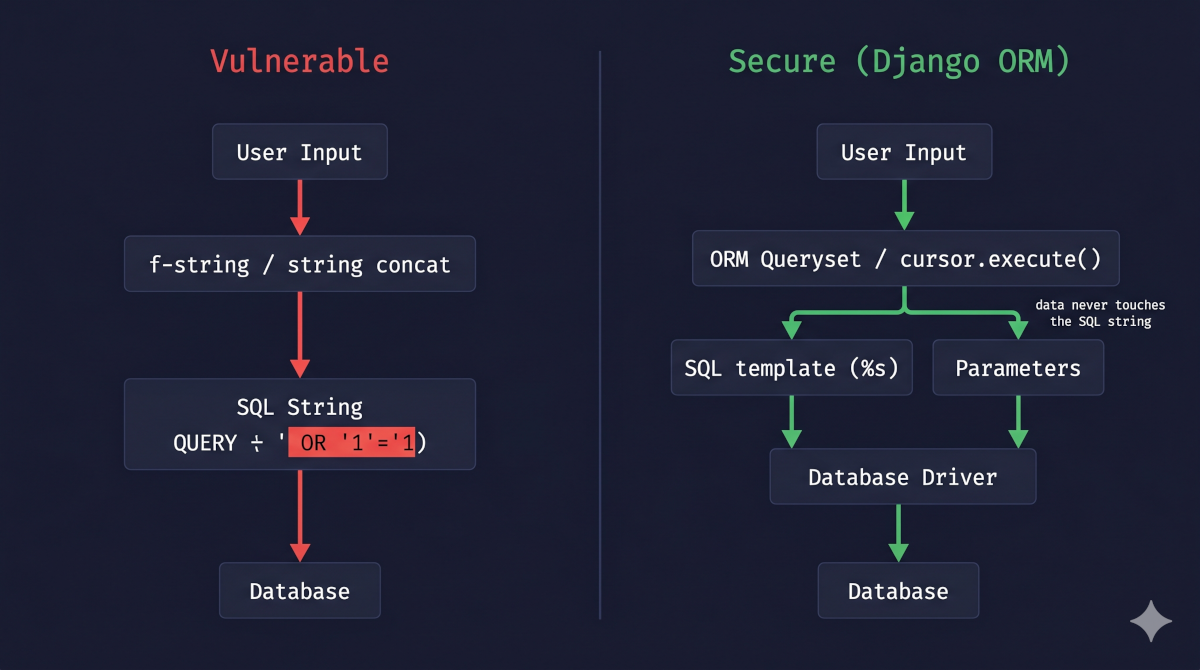
The Django ORM parameterises every query it generates. This is the core protection.
In Web Security for Developers (Chapter 6: Injection Attacks), Malcolm McDonald defines a parameterised query as one where the SQL code and the data values are sent to the database through completely separate channels. The query template is compiled first — the database parses its structure and builds an execution plan — and the data values are bound afterwards. Because the database has already decided what is code and what is data before the values arrive, it is structurally impossible for user input to alter the query's logic, regardless of what characters it contains. McDonald contrasts this with string-building approaches (concatenation, f-strings, % formatting), where code and data share a single channel and the database cannot distinguish one from the other. He describes parameterisation not as a sanitisation technique but as an architectural separation — the root cause of SQL injection is removed, not patched over.
This distinction matters. Escaping special characters is a mitigation; parameterisation eliminates the vulnerability class entirely by making the attack surface structurally unreachable.
When you write:
Post.objects.filter(title=user_input)
Django generates:
SELECT * FROM blog_post WHERE title = %s
…and passes user_input as a separate parameter to the database driver (psycopg3, for PostgreSQL). The driver transmits the query structure and data independently. The database processes user_input as a literal string value, never as SQL syntax.
A payload like ' OR '1'='1 is treated as the literal search string ' OR '1'='1 — not as SQL logic. The attack fails structurally, regardless of what characters the input contains.
This protection is not achieved through escaping or filtering. It works because the SQL and the data never share the same channel. Parameterisation doesn't just filter bad characters; it completely separates the data from the query structure. That's why it's vastly superior to any manual escaping approach.
Vulnerable Pattern: What NOT to Do
# INSECURE — Never build SQL with string formatting
from django.db import connection

def search_posts(request):
    query = request.GET.get('q', '')

    # DANGER: f-string embeds user input directly into SQL
    sql = f"SELECT id, title, slug FROM blog_post WHERE title LIKE '%{query}%'"

    with connection.cursor() as cursor:
        cursor.execute(sql)  # attacker controls the SQL structure
        rows = cursor.fetchall()

    return render(request, 'search.html', {'results': rows})
Attack payload: q=%' UNION SELECT id, password, email FROM auth_user LIMIT 10 --
The resulting query dumps up to 10 rows from the user table. The attacker now has hashed passwords and email addresses.
The same vulnerability appears in all of these:
# String concatenation — equally dangerous
sql = "SELECT * FROM blog_post WHERE slug = '" + slug + "'"

# %-string formatting — NOT parameterisation, still vulnerable
sql = "SELECT * FROM blog_post WHERE slug = '%s'" % slug

# .format() — also vulnerable
sql = "SELECT * FROM blog_post WHERE slug = '{}'".format(slug)

# ORM.extra() with unsanitised input — deprecated AND dangerous
Post.objects.extra(where=[f"title = '{user_input}'"])

# ORM.raw() with string formatting — dangerous
Post.objects.raw(f"SELECT * FROM blog_post WHERE slug = '{slug}'")
What all of these have in common — and why they differ from parameterisation
Every pattern above has the same root problem: they all construct a single string that mixes SQL syntax with user-supplied data before handing it to the database. String concatenation, f-strings, % formatting, and .format() are just different Python syntax for the same mistake — they produce a finished SQL string in which code and data are already fused. When that string reaches the database, the parser cannot tell which characters were written by the developer and which were supplied by the user. A quote, a comment marker, or a UNION keyword in the input looks identical to the same characters in your own SQL.
Parameterisation works differently at every step:
- The SQL template is sent first, without any user data. The database driver transmits a query like
WHERE slug = %s— a structure with typed placeholders, not filled-in values. The database parses this into an execution plan before it has seen any user input at all. - The values are sent separately, in a second channel. The driver then transmits the parameter values as typed data. The database binds them to the placeholders it already parsed — but at this point, parsing is over. There is no stage at which the user's input can influence the query structure, because the query structure was finalised before the data arrived.
- The database engine enforces the boundary. Even if a value contains
' OR '1'='1,--, or a completeUNION SELECTstatement, the engine treats the entire value as a single scalar — a string to be compared, not syntax to be executed.
The distinction matters most for the %s confusion: Python's % operator ("WHERE slug = '%s'" % slug) and cursor.execute("WHERE slug = %s", [slug]) look superficially similar, but they are structurally opposite. The % operator produces a finished string in Python — the database sees one channel. cursor.execute() with a params list transmits template and data through separate wire-level channels — the database sees two. Using % formatting on a raw SQL string before passing it to execute() is exactly as dangerous as an f-string.
Secure Implementation: The Django Way
Preferred: ORM Querysets
For the vast majority of use cases, the ORM handles everything safely:
# SECURE — ORM parameterises automatically
def search_posts(request):
    query = request.GET.get('q', '').strip()
    results = Post.objects.filter(
        title__icontains=query,
        publish=True,
        language='en',
    ).order_by('-created')[:20]
    return render(request, 'search.html', {'results': results})
icontains translates to ILIKE %s (case-insensitive; LIKE %s on databases without ILIKE support). It is worth being precise about what happens to the % wildcards, because this is an easy point of confusion with the vulnerable pattern.
Django does not generate ILIKE '%{query}%' — that would look exactly like the f-string vulnerability we just covered. Instead, it generates ILIKE %s as the SQL template and passes %query% as the parameter value. The wildcards are added to the data, not to the SQL. The database receives a query structure containing a single typed placeholder, and separately receives the string %query% to bind into it. Even if query contains a quote, a comment, or UNION SELECT, that content is part of the bound value — the query structure was already finalised before the value arrived.
When Raw SQL Is Necessary: Parameterised Placeholders
Occasionally you need raw SQL — for complex queries, database-specific features, or full-text search. When you do, always use %s placeholders and pass values as a separate list — never interpolate them into the SQL string.
The %s in a cursor.execute() call is not Python string formatting. It is a signal to the database driver that a parameter will arrive through the second argument. The driver transmits the SQL template and the parameter list independently over the database wire protocol. The database engine receives them in separate protocol fields, parses the query structure first, and binds the values afterwards — the same two-channel guarantee that the ORM provides automatically. The only difference is that here you are writing the SQL template yourself, so the responsibility for keeping code and data separate falls on you.
# SECURE — raw SQL with parameterised placeholders
from django.db import connection

def full_text_search(query):
    with connection.cursor() as cursor:
        cursor.execute(
            """
            SELECT id, title, slug,
                   ts_rank(to_tsvector('english', body), plainto_tsquery(%s)) AS rank
            FROM blog_post
            WHERE to_tsvector('english', body) @@ plainto_tsquery(%s)
              AND publish = TRUE
            ORDER BY rank DESC
            LIMIT 20
            """,
            [query, query]  # ← parameters passed separately, never interpolated
        )
        return cursor.fetchall()
RawSQL() for ORM Annotations
# SECURE — user input passed via params list
from django.db.models.expressions import RawSQL

Post.objects.annotate(
    rank=RawSQL(
        "ts_rank(to_tsvector('english', body), plainto_tsquery(%s))",
        [user_search_term]  # ← parameterised
    )
).filter(publish=True)
When to Use raw() — and How to Use It Safely
raw() should be a last resort. The ORM should handle the vast majority of queries, and cursor.execute() covers anything that needs non-model results. raw() occupies a narrow middle ground: you need to write SQL directly, but you also want back a queryset of model instances rather than raw tuples. Common legitimate reasons:
- Database-specific features the ORM can't express — PostgreSQL window functions, CTEs, lateral joins, JSONB operators
- Full-text search with ranking —
ts_rankandplainto_tsqueryas in the example above - Queries where the ORM generates an inefficient plan and you need to control the exact SQL after profiling
The safe and unsafe forms follow exactly the same logic as cursor.execute():
# UNSAFE — string formatting produces a finished SQL string (single channel)
Post.objects.raw(f"SELECT ... WHERE slug = '{slug}'")

# SAFE — SQL template + params list (two channels)
Post.objects.raw(
    "SELECT id, title, slug FROM blog_post WHERE slug = %s AND publish = TRUE",
    [slug]  # ← passed separately, never interpolated into the SQL string
)
In the unsafe form, slug is baked into the string before raw() sees it — the database receives one channel, and the same injection risk as an f-string applies. In the safe form, the driver transmits the SQL template and the parameter list independently; the database has already parsed the query structure before the value arrives.
Use each raw approach for these situations:
| Use | When |
|---|---|
Post.objects.raw(sql, [params]) |
Need a queryset of model instances but the query is too complex for the ORM |
cursor.execute(sql, [params]) |
Need non-model data: aggregates, cross-table results, or DDL during migrations |
RawSQL(sql, [params]) in .annotate() |
Need one custom SQL expression inside an otherwise ORM-built query |
| ORM querysets | Everything else — always the default |
extra() — When You'd Encounter It, and Why to Replace It
extra() was Django's original escape hatch for queries the ORM couldn't express — injecting raw SQL fragments into the WHERE clause, SELECT list, or ORDER BY of an otherwise ORM-built queryset. You'll encounter it in older codebases filtering on database-computed columns, appending database-specific predicates, or working around limitations in early Django versions.
Deprecated. The Django team states outright that they are no longer improving or fixing bugs in
extra()and that it is targeted for future removal. Building on it means breakage without warning in a future Django release.
Every use case extra() covers has a supported alternative:
# Before — deprecated
Post.objects.extra(where=["slug = %s"], params=[slug])

# After
Post.objects.filter(slug=slug)                              # ORM (preferred)
Post.objects.raw("SELECT ... WHERE slug = %s", [slug])      # raw() for complex queries
Post.objects.annotate(val=RawSQL("...", [param]))           # RawSQL() for computed columns
Replace any extra() call you find. If you must touch one before migrating it, never embed values directly into the where string — always use %s placeholders with a separate params list.
Rule Summary
| Do | Don't |
|---|---|
Post.objects.filter(title=value) |
f"SELECT ... WHERE title = '{value}'" |
cursor.execute("... WHERE id = %s", [value]) |
cursor.execute("... WHERE id = " + value) |
RawSQL("... %s ...", [value]) |
Post.objects.extra(where=[f"... '{value}'"]) |
Principle of Least Privilege
Parameterisation is your primary defence, but Malcolm McDonald makes an important point in Web Security for Developers (Chapter 6): defence in depth means securing every layer of the stack, not just the query construction.
For SQL injection specifically, that means the database account your Django application uses at runtime should have only the permissions it actually needs — typically SELECT, INSERT, UPDATE, and DELETE (the SQL DML subset). It should not have CREATE, DROP, or ALTER privileges (DDL). If an attacker somehow bypasses parameterisation, a least-privilege database account limits the blast radius: they cannot drop tables or modify schema, only operate within the data they can already reach.
In practice for a Django project:
-- PostgreSQL: create a restricted runtime user
CREATE USER blogtech_app WITH PASSWORD 'strongpassword';
GRANT CONNECT ON DATABASE blogtech TO blogtech_app;
GRANT USAGE ON SCHEMA public TO blogtech_app;
GRANT SELECT, INSERT, UPDATE, DELETE ON ALL TABLES IN SCHEMA public TO blogtech_app;
GRANT USAGE, SELECT ON ALL SEQUENCES IN SCHEMA public TO blogtech_app;
-- No CREATE, DROP, or ALTER granted
Run migrations with a separate privileged account; let the application use the restricted one at runtime.
Input Validation: The Third Layer
Parameterisation is the structural defence against SQL injection. Least privilege limits the blast radius. Input validation adds a third layer: reject malformed data before it ever reaches the database.
This is not a replacement for parameterisation — well-crafted SQLi payloads are specifically designed to bypass validation filters. It is defence in depth.
Type coercion via URL converters
Type coercion is the strongest form of input validation against SQL injection because it eliminates the attack surface entirely for a given input. SQL injection requires the attacker to supply characters like ', --, spaces, and keywords like UNION or SELECT. A value that is constrained to contain only decimal digits — by the type system, not by a filter — cannot contain any of those characters. There is nothing to inject.
Django's URL converters enforce this at the routing layer, before the view is even called:
# urls.py — <int:pk> rejects anything that is not a valid integer
path('blog/<int:pk>/', views.post_detail),
If the URL segment is not a sequence of digits, Django returns a 404 and the view never runs. The pk value that reaches post_detail is already a Python int — not a string, not raw request data. There is no SQL injection vector here because there is no string to inject into.
For IDs received as query parameters (?id=42), the URL converter doesn't apply, so enforce the type explicitly in the view:
def post_by_id(request):
    try:
        pk = int(request.GET.get('id', ''))
    except (ValueError, TypeError):
        raise Http404
    post = get_object_or_404(Post, pk=pk, publish=True)
    return render(request, 'blog/post_detail.html', {'post': post})
int() raises ValueError on any input that isn't a valid integer — ' OR '1'='1, 1; DROP TABLE, or even 1.5 all fail before touching the database. If the id parameter is absent from the query string entirely, request.GET.get('id', '') returns '', and int('') also raises ValueError — the view returns 404, which is the correct behaviour. The ORM then receives a plain Python integer and parameterises it safely. Two independent layers both have to hold for any exploit to reach the database.
Django forms for free-text inputs
For search fields and other free-text inputs, you can't eliminate the attack surface the way type coercion does for integers — a search query is a string and must accept any characters. Here the defence is ensuring your view never operates directly on raw request data.
Django's form framework provides a cleaning pipeline that is built into the framework — you don't implement it yourself, you declare what you expect and Django enforces it. When you call form.is_valid(), Django runs each field through its built-in validators and type coercions in sequence. Only if all fields pass does cleaned_data become available. cleaned_data always contains normalised Python values, never raw strings from request.GET or request.POST.
For a search field:
from django import forms

class SearchForm(forms.Form):
    q = forms.CharField(max_length=200, required=False, empty_value='')

def search_posts(request):
    form = SearchForm(request.GET)
    if not form.is_valid():
        return render(request, 'search.html', {'results': []})
    query = form.cleaned_data['q']   # ← normalised Python str, not raw request data
    results = Post.objects.filter(title__icontains=query, publish=True)
    return render(request, 'search.html', {'results': results})
forms.CharField does the following automatically: strips leading/trailing whitespace, coerces the value to a Python str, enforces max_length, and replaces an empty or missing value with the empty_value you declared ('' here). The ORM then receives a clean Python string and parameterises it — no raw request data ever touches the query. The form is not a replacement for parameterisation; it is a guardrail that ensures you're always working with a normalised value when you reach the ORM call.
The Analyst's View
Everything above is developer work, but the CySA+ material frames it in a vocabulary worth borrowing — mostly because it changes how you argue for the work. Parameterisation is a preventive control: it doesn't detect SQL injection or reduce its impact, it removes the vulnerability class outright by making the attack structurally unreachable. Input validation is a second preventive layer, weaker on its own — a well-crafted payload can slip past a filter — but valuable because type coercion eliminates the attack surface entirely for numeric inputs rather than merely narrowing it. Least privilege is neither: it's a compensating control. It assumes the first two failed and limits what the attacker can reach — no DROP, no schema changes, only the data the application already touches.
That taxonomy is the practical half of "defence in depth," and it's why the three layers are worth keeping even though the first one alone is structurally sufficient. Each holds when the others are bypassed, so an analyst reviewing this code doesn't stop at "the query is parameterised." The question is what happens when a control fails — and a database account restricted to SELECT, INSERT, UPDATE, and DELETE is the difference between an ugly data-exposure incident and a dropped table. What the list leaves out is as telling as what's in it. A web application firewall is the control most teams reach for first, and in analyst vocabulary it mitigates rather than remediates — it pattern-matches payloads at the edge, which buys time and can be evaded by encoding tricks, comment splitting, or an endpoint the rules never covered. The practical consequence: when a scan reports this finding and someone answers "the WAF blocks it," the finding doesn't close. It gets a compensating control and stays open until the query is parameterised. And none of the three layers tells you an attempt happened — that's a detective control, and it lives in logging and monitoring rather than in the query layer.
Catching It Automatically
Three defensive layers are only as good as your ability to prove they are switched on and to catch the moment someone quietly steps outside them. This section is the durable home for that: the test you write to prove the control in your own code, and the static analysis that flags the dangerous pattern across a whole codebase before it ships.
Testing Your Defence
# blog/tests.py
from django.test import TestCase, Client
from blog.models import Post

class SQLInjectionTests(TestCase):
    def setUp(self):
        Post.objects.create(
            title="Normal Post",
            slug="normal-post",
            body="Content",
            publish=True,
            language='en',
        )

    def test_tautology_payload_returns_no_match(self):
        """The injection string is treated as a literal — not SQL logic."""
        payload = "' OR '1'='1"
        self.assertEqual(Post.objects.filter(title=payload).count(), 0)

    def test_union_payload_does_not_leak_via_view(self):
        """A UNION payload must not cause blog_post rows to appear in search results.
        The payload injects a UNION against blog_post itself, so if the injection
        were interpreted as SQL it would return every row — including the setUp post.
        The ORM treats the whole string as a literal search term, so no rows match."""
        client = Client()
        payload = "x' UNION SELECT id, title, slug FROM blog_post--"
        response = client.get('/blog/', {'q': payload})
        self.assertEqual(response.status_code, 200)
        # The payload targets blog_post directly via UNION, so if interpreted as SQL,
        # 'normal-post' would appear in results. Its absence proves parameterisation
        # treated the entire payload as a literal string, not as SQL syntax.
        result_slugs = [p.slug for p in response.context['results']]
        self.assertNotIn('normal-post', result_slugs)

    def test_search_view_handles_injection_safely(self):
        """HTTP 200 alone proves nothing — a vulnerable view also returns 200.
        A tautology like ' OR '1'='1 would match every row if interpreted as SQL.
        Confirm it was treated as a literal: the setUp post must not appear in results."""
        client = Client()
        response = client.get('/blog/', {'q': "' OR '1'='1"})
        self.assertEqual(response.status_code, 200)
        # If the tautology had been interpreted as SQL, every post would match —
        # including the one created in setUp. Its absence proves the input was
        # treated as a literal string, not SQL logic.
        result_slugs = [p.slug for p in response.context['results']]
        self.assertNotIn('normal-post', result_slugs)
Scanning It
The unit test proves your code is safe. Scanning is the other half — and it is the analyst's job in the CySA+ sense: not writing detection logic, but running the off-the-shelf tools and reading what they say. Two kinds fit this class. Static analysis (SAST) reads the source and flags the dangerous construct before it ships. Dynamic analysis (DAST) attacks the running app the way a real attacker would. I ran both against the committed lab, so every result below is reproducible from a clone.
Reading the source — Bandit and Semgrep
Both are static analysers: they read the source without running it. Bandit, from the PyCQA project, walks a Python file's syntax tree looking for known-risky constructs — each check has a B-number, and SQL built by string formatting is B608. It needs no configuration; you point it at a path and it reports. Semgrep is a multi-language pattern scanner: instead of matching text, it matches code by structure (an f-string inside an execute() call, regardless of variable names or spacing), and it can follow a tainted value from where it enters the program to where it is used. You run it against a ruleset; its community packs are curated, community-maintained rulesets, and p/django is the Django one. I pointed both at the two lab views:
bandit labs/post_01_sql_injection/views_vulnerable.py
semgrep scan --config p/django labs/post_01_sql_injection/
Both catch the vulnerable view. Bandit flags the f-string as B608:
>> Issue: [B608:hardcoded_sql_expressions] Possible SQL injection vector through string-based query construction.
   Severity: Medium   Confidence: Medium
   CWE: CWE-89 (https://cwe.mitre.org/data/definitions/89.html)
   Location: labs/post_01_sql_injection/views_vulnerable.py:26:14
25          cursor.execute(
26              f"SELECT id, title, body FROM sqli_note WHERE title LIKE '%{q}%'"
Semgrep reaches the same line by a different route. Bandit's B608 is a heuristic: it flags any query assembled with an f-string, %, .format(), or +, whether or not user input ever reaches it. Semgrep's community Django rule is taint-based — it fires only when it can trace a path from a source (request data) to a sink (cursor.execute()), so its message names the actual flow:
python.django.security.injection.sql.sql-injection-using-db-cursor-execute
  User-controlled data from a request is passed to 'execute()'. This could lead to a SQL
  injection ... Instead, use django's QuerySets, which are built with query parameterization.
  20┆ q = request.GET.get("q", "")
  ...
  26┆ f"SELECT id, title, body FROM sqli_note WHERE title LIKE '%{q}%'"
The two are complementary, not redundant. Bandit's heuristic casts the widest net — it will flag a built SQL string even in a helper function with no request in sight, which is exactly the code you get once a view hands user input down to a repository or service layer; the cost is the occasional false positive on constant SQL that never carries user data. Semgrep's taint tracking is more precise — it stays silent unless a real request-to-sink path exists — but that same precision means it can miss the helper Bandit would catch, because with no request in scope it has no source to track from. On the secure ORM view both report zero findings: no raw SQL string is built, so there is nothing to flag. The full runs are committed in the lab under scans/.
Attacking it live — sqlmap
Static analysis reads code and reasons about it; sqlmap is dynamic analysis — it never sees the source. It is an automated SQL-injection tool that fires crafted payloads at a live endpoint, watches how the responses change, and, once it finds an injectable parameter, can fingerprint the database and dump tables out of it. That makes it the closest thing to what a real attacker does, and the proof that the bug is not just theoretical.
I gave it the obvious command — point it at the endpoint, hand it the parameter, and let it run:
sqlmap -u 'http://127.0.0.1:8000/sql-injection/vulnerable/?q=1' \
       -p q --batch --dump -T sqli_flag
It needs no tuning. sqlmap fingerprints the back-end as PostgreSQL on its first probes, confirms q is injectable four different ways, and then walks straight into the one table this search feature has no business touching:
Parameter: q (GET)
    Type: boolean-based blind
    Title: PostgreSQL AND boolean-based blind - WHERE or HAVING clause (CAST)
    Payload: q=1' AND (SELECT (CASE WHEN (1267=1267) THEN NULL ELSE CAST((CHR(89)||CHR(69)||CHR(100)||CHR(107)) AS NUMERIC) END)) IS NULL-- iJxI

    Type: error-based
    Title: PostgreSQL AND error-based - WHERE or HAVING clause
    Payload: q=1' AND 7677=CAST((…(SELECT (CASE WHEN (7677=7677) THEN 1 ELSE 0 END))::text…) AS NUMERIC)-- XUkB

    Type: stacked queries
    Title: PostgreSQL > 8.1 stacked queries (comment)
    Payload: q=1';SELECT PG_SLEEP(5)--

    Type: time-based blind
    Title: PostgreSQL > 8.1 AND time-based blind
    Payload: q=1' AND 4539=(SELECT 4539 FROM PG_SLEEP(5))-- hnyv
back-end DBMS: PostgreSQL
Table: sqli_flag
[1 entry]
+----+--------------------------------------------------+
| id | value                                            |
+----+--------------------------------------------------+
| 1  | FLAG{sql_injection_via_raw_string_interpolation} |
+----+--------------------------------------------------+
Each technique is a different way of asking the database a question the search box was never meant to answer: PG_SLEEP(5) makes the server pause five seconds when a condition is true (blind, timed), the CAST(... AS NUMERIC) payloads force the answer out through an error message, and the stacked ;SELECT rides in on the same connection. Point the same command at /sql-injection/secure/ and sqlmap gives up — "all tested parameters do not appear to be injectable" — because the ORM's parameterisation leaves it nothing to work with. One honest artefact worth naming: the raw-SQL view returns HTTP 500 on sqlmap's malformed probes (unbalanced quotes become database syntax errors), which sqlmap logs as it runs — itself a tell that the view is feeding attacker-shaped input straight to the database. Both runs — the successful dump and the clean secure scan — are committed under scans/ so you can read them without booting anything.
That is the whole detection story for this class, and it takes no heroics: SQL injection is old, well-understood, and covered end to end by tools an analyst already has on hand — SAST reads the code, DAST proves the exploit. You do not need to write a custom rule to catch it — you need to run the standard ones and read what each reports. A project only outgrows off-the-shelf rules on a genuinely Django-specific pattern that neither Bandit nor the community rulesets model (mass assignment, IDOR, a privilege-escalation shape). That is where a hand-written Semgrep rule earns its place — and where a later post will show one. SQLi is not that case.
The rule I took away from writing this post is simple: SQL and user input must never share the same channel. Django's ORM enforces that by default — but only as long as you stay within its parameterised interface. Every time you reach for an f-string, % formatting, or string concatenation in a database query, you step outside that guarantee. Defence in depth means applying all three layers: parameterisation, input validation, and least privilege. Post 2 moves to the browser side: Cross-Site Scripting (XSS), why mark_safe is as dangerous as an unparameterised query, and how to render user-supplied Markdown without opening an XSS vector.
Further Reading
- django-security-lab — the SQL Injection lab (runnable vulnerable/secure views + CTF flag)
- Django Docs — SQL Injection Protection
- Django Docs — Executing raw queries (
cursor.execute,raw()) - Django Docs —
RawSQL()expression - OWASP A03:2021 — Injection
- OWASP SQL Injection Prevention Cheat Sheet
- PortSwigger Web Security Academy — SQL Injection
- SQLMap — Automatic SQL Injection Tool
- Semgrep — pattern-based static analysis (community rulesets)
- Bandit — B608: hardcoded SQL expressions
- MITRE ATT&CK — T1190 Exploit Public-Facing Application
- Web Security for Developers: Real Threats, Practical Defense (Malcolm McDonald) — Chapter 6: Injection Attacks
- Secure Web Application Development: A Hands-On Guide with Python and Django (Matthew Baker, Apress)
Next in this series → Post 2: Cross-Site Scripting (XSS): Stored, Reflected and DOM-Based Attacks — and Why mark_safe and Unsafe Markdown Are Equally Dangerous