Broken Access Control and IDOR: When Logging In Is Not the Same as Being Allowed
Django Security Series — Post 6 | Series II: Broken Access Control
OWASP A01:2025 — Broken Access Control | Reading time: ~20 min
🧪 Run it yourself. This attack ships as a runnable lab in django-security-lab: a
@login_requirednote view that looks an object up by primary key with no ownership scope, and a secure twin that scopes the lookup torequest.user. Everything runs from the command line — log in asalice, read bob's note by its id on/idor/vulnerable/<pk>/and watch the flag leak, then get an indistinguishable404on/idor/secure/<pk>/. Clone it and reproduce every step.
Series I was about injection: data crossing into code at an interpreter boundary. Across five posts the interpreter changed (the SQL engine, the browser, the template engine, the OS shell, the XML parser) but the root cause never did: untrusted input was parsed as syntax instead of treated as a value. Series II opens a completely different failure mode. The code is syntactically correct, the queries are parameterised, the templates are escaped, the shell is never invoked. But the application still hands one user another user's data, because it checked who you are without ever checking what you are allowed to touch.
The scenario I kept coming back to while learning this class is a civic-petition platform — petitions belong to their creators, signatures to the people who signed them. A logged-in citizen opens the edit page for their own petition at /petition/41/edit/, changes the 41 to 42, and the view — guarded by nothing more than @login_required — hands them someone else's petition to edit. No exploit, no payload, one changed digit. Make that leaked record a signature instead — a full name, a CPF (Brazil's individual taxpayer ID), an email — and the stakes change entirely: disclosing another person's data without authorization is not just a logic bug but a legal one, the kind Brazil's LGPD — its GDPR-equivalent data-protection law — treats as a reportable breach (the Real-World Incidents below show what that costs in practice). That is the gap this post is about — the distance between authenticated and authorized is one forgotten queryset filter wide, and on the wrong table it carries judicial weight.
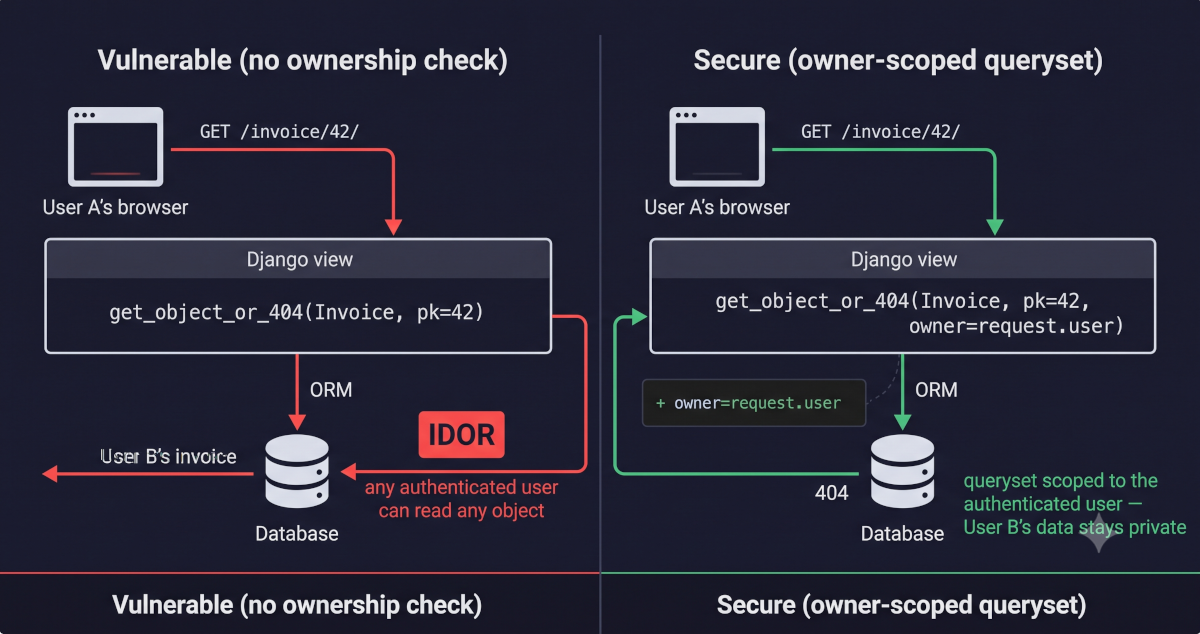
This is Broken Access Control, OWASP's #1 risk category, and the concrete form it takes most often in a Django application is IDOR (Insecure Direct Object Reference). The pattern is disarmingly simple. A view accepts an object identifier in the URL (usually the database primary key), looks the object up, and returns it. The view is behind @login_required, so unauthenticated visitors are redirected to the login page. But once you are logged in, any logged-in user can request any object, because the lookup never asks whether the requesting user owns it or has any relationship to it. Change /invoice/41/ to /invoice/42/ and you are reading someone else's invoice. The ORM does exactly what you told it to, get_object_or_404(Invoice, pk=42), and what you told it has no concept of ownership.
The reason this is the #1 web vulnerability and not the #10 is that the gap is invisible at every stage of normal development. The code reads cleanly, the tests pass (they were written by the same developer who wrote the view, using the same user), the code review sees a @login_required decorator and moves on, and the feature works perfectly in every demo because demos do not involve a second user trying the first user's IDs. The failure is not a missing library or a misconfigured setting; it is a missing concept. The difference between authentication ("who are you?") and authorization ("are you allowed to do this to this specific object?"). Django gives you authentication almost for free and leaves authorization almost entirely to you, and the gap between the two is where IDOR lives.
In this post we look at how IDOR works at the application layer, why Django's authentication system does not cover it, the specific Django REST Framework (DRF) and class-based-view patterns that make it easy to ship, and how to close the gap by scoping every queryset to the authenticated user — plus the DRF has_object_permission trap that silently skips the check you thought you had.
The Attack: What It Is and How It Works
A Django view receives a request for /invoice/42/. It calls get_object_or_404(Invoice, pk=42) and returns the result. The view is decorated with @login_required, so anonymous visitors get redirected to the login page. Looks secure. Except User A can change the URL from /invoices/41/ to /invoices/42/ and read User B's invoice without any resistance at all. The ORM returned the row because pk=42 exists. The decorator confirmed that someone is logged in. Nobody asked whether that someone owns invoice 42. The primary key is a direct reference: it maps one-to-one to a database row, and the user controls it through the URL.
That missing question is the gap between authentication (who is making this request?) and authorization (is that identity allowed to perform this action on this resource?). Broken access control is any failure in the second step, and its most common concrete form is IDOR (Insecure Direct Object Reference): a direct reference to an internal object, usually a database primary key, is exposed in the URL, and the application never verifies that the authenticated user has any relationship to the object it points to. The developer confused "authenticated" (you have a valid session) with "authorised" (you may access this specific object). That confusion is the entire vulnerability.
The most common variant is horizontal IDOR: User A accesses User B's resources at the same privilege level. User A reads User B's invoices, medical records, messages. The attacker is a normal, authenticated user who logged in legitimately, has a valid session, and simply changes the ID in the URL, the query parameter, or the request body. No exploit toolkit, no injection payload, no bypass. Just a different number. There is also vertical IDOR, where a regular user reaches a higher-privileged resource (an admin dashboard, a staff-only record), but that is rarer in typical Django applications and overlaps heavily with privilege escalation, which the next post covers.
The attack requires nothing more than a browser and basic curiosity. An attacker who can see their own invoice at /invoice/41/ tries /invoice/40/, /invoice/42/, and so on; if the view returns data for IDs they do not own, the application is vulnerable — and in practice the whole thing is automated in seconds. The attacker logs in legitimately, notes the URL of their own resource (say /api/documents/1053/), and points a short script — or Burp Suite's Intruder — at a range of IDs, sending an authenticated GET for each with their session cookie attached automatically. Any response that comes back 200 OK with a body is another user's data; a 404 or 403 means that view is protected, but in a vulnerable application every ID returns 200.
The attack scales trivially because primary keys are sequential integers by default. The attacker does not need to guess — they just count. Even when an application uses UUIDs, a single leaked UUID (in an email link, a shared URL, a referrer header, or an API response that lists resources without scoping) gives the attacker a valid reference to try, and the absence of an ownership check means it works.
Real-World Incidents
First American Financial Corporation — IDOR Data Exposure (2019)
In May 2019 the security journalist Brian Krebs reported that First American Financial Corporation, one of the largest title insurance companies in the United States, had exposed approximately 885 million records dating back to 2003 through a straightforward IDOR vulnerability. The company's website allowed title agents to share document images via a direct URL — and that URL contained a sequential, predictable document number. Changing the number returned a different customer's document. No authentication was required at all: anyone with the URL pattern could retrieve any document by iterating the ID. The exposed records included Social Security numbers, driver's licence images, bank account numbers, tax records, and wire transfer receipts — everything needed for identity theft on an industrial scale. The vulnerability had been identified in an internal security review months earlier and never remediated. The New York Department of Financial Services fined the company, and the U.S. Securities and Exchange Commission charged First American with disclosure-controls failures, because it issued public statements about the incident without its senior executives knowing the vulnerability had already been flagged internally.
The lesson for Django developers is that IDOR is not an exotic attack — it is the most mundane vulnerability there is. There was no SQL injection, no zero-day, no sophisticated exploit chain. The entire breach was one missing authorization check on a view that served documents by sequential ID. A single line — the equivalent of adding owner=request.user to a queryset lookup — would have prevented the exposure of 885 million records. The initial access maps to MITRE ATT&CK T1190 (Exploit Public-Facing Application), and the data collection maps to T1213 (Data from Information Repositories) — the attacker simply read documents the application served to anyone who asked. The regulatory exposure is not unique to the United States: in Brazil the same leak of personal data — a name, a CPF, an email — through an unscoped lookup is a security incident under the LGPD, obliging the controller to notify the ANPD (Brazil's data-protection authority) and the affected data subjects (Art. 48), so a forgotten owner=request.user is a reportable breach, not merely a bug.
Django's Default Protections
Django's authentication framework is excellent, and that is precisely the problem, because its excellence creates a false sense of completeness. Here is what Django does give you:
@login_required/LoginRequiredMixin— redirects unauthenticated users to the login page. This is authentication: it establishes identity. It says nothing about what the authenticated user may access.request.user.is_authenticated— the boolean you check in a template or view. Same scope: identity, not permission.- The
authpermissions system (has_perm,PermissionRequiredMixin,@permission_required) — checks whether a user holds a model-level permission likeblog.change_post. This is coarse-grained authorization: "can this user change any post?" It does not answer "can this user change this specific post?" - Session-key rotation on login (
login()callscycle_key()) — prevents session fixation, which gets its own post in this series, but is irrelevant to authorization.
Here is what Django does not give you:
- Object-level authorization. The ORM will happily return any row you ask for.
Invoice.objects.get(pk=42)returns invoice 42 regardless of who is asking. There is no built-in "only return objects this user owns" filter — the developer must add it to every queryset in every view. Django's own documentation is explicit about this: the auth framework provides the foundation for object permissions —has_perm()accepts an optionalobjargument — but ships no concrete implementation in core, so those checks always returnFalse(or an empty list) until a custom authentication backend supplies the logic. That backend is exactly what third-party packages likedjango-guardianprovide. - Automatic queryset scoping. Unlike some frameworks that apply tenant or user filters at the model-manager level, Django's default manager returns
all(). Every view starts from the full table unless the developer narrows it. - DRF's
has_object_permissionenforcement on list views. DRF's permission system has a subtle but critical design:has_object_permission()is only called whenself.get_object()is called, which happens on retrieve, update, and delete, but never on list. AModelViewSetwhoseget_queryset()returnsModel.objects.all()will list every row in the table to every authenticated user, even ifhas_object_permissionwould have denied access to each one individually. The permission you thought you had is silently skipped.
That last one took me by surprise. I initially assumed that if I defined has_object_permission() on a DRF permission class, the viewset was fully protected. It wasn't until I read DRF's source code for this post that I realized list() never calls get_object(), so the permission method I wrote was never invoked on the endpoint that returns the most data. The list action calls self.get_queryset() directly, iterates the rows, and serializes them. Your object-level permission is not part of that path. That's the kind of gap that passes every code review because the permission exists — it just never runs.
Django handles authentication out of the box and leaves object-level authorization entirely to the developer. Every IDOR in a Django application lives in that gap.
Vulnerable Pattern: What NOT to Do
Pattern 1 — A detail view that checks authentication but not ownership
# INSECURE — any authenticated user can read any invoice by changing the PK
from django.contrib.auth.decorators import login_required
from django.shortcuts import get_object_or_404, render

@login_required
def invoice_detail(request, pk):
    invoice = get_object_or_404(Invoice, pk=pk)   # no ownership check
    return render(request, 'billing/invoice_detail.html', {'invoice': invoice})
What goes wrong: User A is logged in and views their invoice at /invoices/41/. They change the URL to /invoices/42/ and receive User B's invoice. The @login_required decorator confirmed that someone is logged in — it never asked whether that someone owns invoice 42. The ORM returned the row because pk=42 exists, and the view served it without question.
Pattern 2 — A DRF ModelViewSet with an unscoped queryset
This one is subtler than Pattern 1, because DRF's class-based design looks like it should handle permissions automatically. The developer sets permission_classes = [permissions.IsAuthenticated], maybe even adds a custom has_object_permission on the permission class, and assumes the viewset is locked down. But queryset = Document.objects.all() hands DRF every row in the table. The list endpoint (GET /api/documents/) returns all documents for all users. And here is the part that got me: DRF only calls has_object_permission when get_object() runs, which means the list action bypasses it entirely.
# INSECURE — queryset returns every document in the database
from rest_framework import viewsets, permissions
from .models import Document
from .serializers import DocumentSerializer

class DocumentViewSet(viewsets.ModelViewSet):
    queryset = Document.objects.all()              # every row, every user
    serializer_class = DocumentSerializer
    permission_classes = [permissions.IsAuthenticated]
Pattern 3 — An update view that mutates another user's object
The write-side of IDOR is worse than the read-side. User A navigates to /profiles/42/edit/ and submits a POST. The view looks up profile 42, binds the form to it, saves the attacker's data over the legitimate user's record. A @login_required decorator sat at the gate and let it all through.
# INSECURE — any authenticated user can edit any other user's profile
from django.contrib.auth.decorators import login_required
from django.shortcuts import get_object_or_404, redirect
from .forms import ProfileForm
from .models import Profile

@login_required
def edit_profile(request, pk):
    profile = get_object_or_404(Profile, pk=pk)    # ← this is the entire problem
    if request.method == 'POST':
        form = ProfileForm(request.POST, instance=profile)
        if form.is_valid():
            form.save()                            # saves attacker's data over victim's record
            return redirect('profile_detail', pk=pk)
    else:
        form = ProfileForm(instance=profile)
    return render(request, 'accounts/edit_profile.html', {'form': form})
Secure Implementation: The Django Way
Rule 1 — Scope every queryset to the authenticated user
The primary fix is one concept applied everywhere: never look up an object from the full table — always filter by ownership first. When the queryset is scoped to the requesting user, an ID that belongs to another user simply does not exist in the result set, and the lookup returns a 404 — exactly the same response as a genuinely nonexistent ID. The attacker learns nothing, and the data stays private.
# SECURE — the queryset is scoped to the requesting user; other users' invoices don't exist
from django.contrib.auth.decorators import login_required
from django.shortcuts import get_object_or_404, render

@login_required
def invoice_detail(request, pk):
    invoice = get_object_or_404(Invoice, pk=pk, owner=request.user)
    return render(request, 'billing/invoice_detail.html', {'invoice': invoice})
The fix is the addition of owner=request.user to the lookup. get_object_or_404 now queries Invoice.objects.filter(pk=pk, owner=request.user) — if the invoice belongs to a different user, the filter returns an empty queryset, and Django raises a 404. No information about whether invoice 42 exists is disclosed; the attacker sees the same response they would get for a nonexistent ID.
For write operations, the same principle applies — scope the lookup before binding the form:
# SECURE — edit_profile scoped to request.user
@login_required
def edit_profile(request, pk):
    profile = get_object_or_404(Profile, pk=pk, user=request.user)
    if request.method == 'POST':
        form = ProfileForm(request.POST, instance=profile)
        if form.is_valid():
            form.save()
            return redirect('profile_detail', pk=pk)
    else:
        form = ProfileForm(instance=profile)
    return render(request, 'accounts/edit_profile.html', {'form': form})
In many cases you can go further and eliminate the PK from the URL entirely. A user editing their own profile does not need to supply an ID — the view already knows who they are:
# SECURE — no PK in the URL; the profile is resolved from the session
@login_required
def edit_my_profile(request):
    profile = get_object_or_404(Profile, user=request.user)
    # ... form handling unchanged ...
Rule 2 — In DRF, override get_queryset() and implement has_object_permission()
DRF's ModelViewSet is the most common IDOR vector in modern Django applications because its ergonomic defaults — a class-level queryset and a ModelSerializer — make it trivially easy to expose every row in a table. The fix has two parts, and both are required:
Part A — Override get_queryset() to scope the base queryset. This protects the list action (which never calls get_object() and therefore never triggers has_object_permission):
# SECURE — every query is scoped to the requesting user
from rest_framework import viewsets, permissions
from .models import Document
from .serializers import DocumentSerializer

class DocumentViewSet(viewsets.ModelViewSet):
    serializer_class = DocumentSerializer
    permission_classes = [permissions.IsAuthenticated]

    def get_queryset(self):
        return Document.objects.filter(owner=self.request.user)
Now GET /api/documents/ returns only the requesting user's documents, and GET /api/documents/42/ returns a 404 if document 42 belongs to someone else — because it is not in the queryset at all.
Part B — Add has_object_permission() as a defence-in-depth layer. This catches any code path that calls get_object() (retrieve, update, partial_update, destroy) in case a future refactor changes the queryset:
# SECURE — object-level permission as a second gate
from rest_framework import permissions

class IsOwner(permissions.BasePermission):
    """Object-level permission: only the owner may access the object."""

    def has_object_permission(self, request, view, obj):
        return obj.owner == request.user
Wire it into the viewset:
class DocumentViewSet(viewsets.ModelViewSet):
    serializer_class = DocumentSerializer
    permission_classes = [permissions.IsAuthenticated, IsOwner]

    def get_queryset(self):
        return Document.objects.filter(owner=self.request.user)
The scoped get_queryset() is the primary control; IsOwner.has_object_permission() is the backstop. Together they close both the list and detail paths.
Rule 3 — Use UserPassesTestMixin for class-based views that need flexible checks
When the ownership model is more complex than a single owner FK — for example, a document shared with a team, or a record accessible by role — UserPassesTestMixin lets you express the check as a method:
# SECURE — class-based view with an explicit ownership test
from django.contrib.auth.mixins import LoginRequiredMixin, UserPassesTestMixin
from django.views.generic import DetailView
from .models import MedicalRecord

class MedicalRecordDetailView(LoginRequiredMixin, UserPassesTestMixin, DetailView):
    model = MedicalRecord

    def test_func(self):
        record = self.get_object()
        return (
            record.patient == self.request.user
            or self.request.user.groups.filter(name='doctors').exists()
        )
UserPassesTestMixin calls test_func() before the view runs. If it returns False, the user gets a 403 Forbidden. This is the cleanest way to express multi-condition authorization in Django's class-based view system without reaching for a third-party library.
Rule 4 — Treat UUIDs as obscurity, not as security
UUIDs eliminate casual enumeration (you can't just increment from /invoice/41/ to /invoice/42/), and that is worth doing. But they leak constantly: in URLs, Referer headers, email links, API responses that list related objects, browser history, logs. Once a single UUID is known, the absence of an ownership check means it works just as well as a sequential integer. Use them as public identifiers, but the queryset still needs to be scoped to the user:
# UUIDs are fine as a public identifier, but the ownership check is still required
import uuid
from django.db import models

class Document(models.Model):
    id = models.UUIDField(primary_key=True, default=uuid.uuid4, editable=False)
    owner = models.ForeignKey('auth.User', on_delete=models.CASCADE)
    # ...

# The view STILL scopes by owner — the UUID alone is not the access control
@login_required
def document_detail(request, pk):
    doc = get_object_or_404(Document, pk=pk, owner=request.user)
    return render(request, 'docs/detail.html', {'document': doc})
IDOR Prevention Checklist
| Control | What it covers |
|---|---|
Scope every queryset by request.user (or the user's org/team) |
The primary IDOR vector — an unscoped lookup returns any object by PK |
In DRF, override get_queryset() (not just queryset) |
The list-action bypass — has_object_permission is never called on list |
Add has_object_permission() as a defence-in-depth layer |
The detail/update/delete path — catches regressions if the queryset scope changes |
Return 404 (not 403) for objects outside the user's scope |
Information leakage — a 403 confirms the object exists; a 404 reveals nothing |
| Eliminate PKs from URLs where possible (resolve from the session) | Reduces the attack surface — no ID to enumerate if the view resolves from request.user |
| Use UUIDs as public identifiers (defence in depth, not primary control) | Casual enumeration — raises the bar for brute-force scanning, but does not replace the ownership check |
One caveat on the 404-not-403 choice from the checklist, because it is a real fork: a 403 on an enumerable ID still leaks information — it confirms the record exists, just isn't yours — so on a sequential PK a probe can map exactly which records are real. Scoping the queryset and returning a 404 for both "doesn't exist" and "isn't yours" is the stronger default, and it is what the secure views above already do. The only price is a legitimate user who mistypes their own URL getting a bare 404 — and that is a wording problem to solve on the 404 page, not a reason to downgrade to a 403 that leaks existence.
The Analyst's View
IDOR is the cleanest example in this series of the distinction the CySA+ draws between authentication and authorization — and of why access control is a preventive control you design in rather than bolt on. Django hands you authentication almost for free; authorization is yours to enforce on every object access, and the enforcement belongs in the query (owner=request.user), not in a downstream if a later refactor can quietly drop. Scoping the queryset is the preventive control; returning an indistinguishable 404 is a small compensating layer on top (it denies the attacker even the confirmation that an object exists); and a DRF has_object_permission() check is a second, defence-in-depth gate on the paths that do call get_object().
What makes IDOR a distinctly analyst problem is what happens after you find one: there is no signature to match and no CVE to patch. The finding is "this endpoint returns objects it shouldn't," and confirming it means reasoning about who should reach what, then testing the boundary with a second account. That is why the scanners in the next section can point at the suspicious lookup but cannot return the verdict — the ownership model lives in your head and your data, not in the code's syntax. What you can automate is "an object lookup with no owner scope"; the judgement, "and that object is somebody else's," stays human.
Catching It Automatically
Testing Your Defence
The proof that closes an IDOR needs two users — one who owns the object and one who doesn't — and asserts that the owner gets 200 while the stranger gets 404 (not 200 with someone else's data, and not 403, which would confirm the object exists). The unit test exercises the view directly:
# tests/test_idor.py
from django.test import TestCase
from django.contrib.auth.models import User
from billing.models import Invoice


class IDORTests(TestCase):
    def setUp(self):
        self.user_a = User.objects.create_user('alice', password='testpass123')
        self.user_b = User.objects.create_user('bob', password='testpass123')
        self.invoice_a = Invoice.objects.create(
            owner=self.user_a, amount=100, reference='INV-001'
        )
        self.invoice_b = Invoice.objects.create(
            owner=self.user_b, amount=200, reference='INV-002'
        )

    def test_user_can_access_own_invoice(self):
        """An authenticated user can view their own invoice."""
        self.client.login(username='alice', password='testpass123')
        response = self.client.get(f'/invoices/{self.invoice_a.pk}/')
        self.assertEqual(response.status_code, 200)
        self.assertContains(response, 'INV-001')

    def test_user_cannot_access_other_users_invoice(self):
        """User A must NOT be able to view User B's invoice — the view
        must return 404, not 200 with another user's data."""
        self.client.login(username='alice', password='testpass123')
        response = self.client.get(f'/invoices/{self.invoice_b.pk}/')
        self.assertEqual(response.status_code, 404)

    def test_unauthenticated_user_is_redirected(self):
        """An unauthenticated request must redirect to login, not serve data."""
        response = self.client.get(f'/invoices/{self.invoice_a.pk}/')
        self.assertEqual(response.status_code, 302)
        self.assertIn('/login', response.url)

    def test_user_cannot_update_other_users_invoice(self):
        """User A must NOT be able to modify User B's invoice."""
        self.client.login(username='alice', password='testpass123')
        response = self.client.post(
            f'/invoices/{self.invoice_b.pk}/edit/',
            {'amount': 0, 'reference': 'HACKED'},
        )
        self.assertEqual(response.status_code, 404)
        self.invoice_b.refresh_from_db()
        self.assertEqual(self.invoice_b.amount, 200)    # unchanged
        self.assertEqual(self.invoice_b.reference, 'INV-002')  # unchanged
The same shape holds for a DRF API — and adds the list-action check that catches the get_queryset() bypass, where a viewset serialises every row to every authenticated user:
# tests/test_idor_api.py
from rest_framework.test import APITestCase
from django.contrib.auth.models import User
from documents.models import Document


class DocumentAPIIDORTests(APITestCase):
    def setUp(self):
        self.user_a = User.objects.create_user('alice', password='testpass123')
        self.user_b = User.objects.create_user('bob', password='testpass123')
        self.doc_a = Document.objects.create(owner=self.user_a, title='Alice doc')
        self.doc_b = Document.objects.create(owner=self.user_b, title='Bob doc')

    def test_list_returns_only_own_documents(self):
        """GET /api/documents/ must return only the requesting user's documents."""
        self.client.force_authenticate(user=self.user_a)
        response = self.client.get('/api/documents/')
        titles = [d['title'] for d in response.data]
        self.assertIn('Alice doc', titles)
        self.assertNotIn('Bob doc', titles)

    def test_retrieve_other_users_document_returns_404(self):
        """GET /api/documents/<bob's pk>/ must return 404, not 200."""
        self.client.force_authenticate(user=self.user_a)
        response = self.client.get(f'/api/documents/{self.doc_b.pk}/')
        self.assertEqual(response.status_code, 404)

    def test_delete_other_users_document_returns_404(self):
        """DELETE /api/documents/<bob's pk>/ must return 404 and leave the row intact."""
        self.client.force_authenticate(user=self.user_a)
        response = self.client.delete(f'/api/documents/{self.doc_b.pk}/')
        self.assertEqual(response.status_code, 404)
        self.assertTrue(Document.objects.filter(pk=self.doc_b.pk).exists())
You can also prove it by hand against a running instance — log in as one user, request another user's id, and expect a 404:
# Log in as user A, note an invoice ID that belongs to user A
curl -c cookies.txt -X POST https://staging.example.com/login/ \
  -d "username=alice&password=testpass123&csrfmiddlewaretoken=..."

# Request user A's own invoice — expect 200
curl -b cookies.txt https://staging.example.com/invoices/41/

# Request user B's invoice — expect 404 (not 200 with user B's data)
curl -b cookies.txt https://staging.example.com/invoices/42/
Scanning It
Run the standard scanners this series has leaned on since Post 1 against the lab's two views and something instructive happens: neither one finds the bug. IDOR is the first class in the series the off-the-shelf tools genuinely miss — not through misconfiguration, but because there is no dangerous call to flag.
Bandit — which walks the Python AST looking for risky constructs by name — reports nothing on either view. Its checks are all about dangerous operations (eval, subprocess … shell=True, mark_safe, yaml.load), and get_object_or_404(Note, pk=pk) is a perfectly ordinary call. The only thing Bandit flags in the whole module is a hardcoded password in the test file — the fixture user's labpass — which is noise unrelated to the class, and a useful reminder that a clean report on a genuinely vulnerable view is a miss, not a pass.
Semgrep's community packs (p/django, p/python, p/owasp-top-ten) report nothing either — 156 Python rules, zero findings. Semgrep's own documentation explains why, and it doubles as the licence to write our own rule: IDOR "is the absence of an authorization check … the vulnerable code appears syntactically correct," and the recommended answer is "writing custom rules for your application that describe the access control logic you're expecting." The vulnerable and the fixed view differ by a single application-specific predicate — owner=request.user — and no generic rule can know that a Note has an owner that should match the requester.
So this post ships the companion repo's third custom Semgrep rule, rules/idor.yaml. It is deliberately syntactic: it flags a get_object_or_404 / get_list_or_404 lookup that carries no owner= or user= scope, so it fires on the vulnerable view and stays silent on the owner-scoped fix — the fires-on-vulnerable / silent-on-secure assert the standard tools could not give, enforced in a hermetic CI job against a stem-paired fixture. Its honest limits (a scope field it doesn't recognise; a raw Model.objects.get(pk=...) outside the shortcut) are documented in that fixture.
# the standard tools — miss the class
bandit -r labs/post_06_idor/
semgrep scan --config p/django --config p/python --config p/owasp-top-ten labs/post_06_idor/

# the custom rule — catches it
semgrep scan --config rules/idor.yaml labs/post_06_idor/views_vulnerable.py   # 1 finding (line 23)
semgrep scan --config rules/idor.yaml labs/post_06_idor/views_secure.py       # 0 findings
There is deliberately no push-button DAST here. IDOR is a runtime class, so a black-box scanner can reach it — but a crawler walking /idor/vulnerable/1/, /2/, /3/ sees three 200s and no error, with no way to know that note 2 belongs to Bob and should have been off-limits to Alice. OWASP ZAP's and Burp's access-control testing can assist — drive two authenticated sessions and diff what each may reach — but a human still supplies the ownership intent. The captured Bandit, Semgrep, and custom-rule runs are committed under scans/ so you can read exactly what each reported; tests.py remains the runnable proof of the leak itself.
The lesson I keep coming back to: every get_object_or_404 and every Model.objects.get(pk=...) needs to answer one question. Is this queryset scoped to the requesting user? If it isn't, the view is an IDOR. UUIDs make exploitation harder but don't fix the logic; ownership checks fix the logic.
Post 7 takes the same failure vertical: Privilege Escalation, where the attacker doesn't just read another user's data but promotes themselves to a higher role, flipping is_staff or is_superuser through a form or serializer that was never supposed to expose those fields.
Further Reading
- django-security-lab — this post's runnable lab (
labs/post_06_idor/) - The custom Semgrep rule for this post —
rules/idor.yaml(with its test fixture,rules/idor.py) - Django Docs — Permissions and Authorization
- Django Docs — Custom Permissions
- DRF Docs — Object-Level Permissions
- PortSwigger Web Security Academy — Insecure Direct Object References (IDOR)
- OWASP A01:2025 — Broken Access Control
- OWASP — IDOR Prevention Cheat Sheet
- OWASP — Authorization Cheat Sheet
- MITRE ATT&CK — T1190 Exploit Public-Facing Application
- Web Security for Developers: Real Threats, Practical Defense (Malcolm McDonald, No Starch Press) — Chapter 11: Access Control
Next in this series → Post 7: Privilege Escalation: How fields = '__all__' Hands an Attacker the Keys to Your Django Admin