Weak Password Hashing: Why a Leaked SHA-1 Table Cracks in Milliseconds
Django Security Series — Post 18 | Series IV: Cryptographic Failures
OWASP A04:2025 — Cryptographic Failures | Reading time: ~18 min
🧪 Run it yourself. This attack ships as a runnable lab in django-security-lab, with a leaked table and a cracker of its own. Dump the table and both legacy accounts fall in one pass of 11,007 guesses; register the same password through the secure sign-up and the same cracker manages about eight guesses a second.
Petição Brasil has never set PASSWORD_HASHERS. Its login backend calls check_password(), its password-change view calls set_password(), and between them every password it stores goes through Django's default: PBKDF2 with a random salt and, on Django 5.2, a million iterations. Nobody chose that. It is what you get by never touching the setting and never writing a password column yourself, and that is the case worth understanding, because the projects that do touch it rarely mean to weaken anything. They import users from an older system, or write a custom user model, or copy a test setting into production, and the password table ends up protected by something that was built to be fast.
A hash is the output of a one-way function: the same password always gives the same short, fixed-length string, and nothing computes the password back from it. That is why a site can store the hash instead of the password, hash whatever is typed at the next login, and compare the two. A salt is a random value generated for each password, stored beside its hash and mixed into the input before hashing, so two people with the same password end up with different hashes. The iterations repeat the work: PBKDF2 repeats its inner step, an HMAC-SHA256, a million times for every password, so each hash costs a million rounds instead of one.
A password hash exists for one day: the day the table leaks. Until then it does nothing an access check could not do. This post follows what an attacker does with a leaked table of fast, unsalted hashes.
The Attack: What It Is and How It Works
A server never needs your password back. It needs to check, at the next login, that you typed the same thing again, so it stores the password's hash and compares hashes. That works until someone copies the table, through a SQL injection (Post 1), a backup left in a bucket, or an employee's stolen VPN credentials. From then on the attacker holds every row, and the hash is the only thing between them and the passwords.
They cannot reverse it. They can guess. Take a candidate password, run it through the same function, and compare the result with every row in the dump. Nothing in the application sees this: there is no login form to rate-limit (Post 11), no lockout, no log entry. The attack runs on the attacker's hardware, offline, and the only limits are how fast the function is and how good the guesses are. The guesses are very good. Wordlists ordered by how often real people chose each password, with mangling rules on top, were the subject of Post 13. The best known is rockyou.txt: the 14,344,392 distinct passwords from the 2009 RockYou breach, a site that stored them in plain text.
Two properties of the stored hash decide how far that goes.
The first is speed. SHA-1, MD5 and plain SHA-256 were designed to be fast, because they hash files and network traffic, and fast is what an attacker wants too. A public hashcat 6.2.6 benchmark of a single RTX 4090, a consumer graphics card, computes about 50.6 billion SHA-1 hashes per second. At that rate, hashing the whole of rockyou.txt is about a third of a millisecond of work, and a ruleset that turns each password into a hundred variants is still a few hundredths of a second. On my laptop, plain Python on one core managed 2.3 million SHA-1 hashes a second, slow enough to feel and still enough to try the whole list in about six seconds.
The second is the salt, which makes the same password produce a different hash in every row. Without one, the same password produces the same hash everywhere: in every row of your table, and in every other database that used the same function. That gives the attacker three gifts. Each guess is computed once and checked against all rows at the same time, so a million-row table costs no more hashing to attack than a single row. Rows that share a hash share a password, which the attacker learns before cracking anything. And the work can be done in advance: precomputed tables of hashes for common passwords turn cracking into a lookup.
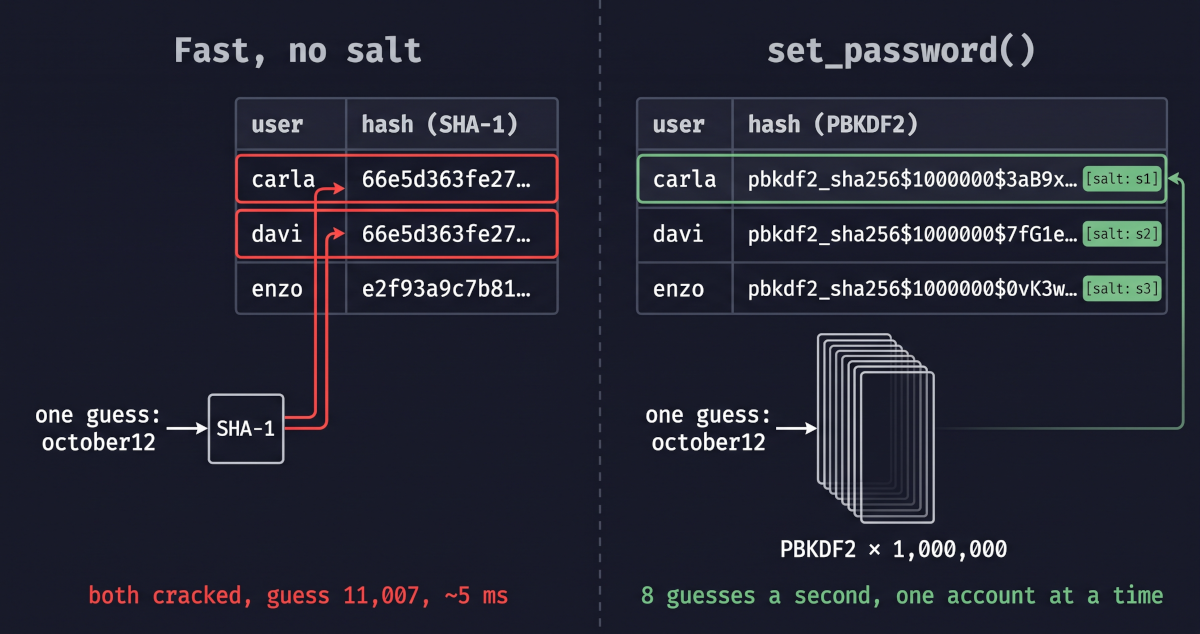
Here is the whole attack against such a table. Suppose a legacy accounts table stored hashlib.sha1(password.encode()).hexdigest(), and the dump has three rows, two of them with 66e5d363fe272fbf3486695d2111921764d26e59. The attacker loads the dump into a dictionary keyed by hash and walks a wordlist once, here the 19,640 common passwords that ship inside Django for its CommonPasswordValidator (Post 13):
leaked = {}                                  # hash -> usernames
for username, digest in rows:
    leaked.setdefault(digest, []).append(username)

for line in gzip.open("common-passwords.txt.gz", "rt", encoding="utf-8"):
    guess = line.rstrip("\n")
    users = leaked.get(hashlib.sha1(guess.encode()).hexdigest())
    if users:
        print(guess, users)                  # october12 ['carla', 'davi']
october12 is guess 11,007, and its SHA-1 is that hash: both accounts fall on the same guess, after 11,007 SHA-1 computations, about five milliseconds at the laptop rate above. A password at the top of the list, such as 123456, would fall on the first guess however slow the hash was; the hash decides the fate of the passwords further down, like this one. The loop never asks which account it is attacking, because without a salt the question has no meaning. Every password that appears anywhere in the list falls the same way, and what remains are the passwords the list does not contain, shared or not.
The same leak can go wrong in other ways too. A salted but still fast hash, such as Django's own MD5PasswordHasher, which Django's testing docs suggest for speeding up a test suite, stops the shared work and the precomputed tables but not the speed: each account costs a separate pass of the wordlist, and each pass is still a fraction of a second. A strong hasher whose iterations were lowered to speed up logins is fast in the same way, only less so. And a hash that is cracked is only the start: the recovered password works wherever its owner reused it, which is credential stuffing (Post 11).
Real-World Incidents
LinkedIn — about 6.5 million unsalted SHA-1 password hashes posted online (June 2012), and more than 100 million from the same theft in May 2016
On June 6, 2012, a file of about 6.5 million SHA-1 password hashes appeared online. The SANS Internet Storm Center described them that day as "unsalted SHA-1 password hashes". LinkedIn confirmed the same day that "some of the passwords that were compromised correspond to LinkedIn accounts", invalidated those passwords and emailed the affected members. Its post added that members would "benefit from the enhanced security we just recently put in place, which includes hashing and salting of our current password databases": salting arrived after the theft, not before it.
The file shows the missing salt directly. It carried no usernames, but Sophos counted about 5.8 million unique hashes among the 6.5 million, and in an unsalted file a hash that appears twice is the same password twice. By the end of that day, close to 3.5 million of the unique hashes, more than 60 percent, had been cracked and published in plain text.
The 6.5 million were only part of what was taken. In May 2016 a seller offered a set from the same 2012 theft, which LinkedIn described as "email and hashed password combinations of more than 100 million LinkedIn members", and LinkedIn invalidated those passwords too. The theft itself began with one employee's computer: a US jury found that Yevgeniy Nikulin had installed malware on a LinkedIn employee's machine, used the employee's credentials to reach the corporate VPN, and "stole a database containing LinkedIn users' login information, including encrypted passwords". He was sentenced in September 2020 to 88 months in prison.
MITRE ATT&CK maps what was done with the file as T1110.002 — Brute Force: Password Cracking: recovering passwords from hashes the attacker already holds, offline, out of sight of the service. Everything after the theft happened on the attackers' machines, and LinkedIn learned how much had been taken four years later.
Sources: LinkedIn — An Update on LinkedIn Member Passwords Compromised (June 6, 2012) · SANS ISC — Potential leak of 6.5 million LinkedIn password hashes (June 6, 2012) · Computerworld — Hackers crack more than 60% of breached LinkedIn passwords (June 7, 2012) · LinkedIn — Protecting Our Members (May 18, 2016) · US Attorney's Office, N.D. California — Russian Hacker Sentenced To Over 7 Years In Prison (2020)
Django's Default Protections
Django's defaults answer both properties. PASSWORD_HASHERS starts with PBKDF2PasswordHasher, which runs a million iterations of HMAC-SHA256 on Django 5.2, a number each release raises. Each password gets its own salt of 22 random characters, 128 bits, and the stored value records everything needed to check it later:
pbkdf2_sha256$1000000$OQoN8WBrBVsb9CBHW5L5kO$Nd/2PizkFBFfG0ZeGuHnmZCpDKdSn7gHC7BavHvwaH0=
Algorithm, iterations, salt, hash. Hash the same password again and the salt, and so the hash, comes out different. The cost moves accordingly. The same benchmark that does 50.6 billion SHA-1 hashes a second does about 8.9 million PBKDF2-SHA256 hashes a second at 999 iterations, which at a million iterations is roughly 8,900, a little under six million times slower than SHA-1. On my laptop one hash took 0.31 seconds. By the same estimate, the rockyou list that was a third of a millisecond of SHA-1 work becomes about 27 minutes on the same card, and that is for one account: with a salt in every row, the next account starts from zero.
set_password() and check_password() are the whole interface. set_password() hashes with the first hasher in the list. check_password() reads the algorithm from the stored value, so a project can hold hashes from several hashers at once, and when a correct password is stored under anything other than the first hasher, or with fewer iterations than the current default, it hashes the password again with the current one and saves it. That is how a table upgrades itself as users log in, and how Django's yearly iteration increases reach old hashes.
The defaults stop at the boundary of those two methods. PASSWORD_HASHERS is yours to replace, and Django ships MD5PasswordHasher in the same module for whoever asks for it. And a string written straight into the password field is not checked against anything: give check_password() a bare 40-character hex digest and it cannot identify a hasher, so it runs a dummy hash to keep the timing even and returns False. A project that hashes passwords itself therefore cannot use Django's login at all. It has to write its own comparison too, which is why this mistake travels with a custom authentication backend.
The Vulnerable Pattern and the Fix
Pattern 1 — A password column hashed by hand
The usual origin is a migration from an older system. The old database stored each password as a SHA-1 hex digest: 40 characters, no salt, no iterations. The new Django project copies those values into User.password unchanged and meets the problem from the previous section: Django's login cannot check them. So someone writes an authentication backend that does what the old system did, hashing the typed password with SHA-1 and comparing, and adds it to AUTHENTICATION_BACKENDS. From there it is a short step to storing new sign-ups the same way, so that one backend checks every account. Django does not require it, since ModelBackend could stay in the list and check the rows set_password() writes, but one format in the table looks simpler, and a shortcut taken to import old accounts becomes the way every new password is stored.
The fix has two halves. The first is the sign-up view, which writes the digest straight into the field:
 def register(request):
     ...
     user = User(username=username, email=email)
-    user.password = hashlib.sha1(password.encode()).hexdigest()
+    user.set_password(password)
     user.save()
set_password() is not given a hash. It is given the password, and it builds the whole stored value shown in the previous section: it takes the first hasher in PASSWORD_HASHERS, generates a new random salt, applies the current iteration count, and writes algorithm, iterations, salt and hash into the field. Every new row is salted and slow, and two people with the same password no longer share a value.
The second half is the backend, which recomputes the SHA-1 of whatever was typed and compares it with the stored digest:
-class SHA1Backend(ModelBackend):
-    def authenticate(self, request, username=None, password=None, **kwargs):
-        user = User.objects.filter(username=username).first()
-        if user and user.password == hashlib.sha1(password.encode()).hexdigest():
-            return user
Rows written by set_password() do not need it. Django's own ModelBackend calls check_password(), which reads the algorithm, iterations and salt back out of the stored value, hashes the typed password with them and compares the results. But the backend cannot be deleted on the day the sign-up is fixed. The imported rows are still bare SHA-1 digests, check_password() returns False for every one of them, and without the backend everyone who signed up before the fix is locked out. It goes, along with its entry in AUTHENTICATION_BACKENDS, once those rows have been converted, which is Pattern 2.
Pattern 2 — The rows that are already in the table
Fixing new sign-ups leaves every imported row as it was: a fast, unsalted SHA-1. The backend could re-hash each one with set_password() when its owner next logs in, but a table holds many accounts whose owners never will, and those rows stay as crackable as the day they were imported. Django's documentation describes the fix for exactly this, with MD5 as its example: a "wrapped" hasher, PBKDF2 run over the old digest, so every row can be converted in one data migration without knowing a single password. For SHA-1:
class PBKDF2WrappedSHA1PasswordHasher(PBKDF2PasswordHasher):
    algorithm = "pbkdf2_wrapped_sha1"

    def encode_sha1_hash(self, sha1_hash, salt, iterations=None):
        return super().encode(sha1_hash, salt, iterations)

    def encode(self, password, salt, iterations=None):
        sha1_hash = hashlib.sha1(password.encode()).hexdigest()
        return self.encode_sha1_hash(sha1_hash, salt, iterations)
The migration replaces each 40-character digest with hasher.encode_sha1_hash(digest, hasher.salt()), and the hasher goes into PASSWORD_HASHERS after the default one, so Django's own login can check those rows and the SHA-1 backend can finally be removed. A wrapped row is now salted and slow: guessing it means running PBKDF2 for every candidate. At its owner's next correct login, check_password() sees a hasher other than the first and re-hashes the password with plain PBKDF2.
Wrapping protects the table from the next leak. It does nothing for a table that has already leaked: those SHA-1 digests are in someone else's hands, as fast and unsalted as they were, so after a known leak the passwords themselves have to be reset.
The Analyst's View
The CySA+ point here is about indicators, and about an attack stage that has none. Password cracking (T1110.002) is the one step of a credential attack that leaves nothing on the victim's side: no failed logins, no lockouts, no requests at all. The indicators sit before and after it. Before it is the exfiltration: a database export, an unusual volume of rows leaving through a query, a backup copied out of its bucket, the traces a SQL injection (Post 1) or an intrusion like LinkedIn's leaves if anyone is watching. After it come the cracked passwords themselves, returning as successful logins from unfamiliar places and as credential stuffing against your login form and everyone else's (Post 11). An analyst who waits for the cracking to show up in the logs ends up seeing the stuffing instead.
That makes the stored format an input to incident response, not only to development. Once a table is confirmed leaked, scoping starts with what its hashes cost to crack. Treat unsalted fast digests as plaintext from the moment of the leak, even though the passwords no list contains survive: invalidate every password, end every session, and assume each password is already being tried elsewhere. Salted, slow hashes buy time and change the order of the work. Weak passwords still fall, often among the first guesses, so resets are still needed. The arithmetic in Django's Default Protections tells you what each guess costs, not how long any one password lasts, and it is no grace period. LinkedIn invalidated the passwords in the 2012 file; more than 100 million from the same theft surfaced four years later, and those had to be invalidated too.
Catching It Automatically
Testing Your Defence
The test that matters registers the same password twice through the secure sign-up and reads what was stored:
def test_secure_register_stores_salted_pbkdf2_and_logs_in_through_django(self):
    for name in ("elisa", "fabio"):
        resp = Client().post(SECURE_REGISTER, {"username": name, "password": LEGACY_PASSWORD})
        self.assertEqual(resp.status_code, 201)
    elisa, fabio = self.password_of("elisa"), self.password_of("fabio")
    algorithm, iterations, salt, _ = elisa.split("$")
    self.assertEqual((algorithm, iterations, len(salt)), ("pbkdf2_sha256", "1000000", 22))
    # Same password, different rows: nothing shared, nothing precomputable.
    self.assertNotEqual(elisa.split("$")[2], fabio.split("$")[2])
    self.assertNotEqual(elisa, fabio)

    client, resp = self.log_in(SECURE_LOGIN, "elisa", LEGACY_PASSWORD)
    self.assertContains(resp, "logged in as elisa")
    self.assertContains(client.get(NOTE), "elisa's notes")
Make the sign-up write hashlib.sha1(...) again and it breaks, because the stored value has no $ to split on. The lab's tests.py has the rest: the leaked table cracking in one pass, a set_password() row not reached in a second of guessing, the wrap converting every legacy row without a password, a correct login upgrading a wrapped row to pbkdf2_sha256, and the old leak still cracking after the wrap.
In your own project the check belongs on the data as well as the code, because imported rows never pass through your sign-up view. From manage.py shell:
User.objects.exclude(password__contains="$").exclude(password__startswith="!").count()
Every value Django's hashers write separates its parts with $, and an unusable password, set by set_unusable_password(), starts with !. Anything else in the column was written by hand, by a view, an import script or a raw SQL UPDATE, and Django's login cannot check it. The answer should be 0, before and after any import. A zero says every row names a hasher, not that the hasher is a good one: an md5$… row passes, which is what the settings search under Scanning It is for.
Scanning It
Both standard tools flag the vulnerable line, and neither is flagging the bug. Bandit and Semgrep's curated packs, run against the lab:
bandit -r labs/post_18_password_hashing/
# 9 issues: B324 on all 7 hashlib.sha1 calls, B105 x2
semgrep scan --config p/django --config p/python --config p/owasp-top-ten labs/post_18_password_hashing/
# Ran 156 rules on 21 files: 8 findings.
Bandit's B324 and Semgrep's insecure-hash-algorithm-sha1 fire on line 45 of views_vulnerable.py, user.password = hashlib.sha1(password.encode()).hexdigest(), and say nothing about set_password(). So far, that is the split a scanner should give. But they fire on every other hashlib.sha1 call in the module too: the attacker's cracker, the seed, a test, and the wrapped hasher from Pattern 2, which is the fix and has to compute SHA-1 to reach the old digests. Both checks are lists of algorithm names. B324 reports md5 and sha1 unless the call passes usedforsecurity=False (Bandit docs). The Semgrep rule is the single pattern hashlib.sha1(...); its message is about collision resistance, and its autofix replaces sha1 with sha256 (the rule). Collision resistance is what a signature needs. Password storage needs a slow function, and ASVS 5.0 lists the two as separate requirements, V11.4.3 and V11.4.2 (ASVS 5.0, V11).
The consequence is easy to check. Edit line 45 to use sha256, sha3_256 or blake2b, each as fast and as unsalted as SHA-1, and neither tool reports anything on that line, in Semgrep's curated packs or in its registry tier; what remains are the CSRF and inline-HTML findings the original draws too. Add usedforsecurity=False, as B324's message suggests, and Bandit goes quiet as well. The Semgrep rule's own autofix produces a line that cracks the same way and that no scanner here flags; the runs are in the lab's scans/fast-hash-variants.txt. Meanwhile the curated packs' most severe finding, use-none-for-password-default at ERROR, lands on the secure view: it flags request.POST.get("password", "") reaching set_password(), although two lines later the view refuses an empty password with a 400. Grepping the rule definitions of all five Semgrep configs finds no rule that mentions .password =, make_password, PASSWORD_HASHERS or a hasher class, and the three that mention set_password() all examine the fix.
So the lab ships a rule of its own, rules/password_hashing.yaml. It is a taint rule. Its sources are hashlib's digest functions, any algorithm, and hmac; its sinks are an assignment to .password, a password= keyword in a model's constructor, create() or update(), and a comparison with .password; and make_password() and the encode() of a hasher, recognised by name, clear the taint.
semgrep scan --config rules/password_hashing.yaml labs/post_18_password_hashing/views_vulnerable.py
# Ran 1 rule on 1 file: 1 finding.
semgrep scan --config rules/password_hashing.yaml labs/post_18_password_hashing/views_secure.py
# Ran 1 rule on 1 file: 0 findings.
It fires on line 45 whatever the algorithm, and on the SHA1Backend comparison; it stays silent on the secure view and on the wrapped hasher, and the repository's CI asserts the split. Its fixture records its limits. It misses a field with another name, such as password_hash, a raw SQL UPDATE, a fast scheme from a library such as passlib, and pbkdf2_hmac() with a single iteration. It flags a field named password that holds the digest of a random API key, where a fast hash is enough. And it cannot see the other ways a project weakens its hashing, MD5PasswordHasher first in PASSWORD_HASHERS or a hasher with lowered iterations, because those are settings, not dataflow:
grep -rnE "PASSWORD_HASHERS|MD5PasswordHasher|iterations\s*=" --include=*.py .
A hit in test settings is what Django's testing docs recommend. The same line in production settings is the vulnerability.
The habit to take from this one is to read the password column, not only the code that writes it. Every value should name its hasher, and a row that does not was written by something Django never saw. When a table has been fast-hashed, wrapping protects it from the next leak, and only a reset helps after the last one. Post 19 moves from what the server stores to what it sends: the cookie attributes that keep a session cookie off plain HTTP and out of reach of JavaScript.
Further Reading
- django-security-lab —
labs/post_18_password_hashing/— the runnable lab: a sign-up that stores SHA-1 and one that callsset_password(), a leak command, a standard-library cracker, the wrap migration, and the captured scanner output inscans/ -
django-security-lab —
rules/password_hashing.yaml— the custom Semgrep rule and, beside it, its fixture -
Django documentation — Password management in Django —
PASSWORD_HASHERS, the upgrade on login, and the wrapped-hasher recipe for legacy MD5 rows - OWASP Password Storage Cheat Sheet
- OWASP A04:2025 — Cryptographic Failures
- OWASP ASVS 5.0 — V11 Cryptography — V11.4.2, password storage
- MITRE ATT&CK — T1110.002: Password Cracking