JWT Attacks: Why Blacklisting the Refresh Token Doesn't Log Anyone Out
Django Security Series — Post 16 | Series III: Authentication & Session
OWASP A07:2025 — Authentication Failures | Reading time: ~17 min
🧪 Run it yourself. This attack ships as a runnable lab in django-security-lab: a simplejwt project whose logout endpoint blacklists the refresh token. Log in, log out, and send the access token again: it still works, until its
exp. The lab also keeps two export views that a forged token tells apart, as a regression check.
A JSON Web Token (JWT, defined in RFC 7519) is a compact, URL-safe string that carries a set of statements about someone, usually a user, together with a cryptographic signature over them. The statements are called claims: who the user is, when the token was issued, when it expires. The signature is what makes the claims worth believing. It is produced with a key the issuer holds, and any change to the claims breaks it.
A JWT serves as a credential. After a user logs in, the server hands them a token, and the client sends it back with every request, usually in an Authorization: Bearer header. The server verifies the signature and knows who is asking without looking anything up: no session table, no shared store. That is why JWT became the usual choice for APIs consumed by single-page apps and mobile clients, for services that need to trust a login performed by another service, and for single sign-on, where OpenID Connect delivers the user's identity as a JWT called an ID token. In the Django world it mostly arrives through Django REST Framework (DRF) and djangorestframework-simplejwt.
That convenience is also why it matters for security. A valid JWT is the user for as long as it lives: whoever holds one is treated as its owner, and whoever can produce one can become anyone. What it takes to end one early is the harder question.
The Attack: What It Is and How It Works
Structurally, a JWT is three base64url strings joined by dots: a header, a payload, a signature. The header says which algorithm signed the token. The payload carries the claims, typically a user id, a token type, an issue time (iat), an expiry (exp) and a unique id (jti). The signature is computed over the first two parts with a key only the server should hold.
Everything else follows from one fact: the server needs no record of the tokens it issues; it needs only the key. A Django session cookie, with the default database backend, is a random key that means nothing until the server looks it up in a table. A JWT carries its own proof: the server checks the signature over the header and payload with its key, and if it holds, the payload is exactly what the server signed. It checks exp and believes the claims. That is the design's whole appeal, since there is no lookup and any service holding the key can verify. It is also the source of the attack below: a token the server believes on sight is a token the server cannot take back.
The attack that follows from it does not touch the signature at all. A JWT is a bearer credential: like cash, it belongs to whoever holds it, and the server has no way to ask whether the person presenting it is the one it was issued to. Stealing a token is as good as stealing the password, for as long as the token lives. And tokens leak in ordinary ways. Single-page apps like to keep them in localStorage, the browser storage that any script on the page can read, so a single XSS bug (Post 2) hands them over; unlike a session cookie marked HttpOnly, nothing hides them from JavaScript. They also end up in server logs, when someone logs request headers, and in browser history and proxy logs, when an app passes them in the URL.
That is where the stateless design bites back. A session cookie is only a pointer to a row on the server: delete the row and the stolen cookie dies on the next request. A JWT points to nothing. It is checked against the key and its exp, and neither changes when the user logs out, changes the password or has the account disabled. The stolen token keeps working until exp, unless the server checks on every request something it stores (a list of revoked tokens, or the user's own row), which is a return to the state JWT was chosen to avoid.
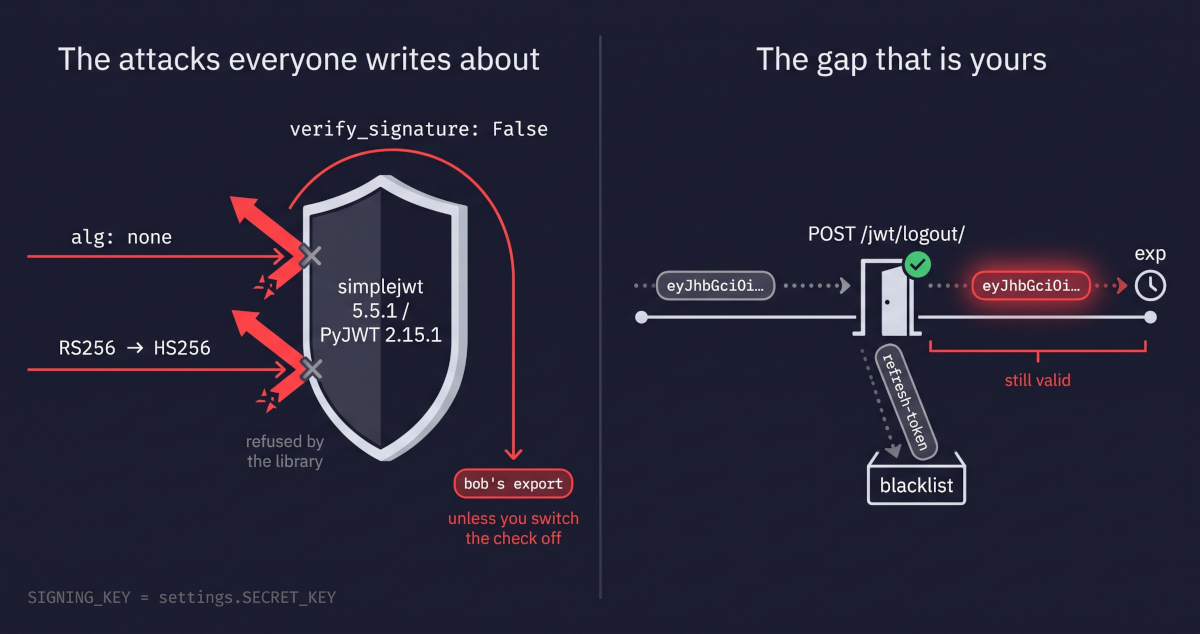
Logout is where that becomes an attack. The user clicks "log out"; the client calls the logout endpoint, which blacklists the refresh token, and then deletes both tokens from its own storage. Everything the user can see says the session is over. But an attacker who copied the access token earlier, from localStorage through an XSS bug or from a log line, holds a copy the client could never delete, and the server never learns that it should refuse it. The next request with that copy is answered as the user, and so is every request after it, until exp. The refresh token is dead; the user is not logged out.
The same trust in the signature opens other ways in. The payload is encoded, not encrypted, so anyone holding a token can read what it says. A server can be talked into accepting a token it never signed: with alg: none, the algorithm for unsigned tokens, or with algorithm confusion, where a token marked HS256 is checked against the server's RSA public key used as the HMAC secret; Tim McLean showed both against popular libraries in 2015, and PyJWT reopened the second as CVE-2022-29217. A view that decodes the token with its signature check switched off (options={"verify_signature": False}) accepts whatever payload anyone types. And whoever gets the signing key, by cracking a weak HMAC secret offline or picking up a leaked SECRET_KEY, the key simplejwt signs with unless told otherwise, mints tokens for any user.
Real-World Incidents
File Browser — CVE-2025-53826, "Insecure JWT Handling Allows Session Replay Attacks after Logout" (GHSA-7xwp-2cpp-p8r7, published July 15, 2025; all versions through 2.39.0, no patched version listed)
File Browser is an open-source web file manager written in Go: it serves a directory through the browser, behind a login. The login endpoint, /api/login, returns a JWT, and every API call carries it in an X-Auth header. The advisory, reported by maen08, found that logging out did nothing on the server: "this action does not invalidate the issued JWT", so "any captured token can be replayed post-logout until it expires naturally." Its proof of concept: log in and keep the token, log out through the dashboard, then call /api/resources with the old token. Logging out sent nothing to the server; the dashboard only cleared the token from the browser. The server kept no session state and no denylist: in http/auth.go, a token with a valid signature and an unexpired exp was accepted, and comparing its issue time with the user record's last update only asked the client to renew it. The advisory is rated High (CVSS 4.0, 7.7) and lists no patched version.
The advisory does not report exploitation; its value is that it files the design itself as the vulnerability, under CWE-613 (Insufficient Session Expiration) among others. In ATT&CK terms, replaying a captured token is T1550.001 — Use Alternate Authentication Material: Application Access Token: the attacker never learns the password, and every request is logged as the user. For Django developers it is the lab's logout view with less behind it: the lab at least retires the refresh token, and File Browser retired nothing. Either way the access token was never recorded anywhere, so only exp ends it. simplejwt's CHECK_REVOKE_TOKEN goes further than anything File Browser had, since it refuses a token issued before the password changed, but it is a check on the account, not on the token, so it cannot single out the token whose user just logged out either.
Sources: File Browser — GHSA-7xwp-2cpp-p8r7: Insecure JWT Handling Allows Session Replay Attacks after Logout (July 15, 2025) · GitHub Advisory Database — CVE-2025-53826
Django's Default Protections
Django ships no JWT support. django.contrib.auth gives you sessions, and that is where it stops. In the Django REST Framework world the de facto choice is djangorestframework-simplejwt, so "Django's defaults" here really means simplejwt's defaults, sitting on top of PyJWT. Everything below was checked against simplejwt 5.5.1, PyJWT 2.15.1 and Django 5.2.
The famous attacks fail here. simplejwt never lets the token choose how it is checked: every decode passes algorithms=[self.algorithm], a list of one taken from your settings, and none is not among the algorithms it allows. Underneath, PyJWT refuses on its own: with simplejwt's list of one, an alg: none token never gets past its header (InvalidAlgorithmError), and even with every algorithm it supports allowed, PyJWT refuses an RSA public key offered as an HMAC secret (InvalidKeyError).
simplejwt also verifies exp with zero leeway, ships a five-minute access token and a one-day refresh token, and refuses tokens for users whose is_active is false. As defaults go, that is a careful list.
What it leaves to you is shorter and matters more. Open rest_framework_simplejwt/settings.py and the defaults are right there:
"ROTATE_REFRESH_TOKENS": False,
"BLACKLIST_AFTER_ROTATION": False,
"ALGORITHM": "HS256",
"SIGNING_KEY": settings.SECRET_KEY,
"CHECK_REVOKE_TOKEN": False,
SIGNING_KEY is your SECRET_KEY. Unless you set it, the key that signs every API token is the one that protects your sessions and password-reset links (Post 14), so a leak of it lets an attacker mint API tokens for any user. Secret management gets its own post later in the series.
Revocation is the last gap, and the least obvious. simplejwt ships a blacklist app, and its name promises more than it delivers. Look at the class definitions: RefreshToken and SlidingToken inherit BlacklistMixin, and AccessToken does not. The blacklist can stop a refresh token from minting new access tokens. It cannot stop an access token that has already been issued, and nothing in simplejwt revokes a single one. What simplejwt can do is refuse every token a user holds: JWTAuthentication loads the user's row on every request and turns away an inactive account (User is inactive), and the first pattern below adds a password change to that list. For one stolen token on an account that stays active, the only end is exp.
The Vulnerable Pattern and the Fix
The first pattern is a settings block, and every line in it is either a default or a reasonable-sounding convenience. The - lines are what such a project ships; the + lines are the fix:
 SIMPLE_JWT = {
-    "ACCESS_TOKEN_LIFETIME": timedelta(days=7),    # a stolen token works for a week
-    "REFRESH_TOKEN_LIFETIME": timedelta(days=90),  # a stolen refresh token mints access for 90 days
-    "ROTATE_REFRESH_TOKENS": False,            # default; a refresh token is reusable until it expires
-    "CHECK_REVOKE_TOKEN": False,               # default; a password change revokes no token
+    "ALGORITHM": "HS256",
+    "ACCESS_TOKEN_LIFETIME": timedelta(minutes=5),
+    "REFRESH_TOKEN_LIFETIME": timedelta(days=1),
+    "ROTATE_REFRESH_TOKENS": True,
+    "BLACKLIST_AFTER_ROTATION": True,
+    "CHECK_REVOKE_TOKEN": True,
 }
+INSTALLED_APPS += ["rest_framework_simplejwt.token_blacklist"]   # then migrate
Each removed line is a separate failure, and each decides what a stolen token is worth. The seven-day access token turns a stolen token into a week of access. No rotation means a stolen refresh token keeps producing access tokens for ninety days. And with CHECK_REVOKE_TOKEN off, a user who changes their password because they think they have been compromised has, as far as the API is concerned, changed nothing. I tested that one too: an access token issued before the password change authenticated happily after it.
Rotation plus the blacklist means each refresh token works once. Strictly, once at a time: the blacklist check and the blacklisting are separate queries, so two refreshes that arrive together can both pass the check, and each gets a new pair. That shortens a theft without ending it: if the attacker refreshes first, they receive a fresh pair, and it is the legitimate user whose next refresh fails. simplejwt does not notice the replay and revoke the chain, so that failed refresh is, at best, a signal someone has to be watching for. CHECK_REVOKE_TOKEN writes a value derived from the user's password hash into every token and compares it on each request, so a password change kills every outstanding access token immediately.
Two things about that last setting that the documentation did not prepare me for. Turning it on for an existing deployment rejects every token issued before the change, since they lack the claim, and each user is told "The user's password has been changed.", which is untrue and will generate the support tickets you would expect. Plan it like a forced logout. And the value it writes is an MD5 of the stored password hash, salt and all, in a payload anyone holding the token can base64-decode. I have convinced myself it does not help an attacker crack anything: it is a hash of a long, salted hash, and the salt never leaves the server. But I am not comfortable shipping a password-derived value in a readable token, and I have not found a write-up that settles it either way.
The second pattern is the one I would have written myself: the logout from the attack section, as code. It retires the refresh token, and only the client throws the access token away:
# INSECURE — logs out the refresh token, not the user
class LogoutView(APIView):
    authentication_classes = [JWTAuthentication]
    permission_classes = [IsAuthenticated]

    def post(self, request):
        RefreshToken(request.data["refresh"]).blacklist()
        return Response(status=205)
The response is a tidy 205 Reset Content. The very access token that authenticated the logout request authenticates the next request too, and keeps doing so until its exp. With simplejwt's five-minute default that window is small. With the seven days from the first pattern, logging out is a ceremony.
This one has no fix to show, and I have to be honest that there is no setting. A five-minute access token is a five-minute window, and making it truly zero means checking every access token's jti against a denylist on every request. That is a database or cache lookup per request, which is to say a session table. (JWTAuthentication already makes one, for the user row, so the statelessness was partly gone before you started.) I keep going back and forth on what that implies. If your API is consumed by a browser on your own domain, Django's ordinary database-backed session, behind a cookie that is HttpOnly by default and out of reach of the scripts that would steal a token from localStorage, already does everything this section is straining towards, and I suspect a fair number of Django projects use JWT because a tutorial did rather than because a second service needed to verify a token. For the projects that do need JWT, the defensible position is a short access lifetime, rotation and the blacklist, and a written-down acceptance of the window that remains.
The Analyst's View
Suppose the finding arrives as "a user's access token was pasted into a support ticket", or a user reports a stolen laptop with the app still signed in. The CS0-003 incident-response lifecycle asks for containment next, and with JWT the usual containment move, ending the session, does not exist for the access token. Logging the user out retires the refresh token and nothing else. What ends every token the user holds is a change simplejwt checks on every request: deactivating the account, or, with CHECK_REVOKE_TOKEN on, resetting the password. That is a heavier action than one leaked token deserves, and it is the smallest one available; the alternative is to wait out the access token's exp. Which is why the access lifetime is a containment decision, made in advance, in settings.py.
Detection is the harder half. A replayed token is accepted as the user it belongs to, so the logs record that user making ordinary requests, and simplejwt keeps no record of access tokens at all: only refresh tokens (and sliding tokens, which this setup does not use) reach its OutstandingToken table. The signals that remain have to come from your own request logging, keyed on the token's jti: the same jti arriving from two client addresses or user agents at once, or a request carrying an access token issued before that user's last logout. Neither proves theft, since a user on two devices and a proxy that changes addresses look the same, but both are cheap to log and impossible to reconstruct afterwards.
Catching It Automatically
Testing Your Defence
Tests that send an alg: none token, a wrong-key token or an expired one pass against a stock simplejwt install even with the insecure settings above: they test the library, which was never the problem. The lab keeps them as regression checks, aimed at its two export views. The tests that discriminate assert your configuration, and this is the one to write first:
def test_password_change_revokes_access_tokens(self):
    access = AccessToken.for_user(self.alice)
    self.alice.set_password("a new passphrase, long enough")
    self.alice.save()
    response = self.client.get(SECURE, HTTP_AUTHORIZATION=f"Bearer {access}")
    self.assertEqual(response.status_code, 401)
It fails on a default install and passes once CHECK_REVOKE_TOKEN is on (SECURE is the URL of the lab's secure export view, and self.alice comes from its seed). A one-line assertion belongs beside it, and the lab's tests.py carries it: api_settings.ACCESS_TOKEN_LIFETIME is at most five minutes, which the default meets and the seven days in the first pattern do not. The same file pins the simplejwt defaults this post quotes, so a release that changes them fails there first.
The last test I wrote fails under every simplejwt configuration: log out, then send the access token that made the logout request, and expect a 401. Against the secure settings above it is the only one still failing, and it will keep failing until you build an access-token denylist. I nearly deleted it. I kept it, marked expectedFailure, because a failing test with an honest comment is the most precise statement I can make of what this project accepts, and the next person to touch the logout view should have to read it. The lab ships it, decorator and comment included.
Scanning It
The scanners have nothing to say about the logout view. It blacklists a refresh token, which is what a correct logout does too; the gap is a call that cannot exist. (They do catch the lab's other pair: Semgrep's curated packs flag the view that decodes with verify_signature off and stay silent on the fix, and the repository's CI asserts the split.) What decides what a stolen token is worth is the SIMPLE_JWT block, and there the scanners run out. Semgrep, every pack at once:
semgrep scan --config p/django --config p/python --config p/owasp-top-ten \
             --config r/python.django --config r/python config/settings.py
# Ran 377 rules on 1 file: 0 findings.
Zero, and not because the block is correct: none of those five packs has a rule definition that mentions SIMPLE_JWT, simplejwt or CHECK_REVOKE_TOKEN, and the lab's scan notes include the loop that greps them. Bandit does read the file, and misreads it:
bandit config/settings.py
# >> Issue: [B105:hardcoded_password_string] Possible hardcoded password: 'django-security-lab-not-a-secret-never-deploy-this'
#    Location: config/settings.py:20:13
# >> Issue: [B105:hardcoded_password_string] Possible hardcoded password: 'True'
#    Location: config/settings.py:115:4
The first is the lab's committed SECRET_KEY, a fair finding with nothing to do with logout. The second is line 115, "CHECK_REVOKE_TOKEN": True, the setting from the first pattern that ends every access token on a password change, reported as a leaked password. B105 compares the dictionary key with a list of password-ish words, and token is on it as long as nothing follows: ROTATE_REFRESH_TOKENS escapes on its trailing S. Against the lab's views Bandit says nothing at all; version 1.9.4 has no check that mentions JWT.
So the scanners leave this attack to the tests. The settings that decide what a stolen token is worth (its lifetime, whether rotation retires it, whether a password change ends it) are invisible to one tool and misread by the other, and the logout gap has no line to point at.
The habit to take from this one is to stop asking whether your tokens can be forged and start asking what your tokens are worth once someone has one: how long they live and what can end them early. Those answers live in your settings file and your logout view, not in the library. Post 17 closes Series III with OAuth2, where the ID token your Django app receives through OpenID Connect is a JWT that someone else signed, and every question in this post has to be asked about a key you do not hold.
Further Reading
- django-security-lab —
labs/post_16_jwt/— the runnable lab: the logout that leaves the access token alive, the project'sSIMPLE_JWTblock, two export views split by one forged token (kept as a regression check), and the captured scanner output inscans/ - Simple JWT — Settings
- Simple JWT — Blacklist app
- OWASP A07:2025 — Authentication Failures
- RFC 8725 — JSON Web Token Best Current Practices
- PortSwigger Web Security Academy — JWT attacks
- File Browser — GHSA-7xwp-2cpp-p8r7: Insecure JWT Handling Allows Session Replay Attacks after Logout (CVE-2025-53826)
- MITRE ATT&CK — T1550.001: Use Alternate Authentication Material: Application Access Token
- Web Security for Developers: Real Threats, Practical Defense (Malcolm McDonald) — Chapter 10: Session Hijacking
- Secure Web Application Development: A Hands-On Guide with Python and Django (Matthew Baker, Apress) — Chapter 10: Authentication and Authorization