Cross-Site Request Forgery (CSRF): How Your Browser Betrays You — and How Django's Token Stops It
Django Security Series — Post 8 | Series II: Broken Access Control
OWASP A01:2025 — Broken Access Control | Reading time: ~13 min
🧪 Run it yourself. This attack ships as a runnable lab in django-security-lab: a money-transfer endpoint where the "money" is a flag. The
@csrf_exemptview accepts a tokenless (forged) POST and the flag moves from the victim to the attacker; the@csrf_protectview returns403. Reproduce the server side from the command line withcurl, and the cross-site mechanic in a browser with theevil.htmlpage in the lab's README.
Posts 6 and 7 dealt with an attacker who had their own account and pushed at its boundaries, reading another user's objects or writing their own role, always from their own browser and session. Post 8 flips that. The attacker never touches your application directly and needs no session, password or account: they trick the victim's browser into making the request, and the browser attaches the victim's session cookie to a request the victim never meant to send.
CSRF is the attack that made me rethink what "authenticated" actually means. My first real encounter with it was years ago, the first time I built anything with Django. I had wired up a form, the POST was submitting, and Django kept returning 403. I spent twenty minutes checking view logic before realising the template was missing {% csrf_token %}. The 403 is annoying; the alternative, silently accepting every cross-site POST, is worse in ways that are not obvious until you see the attack. That is what this post is about: why the token exists, and the few places a Django developer switches it off.
The Attack: What It Is and How It Works
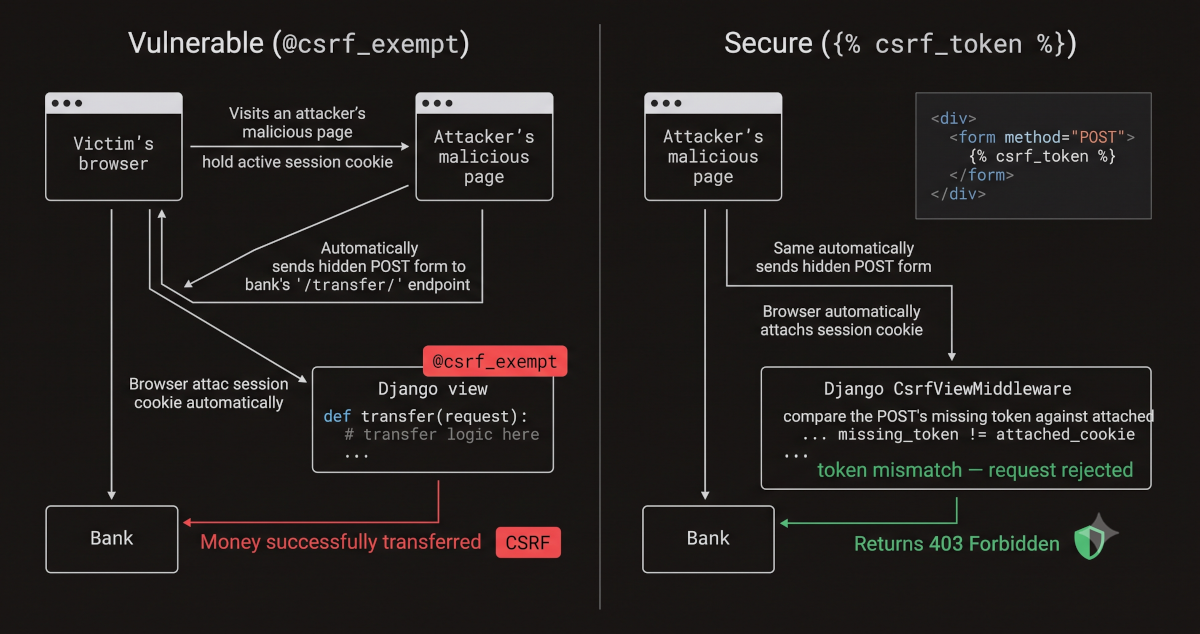
CSRF exploits one browser behaviour: a request to a site carries that site's cookies, whichever page started it. The victim logs into bank.com and gets a session cookie. Later they open a page the attacker controls (a forum post, a link in an email, a compromised ad), and that page holds a hidden form targeting POST bank.com/transfer/, submitted by JavaScript as soon as it loads. The server receives a POST with a valid session and a valid body, has no way to tell it from one the user sent on purpose, and executes the transfer. The attacker never sees the cookie or the response; they need only the target form's field names, which any account holder can read, and a victim who opens their page while logged in. The lab's attack page is the whole technique:
<body onload="document.getElementById('f').submit()">
  <form id="f" action="http://127.0.0.1:8000/csrf/vulnerable/transfer/" method="POST">
    <input type="hidden" name="to_account" value="bob">
  </form>
</body>
A form submission is a navigation, outside CORS entirely, and even a fetch() with that application/x-www-form-urlencoded body is a "simple" request that skips the preflight (it sends cookies cross-origin only with credentials: 'include'): CORS decides whether a page may read the response, not whether the request is sent.
One caveat decides whether this lands in 2026: SameSite. Django sets SameSite=Lax on its session and CSRF cookies by default, and a browser does not send a Lax cookie on a cross-site POST, so the page above, hosted on another site, arrives without a session. A headless Chrome 155 run against a stand-in for the lab view, captured in the lab's scans/samesite-browser.txt, showed it: opened from disk, the page's POST reached the server logged out and was redirected to the login page. Two things reopen the gap. A site is the scheme plus the registrable domain, not the origin, so a page on a sibling subdomain or on another port of the same host is same-site: served from another port on 127.0.0.1, the same page made the transfer as the victim. And a cookie set to SameSite=None, which cross-site embeds and some single-sign-on flows need, is sent on cross-site requests too (browsers accept it only with Secure). SameSite narrows CSRF; the token closes it.
The same forged request has another way in, and one setting weakens the defence it meets. A view that changes state on GET is outside the middleware's check altogether, and Lax still sends the session cookie on a top-level cross-site GET, so a link is enough. And a wildcard in CSRF_TRUSTED_ORIGINS, such as 'https://*.herokuapp.com', lets every app on the platform pass the Origin check, leaving the token as the only barrier.
Real-World Incidents
Netflix CSRF Account Takeover (2006)
On 16 October 2006, the security researcher Dave Ferguson published a Full Disclosure advisory showing that Netflix's account pages accepted forged requests. A page the victim opened while logged in could add movies to their rental queue, move one to the top, and change the name and address on the account; in a window after sign-in, when Netflix did not ask for the current password, it could also change the account's email address and password, locking the owner out. No anti-CSRF token was required, and the browser supplied the session cookie. The same month, Dark Reading quoted Jeremiah Grossman calling CSRF "the sleeping giant" of web vulnerabilities.
The lesson: CSRF turns every state-changing endpoint into a remote control. The attacker does not break authentication; they borrow it. The application's own session management, designed to keep the user logged in for convenience, becomes the attack vector. In MITRE ATT&CK terms the outcome is closest to T1098 — Account Manipulation when the forged request changes credentials, as in Netflix's case, or T1565.001 — Data Manipulation: Stored Data Manipulation when it changes data. The delivery, a page the victim browses to, resembles T1189 — Drive-by Compromise, but that technique gains access to the victim's system, and CSRF never touches it: it rides a session the victim already holds.
Sources: Dave Ferguson — Netflix CSRF Advisory (Full Disclosure, October 2006); Dark Reading — CSRF Vulnerability: A 'Sleeping Giant' (2006)
Django's Default Protections
Django ships CSRF protection on by default: django-admin startproject puts CsrfViewMiddleware in MIDDLEWARE, and the {% csrf_token %} tag renders the token into forms.
- Every unsafe request needs the token. For any method other than GET, HEAD, OPTIONS and TRACE, the middleware requires the
csrftokencookie and a matching token, sent as thecsrfmiddlewaretokenform field or theX-CSRFTokenheader, and answers403before the view runs if either is missing or wrong. The secret lives in the cookie (or in the session, withCSRF_USE_SESSIONS = True); the form carries a masked copy, re-masked on every call toget_token()as a BREACH mitigation, so the two strings never match byte for byte. An attacker's page can make the browser send the cookie but cannot read it from another origin, so it cannot produce the token. - The
Originheader is checked too. When the browser sends one, it must match the request's own host or an entry inCSRF_TRUSTED_ORIGINS; an HTTPS request without it gets a strictReferercheck instead. Django's documentation names the token's weakness, a subdomain that can set cookies for the whole domain, and this check is what stops such a subdomain posting to your application. - The cookies default to
SameSite=Lax, bothsessionidandcsrftoken: a second layer, as the attack section showed, not the control. - The token rotates at login, so a form rendered before login carries a stale token.
One thing that surprised me: Django's session cookie is HttpOnly by default, which blocks JavaScript from reading it, and the CSRF cookie is not; CSRF_COOKIE_HTTPONLY defaults to False. I only noticed when I checked my production settings while writing this post. The reason is AJAX: a fetch() POST with a JSON body has no form field to carry the token, so JavaScript reads the cookie and sends its value as the X-CSRFToken header. Turning the flag on is allowed (the script then reads the token from the hidden input {% csrf_token %} renders), but Django's documentation says it "doesn't offer any practical protection": a script that can read the cookie already runs on your origin and can read the token from the page.
What the middleware does not cover is where Django's CSRF bugs live: a view marked @csrf_exempt, and an API built on DRF's APIView, which exempts itself from the middleware and leaves the check to its authentication classes.
The Vulnerable Pattern and the Fix
Pattern 1 — @csrf_exempt on a State-Changing View
The lab's transfer view is the textbook case: an authenticated POST that moves the victim's holdings to a named account, with the CSRF check switched off. The fix is the decorator:
-@csrf_exempt
 @login_required
+@csrf_protect
 def transfer(request):
     return perform_transfer(request)
On the vulnerable view a tokenless POST carrying alice's session moves the flag to bob; on the secure view the same POST gets 403 and nothing moves. @login_required is on both: it confirms the session is valid, which is exactly the trust CSRF abuses. In a default project the fix is only the deleted line, since the global middleware already protects the view. The lab runs without that middleware so its other labs stay curl-friendly, and its secure twin opts back in with @csrf_protect, the same check applied to one view. Both views are in the lab: views_vulnerable.py and views_secure.py.
The exemption usually arrives as the fix for something else: a form that returns 403 because the template lacks {% csrf_token %}, or a fetch() call that never sends X-CSRFToken. The repair is the tag or the header; @csrf_exempt turns a broken form into a vulnerable one.
Pattern 2 — @csrf_exempt on a View That Takes Both Session and Token Auth
An endpoint serves the browser (session cookie) and a mobile app (an Authorization: Token header). The app has no CSRF cookie, its POSTs fail the middleware, and the shortcut is to exempt the whole view, which strips the check from the session path as well:
-@csrf_exempt  # token clients have no CSRF cookie
-def transfer_funds(request):
-    ...  # checks Authorization: Token, else falls back to the session
-    return JsonResponse({'status': 'ok'})
+class TransferView(APIView):
+    authentication_classes = [SessionAuthentication, TokenAuthentication]
+    permission_classes = [IsAuthenticated]
+
+    def post(self, request):
+        ...  # the transfer
+        return Response({'status': 'ok'})
DRF's APIView.as_view() returns a csrf_exempt view, and SessionAuthentication puts the check back for the requests it authenticates; TokenAuthentication needs none, because the browser never attaches a token header on its own, so a forged request cannot carry the victim's. With DRF 3.18.2, a session POST without the CSRF token gets 403 ("CSRF Failed: CSRF cookie not set."), even when it also carries a valid Authorization: Token header, because SessionAuthentication runs first; a POST with the token header and no session gets 200. Two caveats: SessionAuthentication checks CSRF only for requests it authenticates, so an anonymous request goes unchecked, which DRF's documentation says does not suit login views; and TokenAuthentication needs rest_framework.authtoken in INSTALLED_APPS. Without DRF, an exemption is safe only on a view that never reads the session: give the token clients their own endpoint and keep the session one protected.
One setting finishes the job in production. Behind a proxy that terminates TLS and forwards plain HTTP, Django sees the request as http while the browser's Origin says https, and every POST from your own pages fails the Origin check with 403 unless that origin is in CSRF_TRUSTED_ORIGINS: exactly the failure that tempts an @csrf_exempt. Set SECURE_PROXY_SSL_HEADER instead, once you know the proxy sets that header and strips any copy the client sent.
The Analyst's View
CSRF is the classic confused-deputy problem, a program with legitimate authority (here the victim's browser, holding the session cookie) tricked by another party into misusing it, and it reframes what a CySA+ analyst means by "authenticated": the session cookie proves identity, never intent, and the server on its own cannot tell a request the user meant to send from one their browser was tricked into sending. The anti-CSRF token supplies the missing proof that the request came from your own pages, a secret the attacker's origin cannot read and so cannot forge; script running on your origin through an XSS (Post 2) can read it, so the token is no defence there. That makes it a preventive control, on by default in Django; the vulnerability class is the set of places a developer removed it, which is why triage starts with every @csrf_exempt.
It is also the series' cleanest example of defence in depth: SameSite=Lax stops most cross-site POSTs before Django's check runs. Hold both facts at once. The token is the control you enforce and test; SameSite is a second layer you configure, and it does not cover a same-site attacker page or a SameSite=None cookie, so it never replaces the first.
Catching It Automatically
Testing Your Defence
One test proves the fix against this payload: alice's logged-in client sends a tokenless POST to the secure view, which must answer 403 with the flag still hers. This is the one the lab uses:
def test_exploit_is_blocked_on_secure_view(self):
    # @csrf_protect rejects the tokenless POST with 403; nothing moves.
    self.client.force_login(self.alice)
    resp = self.client.post("/csrf/secure/transfer/", {"to_account": "bob"})
    self.assertEqual(resp.status_code, 403)
    self.assertEqual(self.holdings(self.alice), FLAG)
    self.assertEqual(self.holdings(self.bob), "")
The detail that makes it meaningful is in setUp: self.client = Client(enforce_csrf_checks=True). Django's test client skips CSRF checks unless it is built that way, so without it the secure view would accept the POST and no test could see the check. Point the test at /csrf/vulnerable/transfer/ and it fails: the POST is accepted and the flag moves to bob. The lab's tests.py adds the other two halves: the exploit succeeds on the vulnerable view, and a tokened POST read from the form still works on the secure one. For Pattern 2, assert that a session POST without the token gets 403.
Scanning It
The quickest check is a grep, because @csrf_exempt is most of the surface. The scanners then teach a lesson in rule tiers. Bandit reports nothing on the views: it has no @csrf_exempt check, and its only findings are the two hardcoded test passwords. Semgrep's community packs (p/django, p/python, p/owasp-top-ten) report nothing on either view, yet Semgrep ships a rule for exactly this, python.django.security.audit.csrf-exempt.no-csrf-exempt. It lives among Semgrep's security/audit rules, with LOW confidence in its metadata, since @csrf_exempt is the right call on, say, a webhook receiver that authenticates by signature, and none of the three packs includes it. Run it by name, or through the p/security-audit pack, which carries it, and it separates the pair:
grep -rn "csrf_exempt" --include="*.py" .   # every match outside tests needs a reason

# the standard tools — miss it
bandit -r labs/post_08_csrf/
semgrep scan --config p/django --config p/python --config p/owasp-top-ten labs/post_08_csrf/views_vulnerable.py
semgrep scan --config p/django --config p/python --config p/owasp-top-ten labs/post_08_csrf/views_secure.py

# Semgrep's audit-tier rule — catches it
semgrep scan --config r/python.django.security.audit.csrf-exempt labs/post_08_csrf/views_vulnerable.py  # 1 finding (@csrf_exempt)
semgrep scan --config r/python.django.security.audit.csrf-exempt labs/post_08_csrf/views_secure.py      # 0 findings (@csrf_protect)
Because that rule fires on the vulnerable view and stays silent on the secure one, this post writes no custom rule, and CI asserts both results. It sees only the decorator, which covers both patterns, and only on a function: @method_decorator(csrf_exempt, …) on a class-based view and csrf_exempt(view) in urls.py pass it silently, which is why the grep comes first. The takeaway is tier awareness: a security-relevant rule can sit in a tier your default scan skips, and knowing to reach for it is the analyst's skill. The captured runs, p/security-audit included, are committed under scans/.
CSRF is a listed DAST class, and OWASP ZAP has a passive rule for it, Absence of Anti-CSRF Tokens, which flags a form that carries no token field. This lab ships no captured ZAP run, and that rule would not help here. The transfer form sits behind @login_required, so a faithful run needs an authenticated ZAP context (a login script and session handling), and once there ZAP would find a csrfmiddlewaretoken field in both forms: the lab renders one for each, and the vulnerable view simply ignores it. What proves the gap is a request sent without the token, the check tests.py makes deterministically; like all DAST here, a ZAP run would stay out of CI.
The habit this post left me with: every @csrf_exempt gets a comment naming what authenticates that view instead of the session.
Post 9 continues Series II with Path Traversal, where the attacker escapes the intended directory on the filesystem and turns a download endpoint into a reader of settings.py or /etc/passwd.
Further Reading
- django-security-lab — this post's runnable lab (
labs/post_08_csrf/), incl. theevil.htmlbrowser demo - Django Docs — Cross Site Request Forgery Protection
- Django Docs — How to Use Django's CSRF Protection
- DRF Docs — SessionAuthentication and CSRF
- OWASP A01:2025 — Broken Access Control
- OWASP Cheat Sheet — Cross-Site Request Forgery Prevention
- PortSwigger Web Security Academy — Cross-Site Request Forgery (CSRF)
- MITRE ATT&CK — T1565.001: Data Manipulation: Stored Data Manipulation
- Web Security for Developers: Real Threats, Practical Defense (Malcolm McDonald) — Chapter 8: Cross-Site Request Forgery Attacks